Best Norton Antivirus Alternatives in 2026
Norton 360 is a top-notch tool for cybersecurity. Users adore Norton 360 for its premium offering, large community, feature-rich design, and ease of use.

Norton 360 offers comprehensive security features including a password manager, Norton Secure VPN to help keep your online activities private, and antivirus software to help block hackers.
Videos: Norton Antivirus: Top Features, Pros and Cons, and Alternatives
Top 10 Alternatives to Norton Antivirus
1. Malwarebytes for Business.
2. Symantec End-user Endpoint Security.
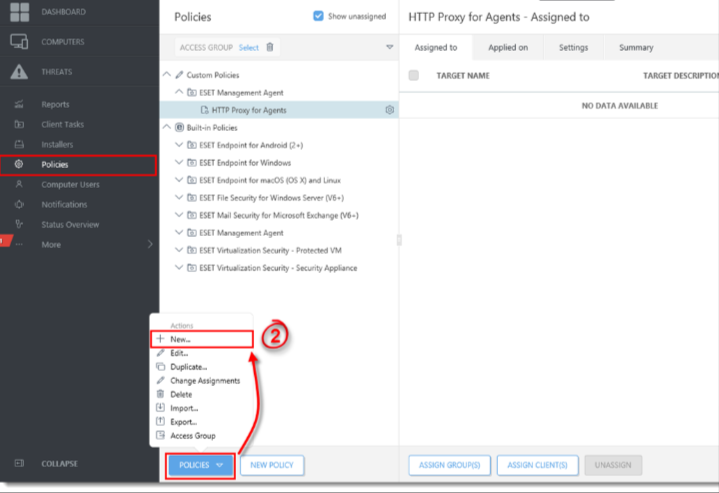
3. ESET PROTECT Advanced.
4. Sophos Intercept X: Next-Gen Endpoint.
5. MVISION Endpoint Security.
6. Webroot Business Endpoint Protection.
7. WithSecure Elements Endpoint Protection.
8. ESET NOD32 Antivirus.
NORTON ANTIVIRUS ALTERNATIVES
1. Webroot Antivirus
Top Features
- Award-winning virus protection to help protect your identity
- Compatible with Mac and PC
- Fast scanning with no lengthy updates
- Helps prevent identity theft
- Secures Android, iOS, and Chromebook mobile apps
- Guards your login information and passwords
- Removes traces of online activity
- Comes with System Optimizer
How Can I Tell If My Antivirus Is Effective? (Easy Guide)
Pricing:
- Webroot offers multiple tiers including Webroot Home Antivirus, Internet Security Plus with Antivirus, and Internet Security Complete with Antivirus. Check the website for current pricing.
Use Webroot Antivirus when:
- Install Webroot Antivirus to protect your computer and devices from malware, viruses, and other threats.
Relevance to telecommuters:
- Use Webroot to stay secure online when working remotely.
2. WebsiteSecurityStore

Top Features
- WebsiteSecurityStore.com offers security products from well-known manufacturers, along with 24/7 support from a team of security specialists.
- We make protecting your website simple.
- Our products include the HackerGuardian PCI and Vulnerability Scanner, CodeGuard Website Backup, Sectigo DV SSL, Sectigo OV SSL, Sectigo EV SSL, Sectigo Multi-Domain and Wildcard SSL, and Secure WordPress Hosting.
Pricing:
- Multiple PCI scan options available
Use WebsiteSecurityStore when:
- Website backup, restore, and security
Relevance to telecommuters:
- Users can access a secure website and perform remote backups.
3. SecurityStudio
Top Features
- SecurityStudio provides solutions to safeguard information for your business, your workers, your vendors, and yourself, backed by more than 100 years of combined legal information and internet security experience.
- For risk, compliance, and internet security leaders, contemporary products are available to help safeguard sensitive data. S2SCORE is used by SecurityStudio to prioritize modifications that will have the biggest impact on internet security.
Pricing:
- Free trial available
Use SecurityStudio when:
- Any company, group, vendor, or for individual use
Relevance to telecommuters:
- Enhancing your home’s information security
4. Snusbase

Top feature
- Snusbase is used to index data from websites whose databases have been breached by hackers.
- Users of the tool can look for emails, names and usernames, IP addresses, phones, hashes, and even passwords to see whether their information has been compromised on any websites.
Pricing:
- Subscription plans available at various price points.
Use Snusbase when:
- Snusbase is excellent for when you are aware that a website you frequently visit has been compromised so you can ensure the security of your data. It is perfect for keeping your data secure because of features like ATO Prevention, Cleartext results, etc.
Relevance to telecommuters:
- While working remotely, safeguard your data online and keep yourself safe from hackers.
5. Bitdefender

Top Features
- Bitdefender Labs identifies new threats continuously and verifies billions of threat queries daily thanks to significant investment in research and development.
- The company has been at the forefront of advancements in anti-malware software, IoT security, behavioral analytics, and artificial intelligence, and many well-known technology companies have licensed its technology.
- Bitdefender has locations worldwide and customers in 170 countries.
Pricing:
- Bitdefender offers a variety of pricing options depending on your needs.
Use of Bitdefender when
- Use Bitdefender Internet Security to stay protected online from malware in this digital age.
Relevance to telecommuters:
- When working remotely, you must take precautions to prevent data loss or tampering. For that, Bitdefender is a fantastic option.
6. BleachBit

Top Features
- An open-source utility with a lot of capabilities is called BleachBit.
- Deletes all private files completely
- Simple to use: read explanations, choose the boxes you want, click preview, then click delete.
- Use on Microsoft Windows PC and Linux – Free
Pricing:
- Free.
Use BleachBit when:
- Installing BleachBit will help you keep your device free of all junk and unneeded data.
Relevance to telecommuters:
- For remote employees searching for an easy way to keep their devices clutter-free, BleachBit is fantastic.
7. Mageni
Top Features
- Mageni helps you identify and prioritize vulnerabilities in your IT infrastructure.
- Automatically identifies weaknesses before hackers do, reducing the risk of network intrusions and security breaches.
Pricing:
- Free
Use Mageni when:
- For: Water, ICS, Energy, Banking, Finance, and E-Commerce industries, as well as the Government, Military, Education, and Fortune 500 corporations.
Relevance to telecommuters:
- Mageni helps defend remote working environments against online threats.
8. Avast Security
Top Features
- Avast provides strong endpoint security for Windows and Mac devices, systems, and servers.
- Avast is compact and quick to set up, yet does not compromise on security protection.
- The browser-based console gives you complete control over your antivirus software.
Pricing:
- Free trial available
- Free antivirus version available
- Custom pricing for business
Use Avast Antivirus when:
- Businesses can use Avast Antivirus to shield employees’ computers and mobile devices from malware, spyware, and other potentially harmful software.
- It protects against malicious programs and websites using sandboxes, and SafeZone provides a secure browser window.
Relevance to telecommuters:
- Avast Antivirus offers a high-end method of safeguarding the company from security risks. By routinely scanning for harmful malware and avoiding phishing scams, using an advanced business antivirus program like Avast Business Antivirus Pro Plus is beneficial.
9. CCleaner
Top Features
- Features like Driver Updater, PC Health Check, 1-Click Update, and others are available with CCleaner.
- You may rest confident that your PC will always operate at the peak of its capabilities by using the feature. Take pleasure in the gratification that comes with a speedier computer, safer browsing, fewer crashes and errors, and faster starting.
Pricing:
- A free version is available, with paid pro packs also offered.
Use CCleaner when:
- Your one-stop shop for all computer cleaning requirements, CCleaner is a fantastic tool for cleaning out junk and improving your PC.
Relevance to telecommuters:
- Utilize CCleaner to remove all the junk from your computer and keep it operating efficiently.
10. iolo.com
Top Features
- iolo creates unique hardware and software that maintains, speeds up, and secures computers and other digital devices, allowing consumers to take full advantage of their processing power.
Pricing:
- Various products available at different price points.
Use iolo.com when:
- iolo products help safeguard your PC from external malware threats.
11. Sophos Home
Top Features
- Sophos is a comprehensive online security solution: regain control over your firewall.
- Stay aware of your Wi-Fi network’s security status.
- Prevent spam, phishing, and ransomware attacks.
- Allow mobile users to work securely on whichever devices they choose.
- Protect your hybrid, on-premises, and cloud server infrastructures from threats and malware.
Pricing:
- Home Premium plans available on annual subscriptions.
Use Sophos Home when:
- For your family’s entire endpoint protection, Sophos is fantastic. It can be installed and used regularly.
Relevance to telecommuters:
- The prevalence of remote work makes it more crucial than ever to protect devices and data from malware while they are in transit.
12. Avira
Top Features
- Award-winning technology trusted by many users and enterprises.
- Features include real-time data breach notifications, advanced webcam protection, antivirus software, VPN, password manager, update scanner, automatic cleaning, and updates.
Pricing:
- Avira Free Security is available for 1 PC or Mac. Pro packages are also available, with plans varying depending on the number of devices.
Use Avira when:
- Install Avira on your computer to use it without anxiety at all times.
Relevance to telecommuters:
- Remote employees may handle sensitive data and face security risks. Avira helps protect them.
References:
https://alternativeto.net/software/norton-antivirus/
Frequently Asked Questions
McAfee Total Protection vs. Norton: Which is better?
Both McAfee and Norton are strong antivirus options. Norton offers additional features such as a VPN, secure cloud backup, privacy tools, and webcam protection, along with solid malware protection.
How does Kaspersky compare to Norton?
Both Norton and Kaspersky are well-regarded antivirus programs. Norton includes a secure VPN, while Kaspersky offers features such as encrypted browsers and file protection. However, note that as of September 2024, Kaspersky can no longer be sold or updated in the United States due to a US Commerce Department determination, so US readers should consider other options.
Which antivirus is ideal for computers and other devices?
McAfee AntiVirus Plus offers protection for Windows, Android, macOS, iOS, and ChromeOS devices in your home, and its Protection Score system encourages users to improve their security practices.