Is AVG Antivirus Safe and Worth Using in 2026?
Simply put, AVG is among the top free antivirus programs. Even the entry-level package is more than capable of protecting your device, though you may want to upgrade to a higher tier for additional security features.

Many users praise AVG for being simple to use, straightforward, and quick to download. Additionally, it uses fewer system resources than some of its more well-known competitors.
Continuous PC scanning and real-time updates help ensure that threats are caught quickly. Both beginners and antivirus enthusiasts will appreciate the dashboard’s simplicity. The free version of AVG outperforms many entry-level programs. It can be used with Windows, Mac, and Android devices (iOS is not supported).
Video: AVG Antivirus Free | Review and Ransomware Test
Benefits and Drawbacks
Let’s examine AVG’s advantages and disadvantages in more detail to determine whether it is the solution you are looking for.
AVG Antivirus can effectively shield you from external threats. Additionally, the user interface is quick, user-friendly, and easy to navigate.
The AVG Windows client is one of the best available. However, this antivirus does have certain drawbacks, such as the cost of paid packages and the absence of an iOS app. Note that Windows 10 reached end of support on October 14, 2025.
Is it safe to use AVG Antivirus?
There’s a good reason AVG has become one of the most recognized antivirus brands. To keep your Internet-connected device healthy and secure, you need reliable antivirus software more than ever.
PROS:
- This antivirus has received high marks from independent testing organizations for its strong performance.
- The interface is basic enough that even beginners will find it easy to understand.
- Choose from a variety of package features without having to pay for them all.
- The Windows, Mac, and Android apps are excellent clients.
- AVG Antivirus can be tailored by users to their preferences.
- The software is quick, dependable, and blocks most malware without slowing down your device.
CONS:
- Only minimal browser protection is provided by the free version.
- iOS is not supported. However, the Android mobile app is solid.
- The performance scans serve no real purpose.
- This antivirus is very similar to Avast, since both share the same parent company.
- The premium tiers can be pricey.
AVG Antivirus Prices and Features
With years of experience and a solid reputation, AVG continues to offer a range of pricing options for prospective customers.

We’ll examine each bundle in this section so you can choose the one that best meets your needs. Check the official website for current pricing.
- AVG Free Antivirus. This is the free version of AVG, as you would have guessed from the name. It contains a fundamental set of features and is also available to Mac users.
- AVG Internet Security. This paid bundle includes a strong set of features and offers coverage for Windows-based devices. You can benefit from the free trial and the 30-day money-back guarantee.
- AVG Ultimate. The most comprehensive option offers cross-platform compatibility and includes the TuneUp tool. Note that this tier may not include a money-back guarantee or free trial.
SECURITY AND RELIABILITY

Any antivirus must prioritize security and dependability above all else, and while AVG is not the greatest product available, it does compete favorably with the majority of its counterparts.
Important information: Since lately, AVG and Avast have shared an engine, allowing the two antivirus programs to seamlessly integrate the best features of each.
DISASTER PROTECTION
Malicious software must pass through multiple layers of security before it can reach your device. Before executing any suspicious files that got past the first level of security, AVG runs a thorough scan of them.
Independent testing has shown that AVG can block the majority of malware samples quickly. When suspicious files do manage to run, AVG’s behavioral detection typically stops them.
When this antivirus discovers any strange or dubious files or applications on your device, it freezes their “movements” and sends them to HQ for an immediate review (the same routine happens with Avast). Sadly, the examination can occasionally take much longer than the 15 seconds that AVG smart scan claims it will.
AVG performs well at blocking malware-hosting URLs and phishing sites, though some competitors like Bitdefender and Norton may score slightly higher in independent tests. Note regarding Kaspersky: as of a US Commerce Department ruling in June 2024, Kaspersky can no longer be sold or updated in the United States.
OPTIONS FOR SCANNING
A green button that is located directly in the center of the main screen allows you to start a rapid scan with just one click. Running through the most exposed parts of your system, is highly effective.

The Deep Scan is what you need if you want something more comprehensive. It takes a few clicks to get there, but this check will examine the more obscure areas of your operating system, which is what you need a thorough scan to do.
Other scans are also available. The Performance scan is for identifying and resolving system problems; the USB/DVD Scan is excellent at inspecting the removable drives. Additionally, you have the option to schedule future scans and scan only particular files and folders (those include boot time scans).
The fine-tuning options are quite good, and AVG has a lot to offer that will please users who want more control. The antivirus engine allows scheduled scans to examine specific files, folders, and archives.
The initial quick scan (referred to as the “Computer Scan” above) may take a minute or two, but subsequent checks often just take a few seconds.
AVOIDING PHISHING
One of the most popular contemporary methods of deceiving someone into providing personal information, giving money, or infecting the device with malware is phishing. Emails, social media posts, and phone calls are the primary methods used by phishing scammers.
To force you to provide your sensitive financial information or transmit money directly to them, some people however also design bogus websites that look just like the legitimate ones. These circumstances occur frequently today.
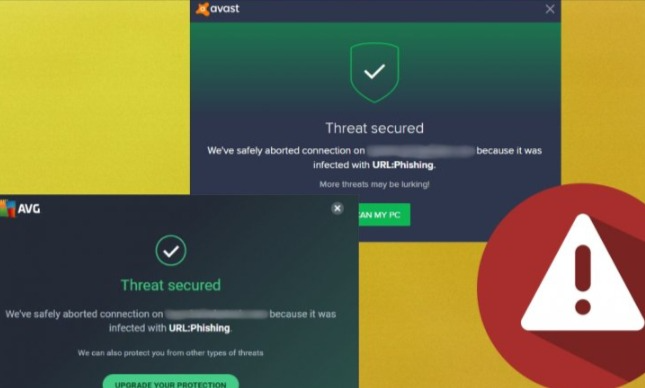
Even in the free edition, AVG Antivirus shields you from some of these threats. One effective tool for identifying harmful files that are merely downloading is provided by AVG. This step is important because they are frequently utilized in phishing attacks.
The screening of suspicious websites and email protection provided by AVG Internet Security or the Ultimate version are even more important safeguards against phishing attacks. Additionally, it offers payment security measures, identifying risky websites and filtering spam.
PROTECTION IN REAL TIME
Real-time protection is one of the most essential components of a good antivirus program. Any delay could have serious consequences. Every suspicious file and program is screened by real-time security once it has been downloaded, installed, or launched.
This option is available to you through AVG in all of its packages because it is impossible to disregard this component of security. These security measures also include background operation and routine automatic upgrades, allowing you to carry on with your daily tasks uninterrupted.
Because AVG’s real-time protection is AI-based and constantly learning about new threats, it is even cooler. With AVG’s real-time protection, you may avoid the need to scan any file you intend to utilize. Before your use or whenever you decide to use it, it has already been examined.
BONUS ELEMENTS
It makes sense that not all of AVG antivirus’s features are available for free. AVG offers a wide range of tools for you to choose from based on your demands and budget because it is a comprehensive alternative for diverse lifestyles. The justifications for the added features are here if you need them.
Webcam protection and sensitive data protection are two of our favorite security features. It’s extremely unsettling to consider sharing your webcam with someone. AVG, however, prevents any attempts to access it.

You can prevent hackers from accessing any vulnerable information by using Sensitive Data Shield. It manages who has access to your data and which software does so. App locks and anti-theft features are further tools. For specific applications, app locks are accessible, and anti-theft is quite helpful if your device is lost or stolen.
If you frequently forget such information, you can also use the password vault. File Shredder can be more tempting if you’re worried that someone will still be able to access your deleted data. Try Disk Cleaner if you’re concerned about the computer’s performance.
LAB SCORE
The objective outcome from lab scores is one of the strongest components that illustrate the success or failure of an antivirus. Independent labs frequently provide excellent, trustworthy information to prospective users so they can make well-informed decisions.
The lab ratings of AVG antivirus on the websites of reputable testers are generally positive. AVG is well-reviewed by AV-Test and other independent testing labs.
Its Internet Security package has received strong scores for security, performance, and usability in independent testing.
The ability of AVG’s home anti-malware protection is evaluated by SE Labs. Despite not being the first antivirus, this one is nonetheless well-regarded for its accuracy.
According to SE Labs, AVG Antivirus Free Edition performs well in accuracy testing. It has received AAA ratings, the lab’s top honor.
The reviews for AV-Comparatives are also favorable. For instance, compared to other widely used antivirus programs, AV has relatively few false positives on threats and one of the most modest effects on the device’s performance.
According to test results on AV-Comparatives, AVG antivirus has received the Advanced award, indicating that it performs better than average for the industry.
AVG has also performed well in MRG-Effitas tests, earning a spot among top-rated antivirus products.
Ease of Use
For years, AVG has been working on this product to make it as quick, dependable, and user-friendly as possible. The present user interface is quite simple and easy to use.

According to statistics, an antivirus’s usability is one of the factors that might make or break it.
AVG is now on par with Avast and other market leaders in terms of usability. The installation procedure, the user interface, and performance are covered in more detail below. Note that Kaspersky, mentioned for comparison, is no longer available to US users.
Download and Installation
You must first download the installer from the official website to begin the installation process. Since most of the procedure is automated, all you need to do is click next and choose the installation folder.
Installation typically takes several minutes, which is comparable to the industry leaders.
Important information: even if you cannot do anything during installation, be sure to uncheck the box for data collection once it is complete (Menu – General – Privacy).
The user of this antivirus is not required to have an account. After you set up an account, you can easily keep an eye on additional devices that are now protected by AVG.
User Interface
The user interface is quite fashionable, and it appears that the team responsible for creating it took inspiration from 90s hacker films.
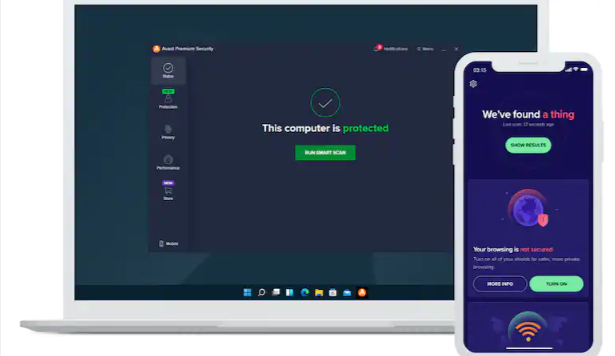
The primary window has a green circle, which indicates that there is no threat to your device. However, if it turns into a red exclamation point, you should investigate whether a virus is already on your device or whether the system is being attacked.
You may obtain rapid scans by clicking the large “Scan Computer” button at the bottom. Use the Web & Email and Computer icons to customize the antivirus as you see fit. The remaining three menus won’t be accessible if you’re using the free version of the software.
You can modify the current password, manage pop-up windows, establish a so-called “whitelist,” and other options in the Settings menu of the software. AVG is now one of the better options in terms of setting options. You may enter the main menu with a single click and check the current status (protected or in danger) in the Tray.
Overall, AVG is a user-friendly antivirus with a clever UI, a quick engine, and strong configuration options.
PERFORMANCE
Making the most of a device’s resources while not overtaxing it is crucial for any software. Despite their age, even old machines can run this antivirus (not as smoothly as the modern ones, of course).

Multiple tests have shown that AVG’s impact on system performance is minimal, which places it on par with industry leaders like Bitdefender.
Package Options
AVG only offers three packages, but they are more than sufficient to meet the demands of both average users and those seeking the finest security. You can also purchase tools for optimization, driver updates, and even a VPN in addition to the above options.
Overall, the organization has a very versatile offer, and the majority of customers can select the mix that best suits their current requirements.
AVG FREE ANTIVIRUS
The basic package is AVG Antivirus Free. Your PC is scanned, automated updates are downloaded, risky email attachments are blocked, and malware is guarded against. It works with both Windows and Mac OS. MacOS 10.10 and later are compatible with the Mac version.
This alternative delivers the ideal principles that satisfy many users without the need for any additional features, which makes it comprehensible why so many people choose it. AVG Antivirus Free does offer real-time security based on ongoing system upgrades. AVG will detect new threats as a result of this action.
This program doesn’t just focus on one area of device security; it also contains scans for viruses, malware, spyware, and performance issues. Identifying potentially harmful apps even before they are downloaded, stops them from installing.
Additionally, it checks email attachments, dubious URLs, and files. An added benefit is that this free edition is still straightforward while not overwhelming the computer with obnoxious pop-ups or buttons.
People who worry that security solutions are too complex have a nice benefit in that the user-friendly interface is perfectly preserved in the free package.
Even with upgrades, the program doesn’t make the entire computer or phone sluggish, thus its main issue is the efficiency it safeguards. For those who require vital protection and dependable support, the free version is appropriate.
ONLINE SECURITY WITH AVG
You will have complete security features with this package for all of your devices. According to corporate representatives, this plan is the most well-liked by their customers. IS offers you access to a huge array of fresh options in addition to all the basic functions that the free version has.
The AVG developers underline that contemporary malware issues have become personal. The AVG’s accomplishments are much more crucial now that using a webcam or circumventing privacy settings is considerably more widespread.
AVG Internet Security offers greater protection against all threats by incorporating cutting-edge artificial intelligence into a better service. With the aid of Email Shield, it also tries to protect emails and the web. Therefore, it safeguards the user from malware.
Additionally, AVG Internet Security checks Wi-Fi networks. To defend against hacker assaults, use the Enhanced Firewall and Ransomware Protection. The possibility of any data being stolen alongside them is quite remote. You will have complete control over your programs, photos, and passwords.
This bundle offers protection for particular folders or files in addition to the webcam. Even more astonishing, you can choose a file shredder to permanently remove the data. AVG Internet Security enables you to encrypt and hide data if you are worried about access to it and want it to be a high concern. Additionally, this version aids in securing the transaction.
In this instance, it employs two features. Using anti-spam ensures that harmful or bothersome emails do not compromise your email security. The fake websites where you make payments are blocked and identified by Fake Website Shield. The Mac, iOS and Android platforms do not support this package.
THE ULTIMATE AVG
This is the top tier, as the name implies. It offers the most complete collection of features and contains everything from the first two packages. According to the website, this edition includes the TuneUp and Internet Security capabilities.
TuneUp makes every effort to make your PC faster. It examines the data to remove useless information, extends battery life, and works wonders as a backup system for both minor and major performance issues.
Because it aims to optimize the potential of both new and old devices, it is helpful for both of them. This top antivirus program comes with a ton of security features that will provide your computer with the best protection available.
AVG Ultimate also offers a Sensitive Data Shield and Device Lock in addition to the tools to further protect your privacy. The first feature also offers a password vault where you may safely save important credentials.
Automatic maintenance further supports real-time protection, which increases its dependability and independence. A disk cleaner included in this software aids in preventing the PC from becoming overloaded with pointless files.
Startup Optimizer, Anti-Theft, Smart Photo Cleaner, and Battery Profiles are other features that make it a wonderful choice. This package, which addresses all security concerns, is appropriate for families and individual use.
Antivirus vs internet security: What’s The Difference? (Answered)
AVG ANTIVIRUS SUPPORT AND CUSTOMER SERVICE
The good news regarding customer support is that there is a fantastic FAQ section on the official website as well as several simple-to-understand movies on the business’ YouTube Channel. Most likely, you’ll be able to resolve everything on your own.
Another choice is to submit a ticket. But we must admit that, in contrast to the majority of competitors in the market, the staff typically takes a long time to consider your query and respond to it.
Furthermore, unless they pay for expert tech help, users are unable to use a live chat feature or make direct calls. That’s correct; with AVG, getting assistance from customer service costs a lot of money.
All of your devices are covered by AVG Premium Tech Support, which also provides toll-free calls (24/7), free consultations, unrestricted access to the company’s technical staff, and virus/malware removal.
AVG offers paid tech support plans for users who need direct assistance. Please note that these plans involve additional fees and may offer limited support sessions.
Additionally, AVG is on social media. You can learn more about the problems you have on LinkedIn and YouTube. You should also visit the pages on Twitter and Facebook to contact the support team more quickly.
CONCLUSION
The free edition of this antivirus is quite good, which is its best feature. Additionally, you can download free trials of the website’s tools and apps as well as the Internet Security bundle.
This is one of your better selections if you’re seeking basic defense. For certain users, Avast Free may be a superior option, but not necessarily for all users.
AVG Internet Security is a little too pricey, and other manufacturers with more reasonable price tags provide the same level of security and adaptability. The advantages include excellent performance, minimal CPU utilization, complete customization, and superior security rankings from outside organizations.
References:
https://www.pcmag.com/reviews/avg-antivirus-free
https://www.usnews.com/360-reviews/privacy/antivirus/avg-technologies
Frequently Asked Questions
Is AVG a trustworthy antivirus?
AVG is one of the most reputable names in antivirus. Strong antivirus protection is important for the security of any Internet-connected device.
Can I trust AVG Antivirus Free?
The independent testing organization AV-Comparatives has given AVG’s antivirus software favorable ratings. AVG Antivirus Free has received good marks for both basic security and performance.
Is AVG a Russian company?
No. AVG was founded in Czechoslovakia in 1990, during the country’s transition from communism to capitalism. Early in the new millennium, AVG expanded internationally and made several acquisitions. In February 2012, AVG debuted on the New York Stock Exchange. AVG is now part of Gen Digital (formerly NortonLifeLock).