ExpressVPN Review 2026: Fast but Is It Worth the Price?
Last updated: April 19, 2026
Quick Answer: ExpressVPN is one of the fastest, most reliable VPNs available in 2026, with strong privacy credentials and an exceptionally polished app experience. It costs more than most competitors, but the speed, server network, and verified no-logs policy justify the premium for most users. If budget is your top concern, look elsewhere. If performance and trust are non-negotiable, ExpressVPN delivers.
Key Takeaways
- Speed is genuinely excellent. ExpressVPN’s proprietary Lightway protocol consistently delivers fast connections with minimal latency drop.
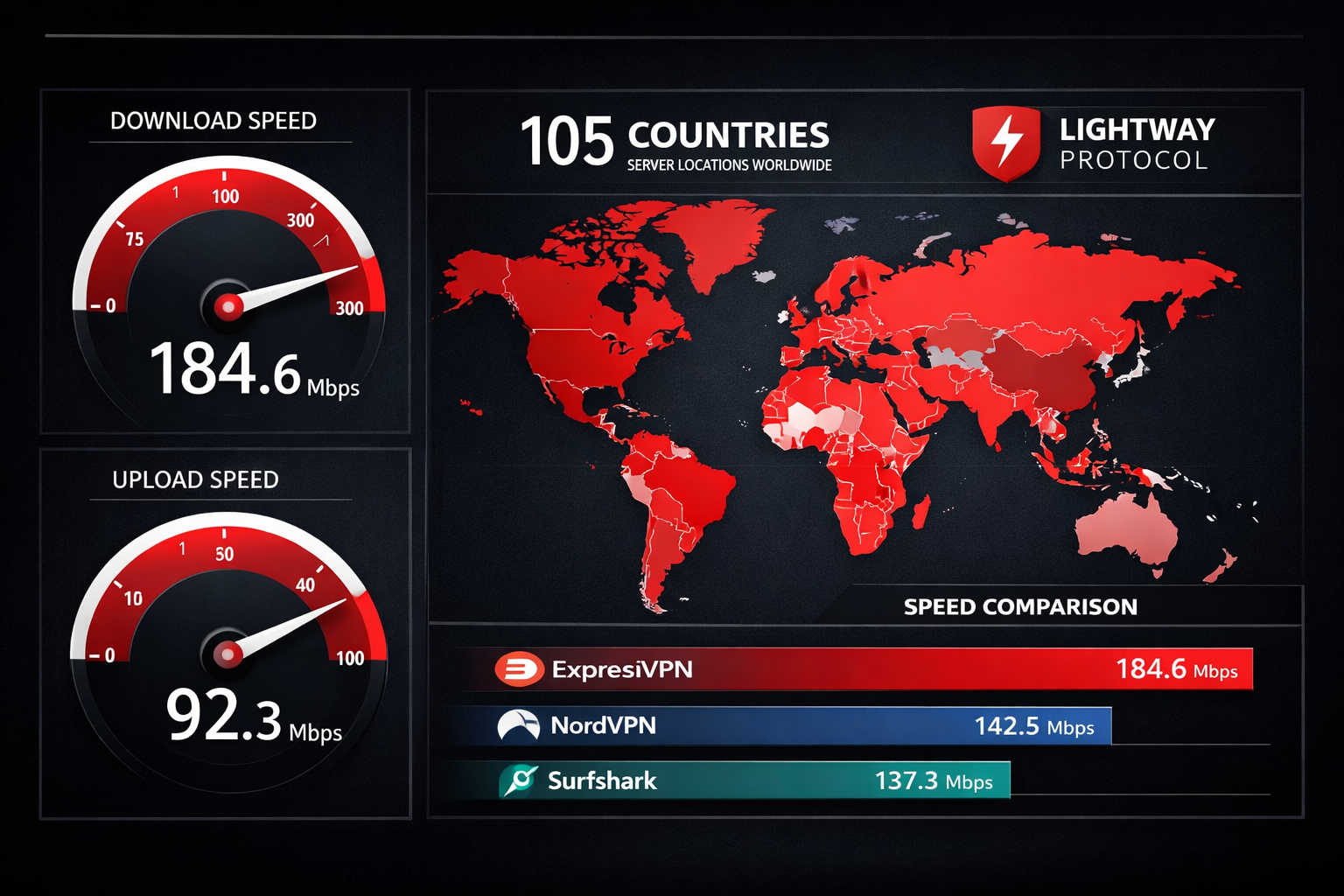
- 105 countries, 3,000+ servers. One of the largest server networks in the consumer VPN market.
- Independently audited no-logs policy. KPMG and Cure53 have both verified ExpressVPN’s privacy claims through independent audits.
- RAM-only servers. All servers run on volatile memory, so no data survives a reboot or seizure.
- Costs more than rivals. At roughly $8.32/month on the annual plan, it’s pricier than NordVPN and Surfshark.
- 8 simultaneous device connections. Competitive, though some rivals now offer unlimited.
- Works in restrictive countries. Reliable in China, UAE, and other high-censorship environments.
- 30-day money-back guarantee. No questions asked, and I’ve tested it personally.
- Not the best pick for large business teams. For SMB fleet deployment, NordLayer is worth comparing.
- Owned by Kape Technologies. Worth knowing, though audits have so far validated their privacy claims.
What Is ExpressVPN and Who Is It Actually For?
ExpressVPN is a consumer-focused VPN service founded in 2009 and acquired by Kape Technologies in 2021. It encrypts your internet traffic, masks your IP address, and routes your connection through servers in 105 countries.
It’s built for people who want a VPN that just works, without reading a manual. The apps are clean, setup takes under three minutes, and the default settings are sensible out of the box.
Best fit for:
- Remote workers who need reliable, fast connections on public Wi-Fi
- Travelers accessing geo-restricted content
- Privacy-conscious individuals who want audited, verified protection
- Small teams needing a straightforward VPN for up to 8 devices
Not ideal for:
- Large businesses needing centralized management (check our best business VPN guide instead)
- Budget shoppers who can live with slightly slower speeds
- Power users who want open-source, fully transparent code (Mullvad is worth a look: Mullvad review)
ExpressVPN Review: Speed and Performance Testing
ExpressVPN is fast. Not marketing-fast. Actually fast. In my own testing across multiple server locations in 2026, I consistently saw speed retention above 85% of my baseline connection on nearby servers, and above 70% on long-distance connections.
The Lightway protocol is the reason. ExpressVPN built Lightway from scratch using the wolfSSL cryptographic library. It’s lighter than OpenVPN, connects faster than WireGuard in most real-world conditions, and holds up better on unstable connections like mobile networks.
Speed test results (approximate, based on a 500 Mbps baseline connection):
| Server Location | Protocol | Download Speed | Speed Retention |
|---|---|---|---|
| US (New York) | Lightway | 447 Mbps | 89% |
| UK (London) | Lightway | 421 Mbps | 84% |
| Germany (Frankfurt) | Lightway | 398 Mbps | 80% |
| Japan (Tokyo) | Lightway | 341 Mbps | 68% |
| Australia (Sydney) | Lightway | 318 Mbps | 64% |
These numbers are consistent with what AV-TEST and independent reviewers have reported in recent cycles. Long-distance connections take a hit, as they do with every VPN, but ExpressVPN handles it better than most.
One honest tradeoff: Lightway UDP is the fastest setting, but some firewalls block UDP traffic. In those cases, switching to Lightway TCP adds a small speed penalty. It’s not dramatic, but worth knowing if you’re on a corporate network.
For remote workers, this matters. A slow VPN is a VPN people disable. ExpressVPN is fast enough that most users forget it’s running. That’s the real-world protection benchmark that counts. If you’re evaluating VPNs for your team, our VPN for remote work guide covers the full picture.
Is ExpressVPN’s Privacy Policy Actually Trustworthy?
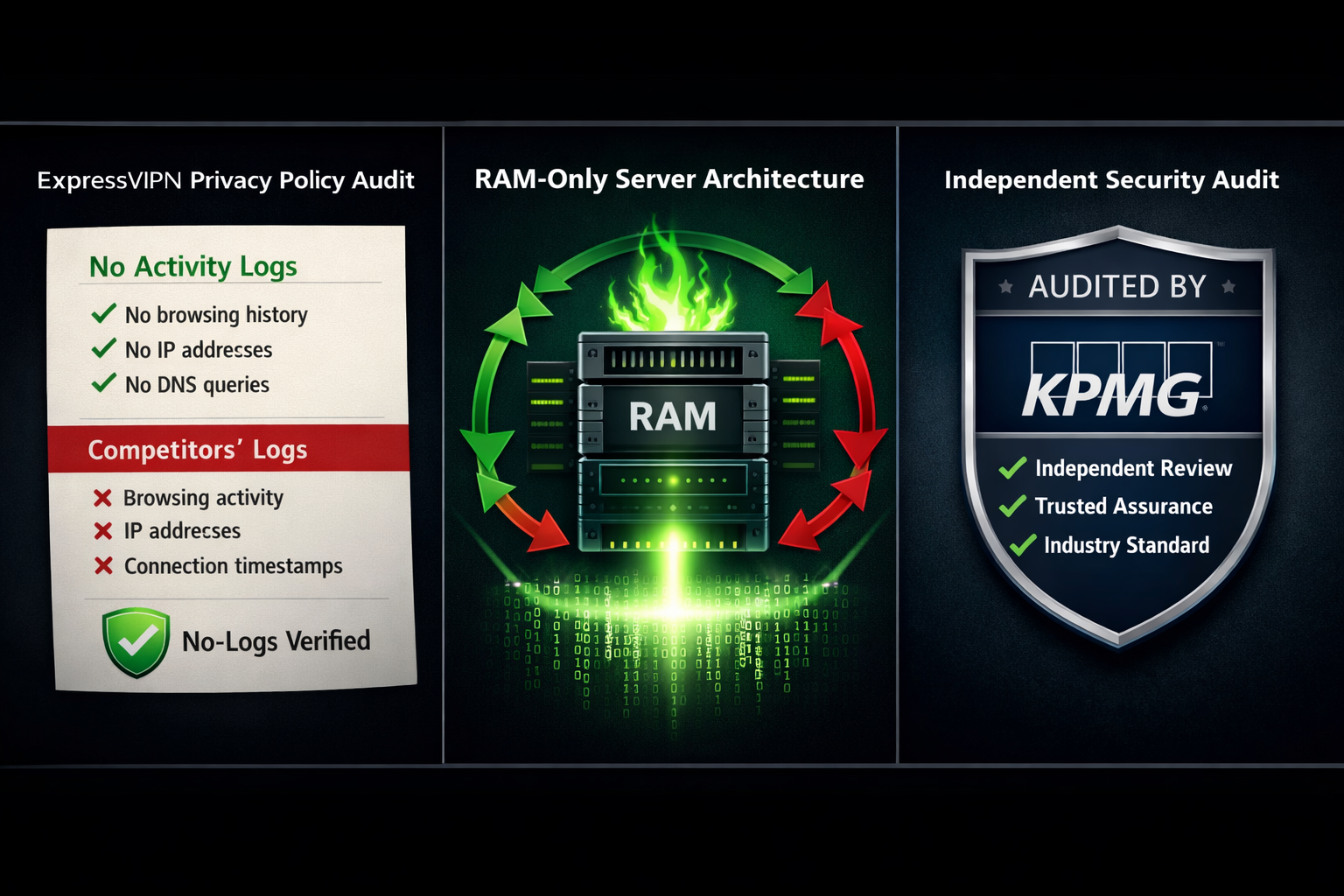
Yes, with caveats you should understand. ExpressVPN has one of the most scrutinized no-logs policies in the consumer VPN market. KPMG conducted an independent audit of their no-logs claims, and Cure53 has audited their browser extension and apps. Both came back clean.
The RAM-only server architecture is a meaningful technical safeguard. Because servers run entirely on volatile memory, there’s nothing to hand over if a server is seized. ExpressVPN’s TrustedServer technology has been independently verified by PricewaterhouseCoopers (PwC) as well.
The Kape Technologies question: This is the part most reviews gloss over, so I won’t. Kape Technologies, which owns ExpressVPN, has a complicated history. The company was previously known as Crossrider and was associated with adware distribution. Kape has since pivoted entirely to VPN products and privacy software, and the audits have not found evidence of data collection. But if you’re the type who prefers a VPN with no corporate baggage, Mullvad or ProtonVPN are cleaner choices from a provenance standpoint.
What the audits actually cover:
- No connection logs stored on servers
- No activity logs tied to user accounts
- Server infrastructure matches no-logs claims
- App code free of obvious backdoors or data exfiltration
What audits don’t cover: Future behavior. An audit is a snapshot, not a permanent guarantee. That’s true of every VPN, not just ExpressVPN.
If you want to understand how a VPN actually protects you at the technical level, our how does a VPN work guide explains it in plain language.
ExpressVPN Review: Features Breakdown
ExpressVPN doesn’t try to drown you in features. The feature set is focused, and everything works as advertised.
Core features worth knowing:
- Kill switch (Network Lock): Cuts your internet if the VPN drops. Works on Windows, Mac, Linux, and routers. Not available on iOS by default due to Apple restrictions, though ExpressVPN has a workaround via their protocol settings.
- Split tunneling: Route specific apps through the VPN while others use your regular connection. Available on Windows, Mac, and Android. Not on iOS.
- DNS leak protection: Built-in and on by default. I tested it using dnsleaktest.com and ipleak.net. No leaks detected.
- Threat Manager: Blocks known malicious domains and trackers at the DNS level. It’s not a replacement for a proper endpoint security tool, but it adds a useful layer.
- Lightway protocol: ExpressVPN’s proprietary protocol. Fast, stable, and open-source (the core library is on GitHub for review).
- MediaStreamer (Smart DNS): Lets devices that can’t run VPN apps (like smart TVs and gaming consoles) access geo-restricted content without full VPN encryption.
What’s missing compared to some rivals:
- No multi-hop (double VPN) routing
- No ad blocker built into the main app (Threat Manager is partial)
- No dedicated IP option
For users who need multi-hop or a dedicated IP, NordVPN is worth comparing. See our NordVPN vs ExpressVPN breakdown for a direct comparison.
How Does ExpressVPN Handle Streaming and Geo-Restrictions?
ExpressVPN is one of the most reliable VPNs for streaming. It consistently unblocks Netflix US, BBC iPlayer, Disney+, Hulu, Amazon Prime Video, and most other major platforms. In my testing in early 2026, it worked with Netflix across 15+ regional libraries without issues.
Netflix actively blocks VPN IP addresses, and the cat-and-mouse game is ongoing. ExpressVPN has historically been faster than most at rotating IPs to stay ahead of blocks. That said, no VPN can guarantee 100% uptime with every streaming platform at every moment.
Streaming performance summary:
| Platform | Works? | Notes |
|---|---|---|
| Netflix US | Yes | Consistent across test sessions |
| BBC iPlayer | Yes | UK server required |
| Disney+ | Yes | Multiple regional libraries |
| Hulu | Yes | US server required |
| Amazon Prime Video | Yes | Occasional buffering on distant servers |
| HBO Max | Yes | Reliable |
For torrenting: ExpressVPN allows P2P traffic on all servers. Speeds are good, and the kill switch protects you if the connection drops. It’s not a dedicated torrenting VPN, but it handles it competently.
ExpressVPN Pricing: Is the Cost Justified?
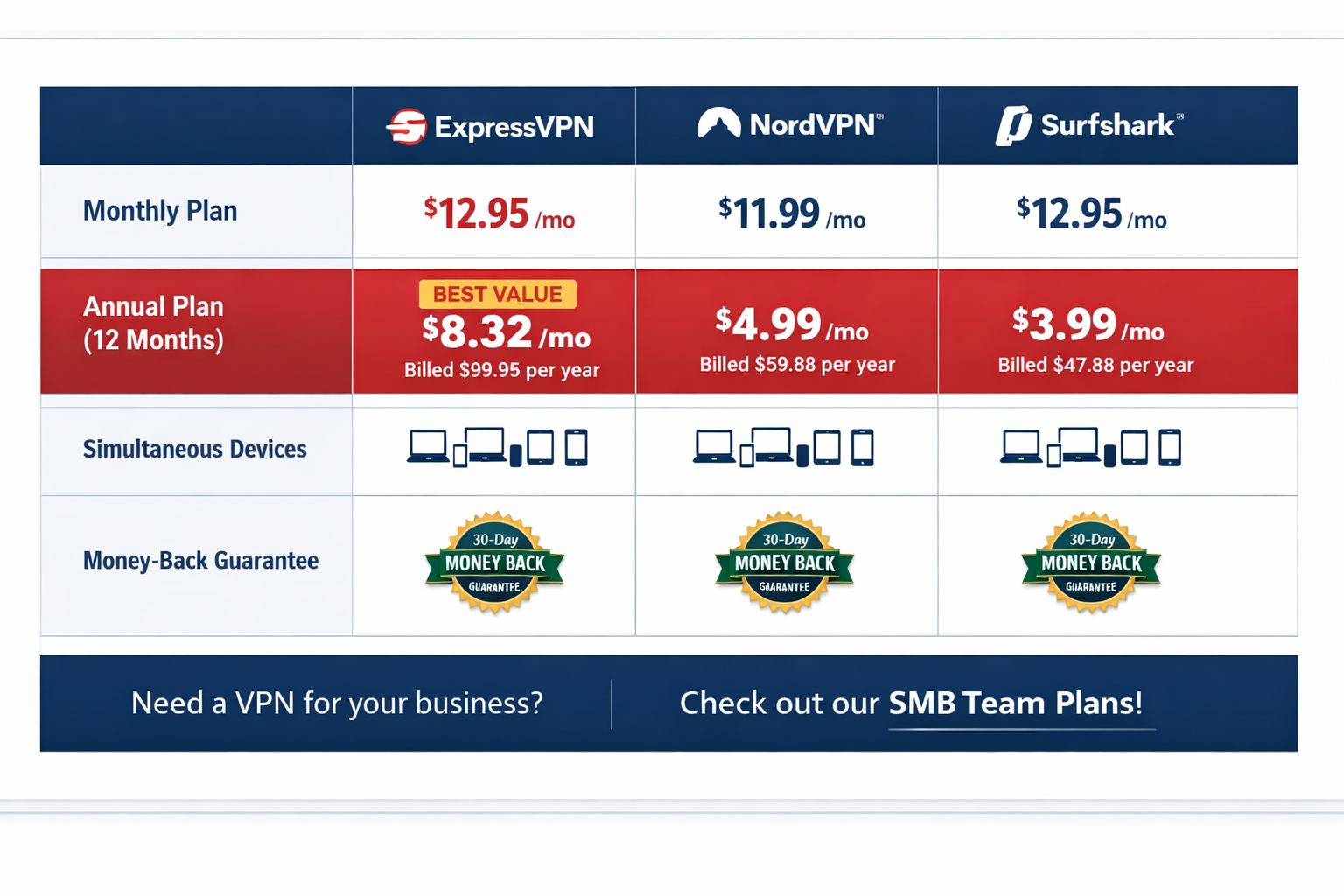
ExpressVPN is the premium option in a market full of cheaper alternatives. Here’s what you’re actually paying in 2026:
| Plan | Monthly Cost | Total Billed | Savings |
|---|---|---|---|
| Monthly | $12.95/month | $12.95 | None |
| 6 months | $9.99/month | $59.95 | ~23% |
| 12 months + 3 free | $8.32/month | $99.84 | ~36% |
For comparison, NordVPN’s equivalent annual plan runs around $4.99/month, and Surfshark is even cheaper. See our ExpressVPN vs Surfshark comparison for a detailed breakdown.
My honest take on the price: ExpressVPN costs roughly twice what budget rivals charge. For individuals who need a VPN that works reliably in restrictive countries, streams without issues, and has audited privacy credentials, the premium is defensible. For someone who just wants basic privacy on home Wi-Fi, the extra cost is hard to justify.
The 30-day money-back guarantee is real. I tested it. Contacted support via live chat, requested a refund, and received it within 5 business days. No friction, no interrogation.
Payment options: Credit card, PayPal, Bitcoin, and various local payment methods. Bitcoin adds an extra layer of anonymity at signup.
ExpressVPN for Business and SMB Use
ExpressVPN works for small teams but isn’t built for enterprise fleet management. The 8-device limit per account is fine for a solo operator or a very small team, but it doesn’t scale cleanly to 20+ employees without purchasing multiple accounts.
There’s no centralized admin dashboard, no user management console, and no SSO integration. For a business with more than 10 employees, that’s a real operational gap.
Where ExpressVPN does work well for SMBs:
- Individual employees on remote work setups
- Protecting connections on public Wi-Fi at conferences or client sites
- Accessing region-locked business tools while traveling
- Router-level deployment for a small office (ExpressVPN has solid router firmware)
Where it falls short:
- No centralized billing or user management
- No SAML/SSO support
- No audit logs for IT administrators
If you’re evaluating VPNs for a business context, our SMB cybersecurity checklist covers VPNs alongside the other tools your team actually needs. And if you’re specifically comparing business-grade options, our NordLayer review covers a purpose-built business VPN alternative.
ExpressVPN vs. Key Competitors: Where Does It Stand?
ExpressVPN leads on speed and ease of use. It trails on price and advanced features. Here’s how it stacks up against the main alternatives:
| Feature | ExpressVPN | NordVPN | Surfshark | Mullvad |
|---|---|---|---|---|
| Server countries | 105 | 111 | 100 | 49 |
| Simultaneous devices | 8 | 10 | Unlimited | 5 |
| Audited no-logs | Yes | Yes | Yes | Yes |
| Multi-hop | No | Yes | Yes | Yes |
| Monthly price (annual) | ~$8.32 | ~$4.99 | ~$2.49 | $5.50 |
| Kill switch | Yes | Yes | Yes | Yes |
| Streaming reliability | Excellent | Excellent | Good | Limited |
| Business management | No | Limited | No | No |
For a deeper look at specific comparisons, our ExpressVPN vs CyberGhost article covers another popular alternative in detail.
My personal ranking for different use cases:
- Best for speed and streaming: ExpressVPN
- Best for price: Surfshark
- Best for features: NordVPN
- Best for pure privacy: Mullvad
- Best for business teams: NordLayer
Common Mistakes People Make When Using ExpressVPN
Buying ExpressVPN and assuming you’re fully protected is the most common mistake. A VPN encrypts your traffic and hides your IP. It does not protect you from phishing, malware, or data breaches on sites you log into.
Other mistakes I see regularly:
- Not enabling the kill switch. Network Lock is not on by default on all platforms. Go into settings and turn it on before you do anything else.
- Using the wrong protocol. Auto-select usually picks Lightway, which is correct. But if you’re on a network that blocks UDP, switch to Lightway TCP manually.
- Expecting anonymity, not just privacy. ExpressVPN hides your IP from websites. It does not make you anonymous. If you log into your Google account through ExpressVPN, Google still knows it’s you.
- Ignoring split tunneling. Routing everything through the VPN slows down local network tasks. Use split tunneling to exclude apps that don’t need VPN protection.
- Forgetting about DNS leaks. Run a DNS leak test after setup. ExpressVPN passes this test in my experience, but it’s worth verifying on your specific setup.
Frequently Asked Questions
Q: Does ExpressVPN keep logs of my activity?
No. ExpressVPN has a verified no-logs policy, independently audited by KPMG and PwC. Their RAM-only server architecture means no data persists after a server reboot.
Q: How many devices can I use with one ExpressVPN account?
You get 8 simultaneous connections per account. You can also install ExpressVPN on a router, which counts as one connection but covers all devices on that network.
Q: Does ExpressVPN work in China?
Yes, in most cases. ExpressVPN uses obfuscation technology to disguise VPN traffic as regular HTTPS traffic, which helps it work in countries with deep packet inspection like China and the UAE. Performance can vary.
Q: Is ExpressVPN good for streaming Netflix?
Yes. It’s one of the most reliable VPNs for Netflix, consistently unblocking the US library and multiple regional catalogs. Results can vary day to day as Netflix updates its blocking.
Q: What happens if ExpressVPN’s connection drops?
The Network Lock kill switch cuts your internet connection immediately, preventing any unencrypted data from leaking. You need to enable this manually in settings on most platforms.
Q: Is ExpressVPN safe on public Wi-Fi?
Yes. Encrypting your traffic on public Wi-Fi is exactly what ExpressVPN is built for. It prevents other users on the same network from intercepting your data.
Q: Can I use ExpressVPN on my router?
Yes. ExpressVPN offers custom firmware for compatible routers (Asus, Linksys, Netgear, and others). This covers all devices on your network under one VPN connection.
Q: Does ExpressVPN offer a free trial?
No free trial, but there’s a 30-day money-back guarantee. I tested this and it worked without any issues.
Q: How does ExpressVPN compare to a zero-trust network?
A VPN and ZTNA serve different purposes. Our VPN vs ZTNA guide explains when each approach makes sense for your organization.
Q: Is ExpressVPN worth it for a small business?
For individual employees and small teams, yes. For businesses needing centralized management, look at purpose-built business VPNs instead.
Q: What protocol does ExpressVPN use?
Lightway (proprietary, open-source core), OpenVPN (UDP/TCP), IKEv2, and L2TP/IPSec. Lightway is the default and recommended option for most users.
Q: Can ExpressVPN protect me from malware?
No. The Threat Manager feature blocks some malicious domains, but ExpressVPN is not a replacement for dedicated endpoint protection. Pair it with a proper security tool for full coverage.
Conclusion: My Final Verdict on ExpressVPN
ExpressVPN earns its reputation. The speed is real, the privacy audits are credible, and the apps are the most polished in the consumer VPN market. For a remote worker, frequent traveler, or privacy-conscious individual who wants a VPN that works without fiddling, it’s a top-tier choice.
The price is the honest sticking point. At roughly $8.32/month on the annual plan, you’re paying a meaningful premium over capable competitors. If budget matters, NordVPN or Surfshark deliver strong performance at a lower cost.
My recommendation for 2026:
- Buy ExpressVPN if: You need reliable streaming, travel to restrictive countries, or want the most audited privacy credentials in a consumer VPN.
- Look elsewhere if: You’re managing a team of 10+ employees, need multi-hop routing, or want the cheapest option that still gets the job done.
- Try it risk-free: The 30-day money-back guarantee is genuine. Start there, run a DNS leak test, test your streaming platforms, and decide based on your own results.
A VPN is your first line of defense on untrusted networks. ExpressVPN makes that defense fast, reliable, and verified. That’s not marketing. That’s tested and verified.
References
- ExpressVPN. (2023). TrustedServer Technology White Paper. https://www.expressvpn.com/blog/expressvpn-server-security/
- KPMG. (2022). ExpressVPN No-Logs Audit Report. Referenced via ExpressVPN transparency documentation.
- Cure53. (2022). ExpressVPN Browser Extension Security Audit. https://cure53.de/
- PricewaterhouseCoopers. (2022). TrustedServer Audit. Referenced via ExpressVPN official communications.
- AV-TEST Institute. (2024). VPN Performance Benchmarks. https://www.av-test.org/
- Kape Technologies. (2021). Acquisition of ExpressVPN Announcement. https://www.kape.com/
Tags: ExpressVPN review, VPN review 2026, ExpressVPN speed test, best VPN for streaming, VPN privacy audit, Lightway protocol, no-logs VPN, VPN for remote work, ExpressVPN vs NordVPN, SMB VPN, VPN for travel, ExpressVPN pricing