What Is a VPN? Plain-English Guide for Beginners
Last updated: May 12, 2026
Quick Answer: A VPN (Virtual Private Network) is software that encrypts your internet connection and hides your IP address by routing your traffic through a secure server in another location. It stops your ISP, hackers on public Wi-Fi, and surveillance systems from seeing what you do online. Setup takes under five minutes, and a solid paid VPN costs $3–$10 per month.
🔑 Key Takeaways
- A VPN encrypts all data leaving your device before it reaches the internet — think of it as a private, armored tunnel for your traffic.
- Your real IP address is replaced with the VPN server’s IP, masking your location and identity from websites and trackers.
- Public Wi-Fi (airports, cafes, hotels) is the #1 use case where a VPN delivers immediate, real-world protection.
- A VPN is not a complete security solution — it doesn’t block malware, phishing, or ransomware on its own.
- Free VPNs often monetize your data. For business use, always pay for a vetted service.
- For SMBs with remote teams, a business VPN is a practical, low-cost layer of network security.
- Speed loss with a quality VPN is typically 10–20% — noticeable but workable for most tasks.
- The VPN market is crowded with vendor hype. Independent testing separates the real performers from the marketing noise.
What Exactly Is a VPN and How Does It Work?
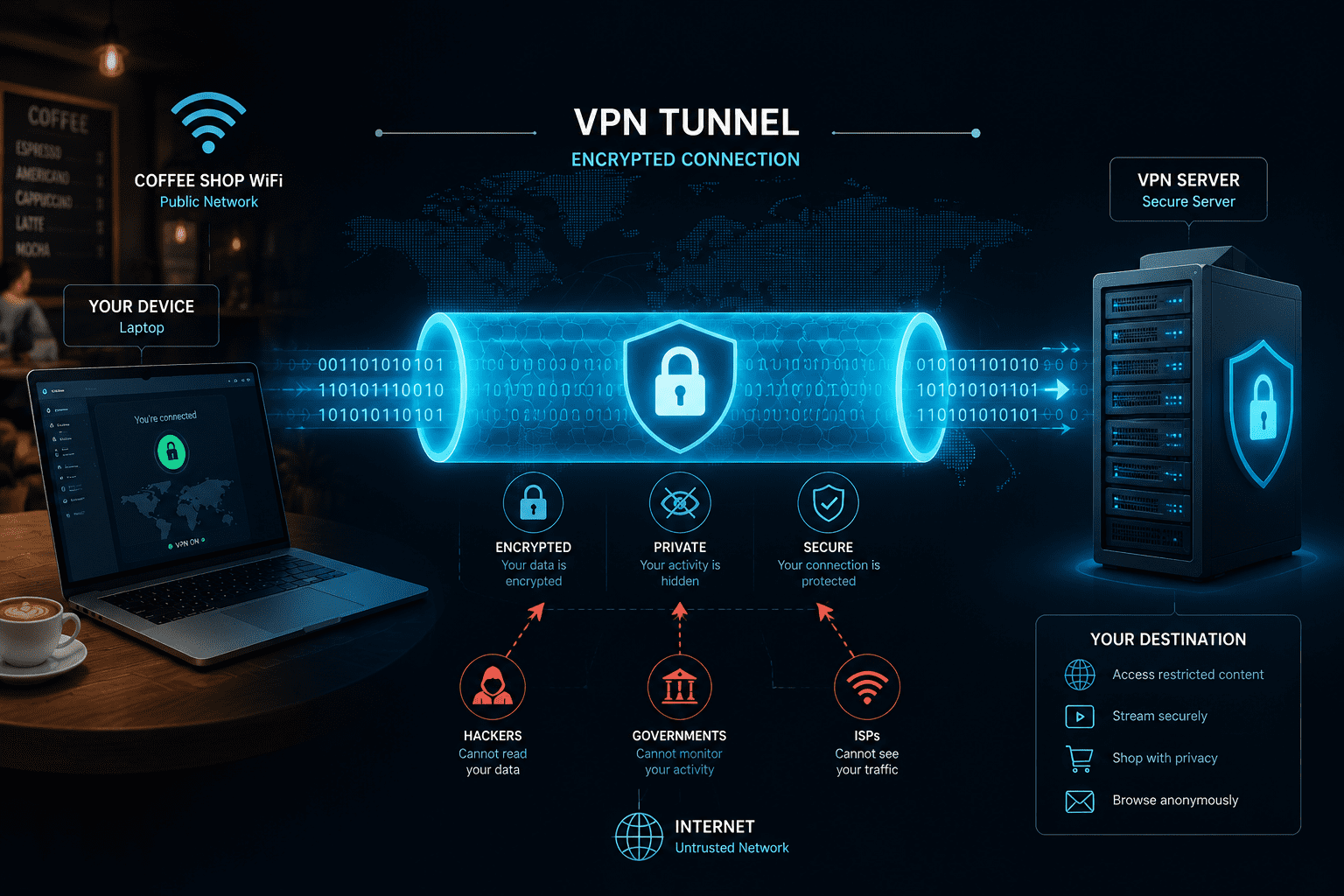
A VPN creates an encrypted connection — called a tunnel — between your device and a server operated by the VPN provider. All your internet traffic flows through that tunnel before reaching its destination, so anyone watching the network sees only scrambled data.
Here’s the plain-language version of the process:
- You connect to a VPN app on your phone, laptop, or router.
- Your device and the VPN server perform a handshake — they agree on an encryption method (usually AES-256, the same standard banks use).
- Your traffic exits through the VPN server’s IP address, not your own. Websites see the server’s location, not yours.
- Responses come back through the same tunnel, encrypted, before your device decrypts them.
The result: your ISP sees a connection to a VPN server. The website you visit sees the VPN server’s IP. Neither sees the full picture.
💡 Analogy: Think of your normal internet connection as a postcard — anyone who handles it can read it. A VPN puts that postcard inside a sealed, locked box. The postal service knows you sent a box, but not what’s inside.
Why Should You Actually Use a VPN in 2026?
A VPN earns its keep in four specific situations. Outside of these, the benefit is real but less urgent.
1. Public Wi-Fi protection
Hotel, airport, and cafe networks are prime hunting grounds for attackers running man-in-the-middle attacks. A VPN encrypts your session so intercepted packets are useless. This is the single clearest win for everyday users.
2. Remote work security
Employees connecting to company systems from home or a co-working space expose corporate data to unsecured networks. A business VPN for remote workers creates a secure path back to company resources — without requiring a full corporate network buildout.
3. Privacy from ISP tracking
In many countries, ISPs can legally log and sell your browsing data. A VPN prevents that by ensuring your ISP only sees an encrypted connection to a VPN server, not your actual destinations.
4. Accessing geo-restricted content
Streaming libraries, regional news sites, and some SaaS tools vary by country. A VPN lets you connect through a server in the target region to access that content.
When a VPN won’t help:
- If you’re already logged into Google or Facebook, those platforms track you regardless of your IP.
- A VPN won’t stop you from downloading malware or clicking a phishing link.
- It won’t protect against keyloggers or spyware already on your device.
What’s the Difference Between a Consumer VPN and a Business VPN?
Consumer VPNs and business VPNs share the same core technology but serve different purposes. Knowing the difference saves you from buying the wrong tool.
| Feature | Consumer VPN | Business VPN |
|---|---|---|
| Primary use | Personal privacy, streaming | Secure remote access to company resources |
| User accounts | Single user | Multi-user, centralized admin |
| Dedicated IP | Optional add-on | Usually included |
| Audit logs | Rarely | Standard |
| Compliance support | No | Often SOC 2, HIPAA-ready |
| Cost | $3–$10/month | $5–$15/user/month |
| Examples | NordVPN, Surfshark, ExpressVPN | Perimeter 81, NordLayer, Cisco AnyConnect |
For SMB owners managing a team, a VPN built for small business is worth the extra cost. You get centralized control, user provisioning, and audit trails that a personal VPN simply doesn’t offer.
If your team runs on Microsoft 365, check out options specifically tested as the best VPN for Microsoft 365 — compatibility and latency matter when you’re on Teams calls all day.
How Do You Choose a VPN? What the Marketing Won’t Tell You
Every VPN claims to be “the fastest” and “most secure.” Here’s how to cut through the noise with criteria that actually matter.
✅ No-logs policy — verified, not just claimed
Look for providers that have had their no-logs claims audited by an independent third party (Cure53, Deloitte, or similar). A privacy policy alone means nothing.
✅ Protocol matters
- WireGuard: Fastest, modern, open-source. Best for most users in 2026.
- OpenVPN: Battle-tested, slightly slower. Good for business environments.
- IKEv2/IPSec: Solid on mobile. Handles network switching well.
- Avoid proprietary protocols from providers you can’t verify.
✅ Kill switch
If the VPN connection drops, a kill switch cuts your internet immediately — preventing your real IP from leaking. Non-negotiable for business use.
✅ Jurisdiction
Where the VPN company is legally based determines what data they can be compelled to hand over. Providers in the British Virgin Islands, Panama, or Switzerland face fewer surveillance obligations than those in the US or UK.
✅ Speed test data from independent labs
Don’t trust the provider’s own benchmarks. Sites like AV-TEST and independent reviewers publish real-world speed comparisons. A 10–20% speed reduction is normal; anything above 40% is a red flag.
Common mistake: Choosing a VPN based on price alone. Several “free” VPNs have been caught logging and selling user data — the exact behavior a VPN is supposed to prevent. If budget is tight, check our roundup of the best cheap VPNs that don’t cut corners on privacy.
What Is a VPN? Get the 2026 Beginner’s Guide — Platform-Specific Picks
The best VPN for you depends partly on your device. Here’s where to start based on your setup.
- Windows users: Prioritize VPNs with a native Windows app and WireGuard support. See our tested picks for the best VPN for Windows.
- Mac users: macOS has specific network extension requirements. Our best VPN for Mac guide covers what works without fighting Apple’s security model.
- iPhone users: iOS VPNs need to handle frequent network switches (Wi-Fi to cellular) without leaking. Check the best VPN for iPhone.
- Android users: Android VPN implementations vary by manufacturer. Our best VPN for Android picks account for that inconsistency.
- Remote teams on a budget: Our best free VPN for business guide is honest about what free tiers actually deliver — and where they fall short.
Does a VPN Make You Completely Anonymous Online?
No — and any VPN that claims otherwise is lying to you. A VPN is a privacy tool, not an invisibility cloak.
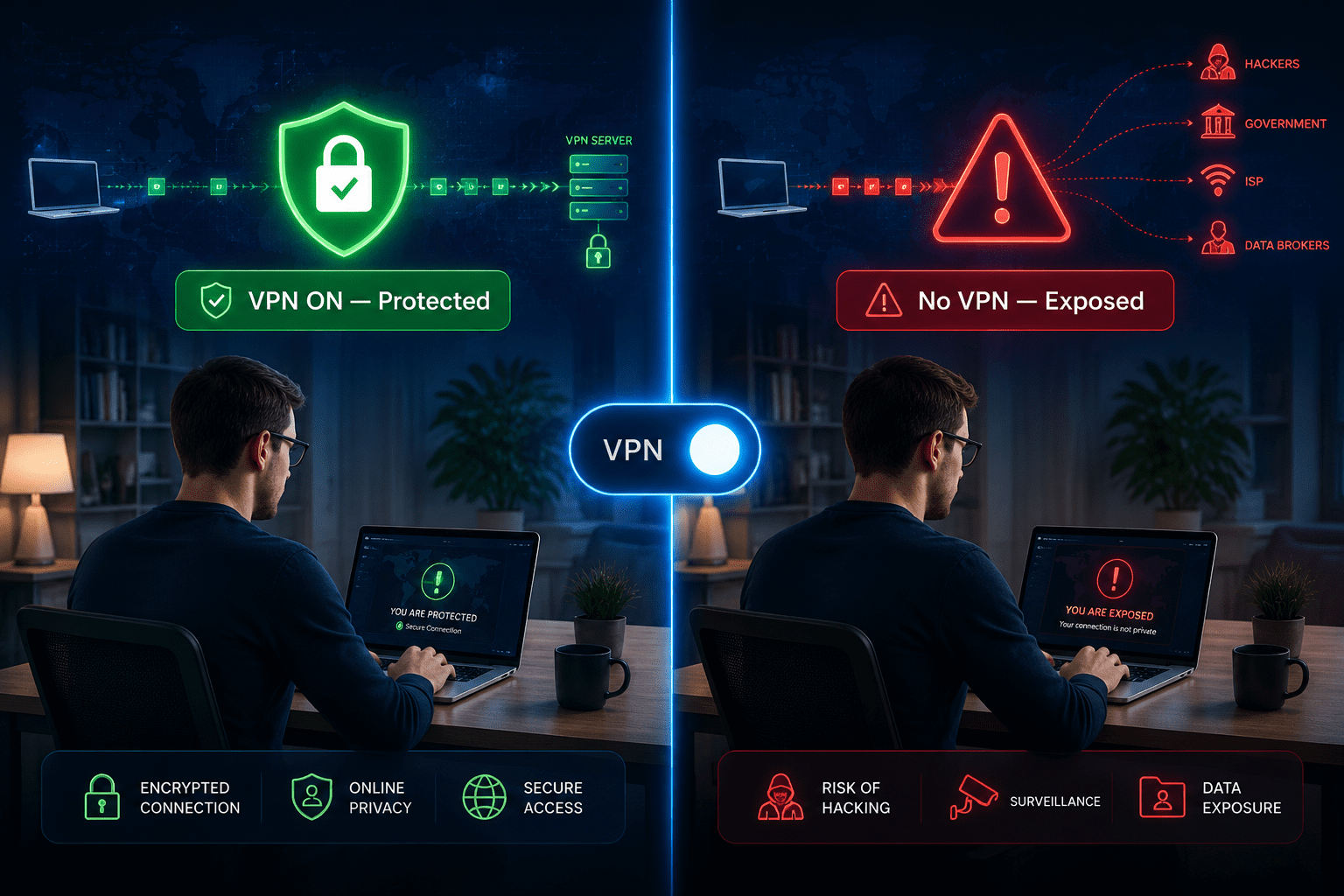
What a VPN hides:
- Your real IP address from websites and trackers
- Your browsing activity from your ISP
- Your traffic content from attackers on the same network
What a VPN does NOT hide:
- Your identity when you’re logged into accounts (Google, Facebook, your bank)
- Browser fingerprinting (your browser’s unique combination of settings and plugins)
- Cookies already stored on your device
- Activity from malware or spyware already running on your system
For businesses, a VPN is one layer in a broader security stack. It pairs well with endpoint detection and response tools and a solid network security posture — but it doesn’t replace them.
💡 Bottom line: A VPN significantly raises the cost of surveillance and interception. It doesn’t make you untraceable. Treat it as a strong privacy layer, not a complete solution.
What Is a VPN? Get the 2026 Beginner’s Guide — How to Set One Up in 5 Minutes
Setting up a VPN is genuinely simple. Here’s the process for a consumer VPN on any device.
Step-by-step setup:
- Choose a provider and create an account (NordVPN, ExpressVPN, Surfshark, and ProtonVPN are all independently audited options).
- Download the app for your device from the provider’s official website or your device’s app store.
- Log in with your account credentials.
- Select a server — for privacy, pick any server in your country. For geo-restricted content, pick the target country.
- Enable the kill switch in settings before connecting (critical for business use).
- Connect — most apps have a single large “Connect” button. The whole process takes under 30 seconds.
- Verify your IP has changed by visiting a site like whatismyip.com before and after connecting.
For business deployment:
- Use a VPN with a centralized admin console.
- Push the client to employee devices via MDM (Mobile Device Management).
- Set the VPN to auto-connect on untrusted networks.
- Review our best business VPN guide for options with proper admin controls.
How Much Does a VPN Cost — and Is It Worth It?
A quality consumer VPN costs $3–$10 per month on an annual plan. Business VPNs run $5–$15 per user per month depending on features and user count.
Is it worth it? For most people and businesses, yes — with caveats.
- If you regularly use public Wi-Fi, a $4/month VPN is cheap insurance.
- If your team works remotely, a business VPN is cheaper than the alternative: a data breach that costs SMBs an average of $4.88 million according to IBM’s 2024 Cost of a Data Breach Report.
- If you only browse at home on a trusted network and never travel, the urgency is lower.
What you get for free:
Free VPN tiers from reputable providers (ProtonVPN’s free tier is the strongest example) offer unlimited bandwidth but limited server locations and slower speeds. They’re fine for occasional use. For daily business use, pay for a proper plan.
FAQ: What Is a VPN? Your Plain-English Questions Answered
Q: Will a VPN slow down my internet?
Yes, slightly. Expect a 10–20% speed reduction with a quality provider using WireGuard. Budget providers or overloaded servers can cut speeds by 50% or more.
Q: Can my employer see what I do on a VPN?
If your employer provides and controls the VPN, yes — they can see your traffic. A personal VPN on your own device prevents employer visibility on your personal traffic, but not on company-managed devices with monitoring software installed.
Q: Is using a VPN legal?
In most countries, yes. VPNs are legal in the US, UK, EU, Canada, and Australia. They’re restricted or banned in a small number of countries including China, Russia, and Iran. Always check local laws.
Q: Does a VPN protect me from hackers?
It protects you from network-level attacks (like man-in-the-middle on public Wi-Fi). It doesn’t protect against malware, phishing, or attacks targeting your accounts directly.
Q: Can I use a VPN on multiple devices?
Most paid plans allow 5–10 simultaneous connections. Business plans typically have no device limit per user account.
Q: Do I need a VPN if I use HTTPS?
HTTPS encrypts the content of your web traffic, but your ISP and network observers can still see which sites you visit. A VPN hides the destination as well as the content.
Q: What’s the difference between a VPN and a proxy?
A proxy reroutes specific app traffic (usually your browser) without encrypting it. A VPN encrypts all traffic from your entire device. For real privacy, use a VPN.
Q: Will a VPN stop ransomware?
No. Ransomware is malware — it attacks your files, not your network connection. A VPN is irrelevant to ransomware defense. You need endpoint protection for that.
Q: Is NordVPN or ProtonVPN better for privacy?
Both have passed independent audits. ProtonVPN is based in Switzerland (stronger legal privacy protections) and publishes open-source code. NordVPN has faster speeds in most independent tests. For pure privacy, ProtonVPN edges ahead. For speed and streaming, NordVPN wins. See our ProtonVPN vs NordVPN comparison for the full breakdown.
Q: Can a VPN be hacked?
The encryption itself (AES-256) is not practically breakable. Attacks target VPN software vulnerabilities, weak passwords, or the provider’s infrastructure — not the encryption algorithm. Keep your VPN app updated and use strong credentials.
Conclusion: What You Should Do Today
A VPN is one of the simplest, most cost-effective privacy tools available in 2026 — and one of the most misunderstood.
Here’s what to actually do based on your situation:
- Individual user who travels or uses public Wi-Fi: Sign up for a paid consumer VPN today. ProtonVPN, NordVPN, or Surfshark are all independently audited and cost less than a coffee per week.
- SMB owner with remote employees: Evaluate a business VPN with centralized admin controls. NordLayer, Perimeter 81, or Cisco AnyConnect are worth a look. Our best business VPN guide has tested comparisons.
- Budget-conscious user: Start with ProtonVPN’s free tier. It’s the only free VPN I’d recommend without caveats — no data caps, no ads, no selling your traffic.
- Enterprise or compliance-focused team: A VPN alone isn’t enough. Layer it with zero-trust security and proper endpoint detection.
A VPN won’t solve every security problem. But it’s a proven, low-friction first line of defense that most people and small businesses still don’t use. That’s a gap worth closing — today, not next quarter.
Interactive Tool: VPN Selector — Find the Right VPN for Your Situation
.cg-vpn-tool {
font-family: -apple-system, BlinkMacSystemFont, 'Segoe UI', Roboto, sans-serif;
background: #0f172a;
color: #e2e8f0;
border-radius: 12px;
padding: 28px 24px;
max-width: 680px;
margin: 0 auto;
}
.cg-vpn-tool h2 {
font-size: 1.25rem;
font-weight: 700;
color: #38bdf8;
margin-bottom: 6px;
}
.cg-vpn-tool .cg-subtitle {
font-size: 0.875rem;
color: #94a3b8;
margin-bottom: 24px;
}
.cg-question-block {
margin-bottom: 20px;
}
.cg-question-block label {
display: block;
font-size: 0.95rem;
font-weight: 600;
color: #cbd5e1;
margin-bottom: 10px;
}
.cg-options {
display: flex;
flex-wrap: wrap;
gap: 8px;
}
.cg-option-btn {
background: #1e293b;
border: 2px solid #334155;
color: #cbd5e1;
padding: 9px 16px;
border-radius: 8px;
font-size: 0.875rem;
cursor: pointer;
transition: all 0.18s ease;
}
.cg-option-btn:hover {
border-color: #38bdf8;
color: #38bdf8;
}
.cg-option-btn.cg-selected {
background: #0c4a6e;
border-color: #38bdf8;
color: #e0f2fe;
font-weight: 600;
}
.cg-find-btn {
background: #0284c7;
color: #fff;
border: none;
padding: 13px 28px;
border-radius: 8px;
font-size: 1rem;
font-weight: 700;
cursor: pointer;
width: 100%;
margin-top: 8px;
transition: background 0.18s ease;
}
.cg-find-btn:hover { background: #0369a1; }
.cg-find-btn:disabled { background: #334155; color: #64748b; cursor: not-allowed; }
.cg-result {
display: none;
margin-top: 24px;
background: #1e293b;
border: 1px solid #334155;
border-radius: 10px;
padding: 20px;
}
.cg-result.cg-visible { display: block; }
.cg-result-header {
font-size: 1rem;
font-weight: 700;
color: #38bdf8;
margin-bottom: 4px;
}
.cg-result-type {
font-size: 0.8rem;
color: #64748b;
text-transform: uppercase;
letter-spacing: 0.05em;
margin-bottom: 12px;
}
.cg-result-rec {
font-size: 0.925rem;
color: #e2e8f0;
line-height: 1.6;
margin-bottom: 14px;
}
.cg-rec-pills {
display: flex;
flex-wrap: wrap;
gap: 8px;
margin-bottom: 14px;
}
.cg-pill {
background: #0c4a6e;
color: #7dd3fc;
padding: 4px 12px;
border-radius: 20px;
font-size: 0.8rem;
font-weight: 600;
}
.cg-caveat {
font-size: 0.825rem;
color: #94a3b8;
border-top: 1px solid #334155;
padding-top: 12px;
line-height: 1.5;
}
.cg-reset-btn {
background: transparent;
border: 1px solid #475569;
color: #94a3b8;
padding: 8px 18px;
border-radius: 6px;
font-size: 0.825rem;
cursor: pointer;
margin-top: 14px;
transition: all 0.15s ease;
}
.cg-reset-btn:hover { border-color: #94a3b8; color: #e2e8f0; }
@media (max-width: 480px) {
.cg-vpn-tool { padding: 20px 16px; }
.cg-option-btn { font-size: 0.825rem; padding: 8px 12px; }
}
🔒 Find Your Right VPN in 60 Seconds
Answer 3 questions. Get a plain-English recommendation — no vendor bias.
<div class="cg-question-block">
<label>1. Who are you protecting?</label>
<div class="cg-options" id="cg-q1">
<button class="cg-option-btn" data-q="1" data-v="personal">Just me (personal use)</button>
<button class="cg-option-btn" data-q="1" data-v="remote">Remote employee / freelancer</button>
<button class="cg-option-btn" data-q="1" data-v="smb">Small business team (2–50 people)</button>
<button class="cg-option-btn" data-q="1" data-v="enterprise">Larger organization (50+ people)</button>
</div>
</div>
<div class="cg-question-block">
<label>2. What's your main reason for using a VPN?</label>
<div class="cg-options" id="cg-q2">
<button class="cg-option-btn" data-q="2" data-v="publicwifi">Public Wi-Fi safety</button>
<button class="cg-option-btn" data-q="2" data-v="privacy">Privacy from ISP / trackers</button>
<button class="cg-option-btn" data-q="2" data-v="streaming">Streaming / geo-restricted content</button>
<button class="cg-option-btn" data-q="2" data-v="remote-access">Secure access to company systems</button>
</div>
</div>
<div class="cg-question-block">
<label>3. What's your budget?</label>
<div class="cg-options" id="cg-q3">
<button class="cg-option-btn" data-q="3" data-v="free">Free only</button>
<button class="cg-option-btn" data-q="3" data-v="low">Under $5/month</button>
<button class="cg-option-btn" data-q="3" data-v="mid">$5–$15/month</button>
<button class="cg-option-btn" data-q="3" data-v="high">$15+/month (business features)</button>
</div>
</div>
<button class="cg-find-btn" id="cg-find-btn" disabled>Get My Recommendation →</button>
<div class="cg-result" id="cg-result">
<div class="cg-result-header" id="cg-result-title"></div>
<div class="cg-result-type" id="cg-result-type"></div>
<p class="cg-result-rec" id="cg-result-rec"></p>
<div class="cg-rec-pills" id="cg-rec-pills"></div>
<p class="cg-caveat" id="cg-result-caveat"></p>
<button class="cg-reset-btn" id="cg-reset-btn">← Start Over</button>
</div>
(function () {
const answers = { 1: null, 2: null, 3: null };
const recommendations = {
enterprise: {
title: "Enterprise / Mid-Market Business VPN",
type: "Business-grade solution",
rec: "At 50+ users, you need centralized policy management, SSO integration, and audit logging. Look at Cisco AnyConnect, Zscaler Private Access, or Palo Alto GlobalProtect. These integrate with your existing identity stack and support compliance requirements.",
pills: ["Cisco AnyConnect", "Zscaler ZPA", "Palo Alto GlobalProtect"],
caveat: "⚠️ At this scale, a traditional VPN may not be enough. Consider pairing with a zero-trust network access (ZTNA) model for better security posture."
},
smb_remote_access_high: {
title: "Business VPN with Admin Controls",
type: "SMB / Remote team",
rec: "NordLayer and Perimeter 81 are the strongest SMB-focused options in 2026. Both offer centralized user management, dedicated IPs, and audit logs — without requiring an IT department to run them.",
pills: ["NordLayer", "Perimeter 81", "Twingate"],
caveat: "⚠️ Make sure your chosen provider supports your identity provider (Google Workspace, Microsoft 365, Okta) for smooth user provisioning."
},
smb_general: {
title: "SMB Business VPN",
type: "Small business team",
rec: "For a team under 50, NordLayer or Perimeter 81 give you the right balance of features and manageability. If budget is tight, ExpressVPN's Teams plan is a lighter option that still covers the basics.",
pills: ["NordLayer", "Perimeter 81", "ExpressVPN Teams"],
caveat: "⚠️ Avoid consumer VPNs for business use — they lack the admin controls and audit trails you'll need for compliance or incident response."
},
remote_privacy: {
title: "ProtonVPN or Mullvad",
type: "Privacy-first personal VPN",
rec: "ProtonVPN (Switzerland-based, open-source, independently audited) is the strongest privacy-focused consumer VPN available. Mullvad is a close second — it accepts anonymous payment and keeps zero logs, verified by audit.",
pills: ["ProtonVPN", "Mullvad", "IVPN"],
caveat: "⚠️ No VPN makes you fully anonymous. Browser fingerprinting and logged-in accounts still expose your identity. Use alongside a privacy-focused browser for best results."
},
streaming: {
title: "NordVPN or ExpressVPN",
type: "Speed + streaming access",
rec: "NordVPN consistently tops independent speed tests and unblocks the widest range of streaming platforms. ExpressVPN is slightly pricier but has excellent server coverage. Both have passed independent no-logs audits.",
pills: ["NordVPN", "ExpressVPN", "Surfshark"],
caveat: "⚠️ Streaming services actively block VPN IP ranges. If a server stops working, switch to another server in the same country — don't assume the VPN is broken."
},
budget_free: {
title: "ProtonVPN Free Tier",
type: "Best free option (no caveats)",
rec: "ProtonVPN's free tier is the only free VPN I'd recommend without hesitation. No data cap, no ads, no selling your traffic. You get 3 server locations and slightly slower speeds — acceptable for occasional use.",
pills: ["ProtonVPN Free", "Windscribe (limited)", "Cloudflare WARP"],
caveat: "⚠️ Avoid free VPNs from unknown providers. Several have been caught logging and selling user data — the exact behavior a VPN should prevent."
},
publicwifi_low: {
title: "Surfshark or NordVPN",
type: "Everyday privacy + public Wi-Fi",
rec: "For public Wi-Fi protection on a budget, Surfshark offers unlimited simultaneous connections at around $2.50/month on a 2-year plan. NordVPN costs slightly more but has faster servers. Both are independently audited.",
pills: ["Surfshark", "NordVPN", "ExpressVPN"],
caveat: "⚠️ Enable the kill switch before connecting to public networks. Without it, a dropped VPN connection briefly exposes your real IP and traffic."
},
default: {
title: "NordVPN or ProtonVPN",
type: "Solid all-around picks",
rec: "For most users in 2026, NordVPN (speed + features) or ProtonVPN (privacy + open-source) are the two strongest independently audited options. Both work on all major platforms and have clear no-logs policies.",
pills: ["NordVPN", "ProtonVPN", "Surfshark"],
caveat: "⚠️ Whatever you choose, always verify the kill switch is enabled and check your IP has changed after connecting."
}
};
function getRecommendation(a) {
if (a[1] === 'enterprise') return recommendations.enterprise;
if (a[1] === 'smb' && a[2] === 'remote-access' && (a[3] === 'high' || a[3] === 'mid')) return recommendations.smb_remote_access_high;
if (a[1] === 'smb') return recommendations.smb_general;
if (a[3] === 'free') return recommendations.budget_free;
if (a[2] === 'privacy') return recommendations.remote_privacy;
if (a[2] === 'streaming') return recommendations.streaming;
if (a[2] === 'publicwifi' && (a[3] === 'low' || a[3] === 'free')) return recommendations.publicwifi_low;
return recommendations.default;
}
document.querySelectorAll('.cg-option-btn').forEach(btn => {
btn.addEventListener('click', function () {
const q = this.dataset.q;
document.querySelectorAll(`[data-q="${q}"]`).forEach(b => b.classList.remove('cg-selected'));
this.classList.add('cg-selected');
answers[q] = this.dataset.v;
const allAnswered = answers[1] && answers[2] && answers[3];
document.getElementById('cg-find-btn').disabled = !allAnswered;
});
});
document.getElementById('cg-find-btn').addEventListener('click', function () {
const rec = getRecommendation(answers);
document.getElementById('cg-result-title').textContent = rec.title;
document.getElementById('cg-result-type').textContent = rec.type;
document.getElementById('cg-result-rec').textContent = rec.rec;
const pillsEl = document.getElementById('cg-rec-pills');
pillsEl.innerHTML = rec.pills.map(p => `${p}`).join('');
document.getElementById('cg-result-caveat').textContent = rec.caveat;
const result = document.getElementById('cg-result');
result.classList.add('cg-visible');
result.scrollIntoView({ behavior: 'smooth', block: 'nearest' });
});
document.getElementById('cg-reset-btn').addEventListener('click', function () {
answers[1] = null; answers[2] = null; answers[3] = null;
document.querySelectorAll('.cg-option-btn').forEach(b => b.classList.remove('cg-selected'));
document.getElementById('cg-find-btn').disabled = true;
document.getElementById('cg-result').classList.remove('cg-visible');
});
})();
References
- IBM Security. Cost of a Data Breach Report 2024. IBM, 2024. https://www.ibm.com/reports/data-breach
- National Institute of Standards and Technology (NIST). Guidelines on VPNs and TLS. NIST Special Publication 800-113, 2008 (updated guidance). https://csrc.nist.gov/publications/detail/sp/800-113/final
- Cure53. ProtonVPN Security Audit. Cure53, 2022. https://protonvpn.com/blog/security-audit/
- Deloitte. NordVPN No-Logs Audit. Deloitte, 2023. https://nordvpn.com/blog/nordvpn-audit/
- AV-TEST Institute. VPN Performance Benchmarks. AV-TEST, 2024. https://www.av-test.org/en/
Tags: VPN explained, what is a VPN, VPN for beginners, best VPN 2026, VPN for small business, VPN privacy, how VPN works, business VPN, VPN security, remote work VPN, VPN guide, encrypted internet connection