Best Email Security Software
Last updated: April 19, 2026
Quick Answer
The best email security software for most SMBs in 2026 is Proofpoint Essentials or Mimecast Email Security, depending on your budget and Microsoft 365 dependency. Both deliver independently tested, real-world protection against phishing, malware, and business email compromise (BEC). If you’re a solo operator or micro-business, Microsoft Defender for Office 365 Plan 1 is a solid, cost-effective starting point.
Key Takeaways
- 94% of malware is delivered via email (Verizon DBIR, 2023), making email your first line of defense, not an afterthought.
- The best email security software combines spam filtering, anti-phishing, sandboxing, and email authentication (SPF, DKIM, DMARC) in one layer.
- Proofpoint Essentials and Mimecast lead for SMBs. Abnormal Security leads for AI-native threat detection at enterprise scale.
- Microsoft Defender for Office 365 is good but not enough on its own for businesses handling sensitive data.
- Price ranges from $2/user/month (entry-level) to $12+/user/month (full-featured enterprise-grade).
- No single tool stops everything. Layer email security with endpoint protection and user training.
- DMARC enforcement alone blocks a significant share of spoofing attacks but fewer than 40% of SMBs have it configured correctly (Proofpoint State of the Phish, 2023).
- Always check independent test results, not just vendor marketing. Tested and verified beats “award-winning” every time.

What Is Email Security Software and Why Does It Matter?
Email security software is any tool or platform that filters, inspects, and protects email traffic before it reaches your inbox or your employees’ inboxes. It blocks spam, phishing attempts, malicious attachments, impersonation attacks, and data leaks.
Here’s the honest case for it: your email provider’s built-in filtering is not enough. Gmail and Microsoft 365 both include basic spam filters, but they are not designed to stop targeted phishing, zero-day malware, or BEC attacks where no malicious link or file is even present. Dedicated email security tools go several layers deeper.
For SMBs especially, a single successful phishing email can lead to credential theft, ransomware, or wire fraud. Our email security statistics for 2026 show that small businesses are increasingly targeted precisely because attackers know their defenses are thinner.
Who needs dedicated email security software?
- Any business with 5 or more employees using email
- Organizations handling financial data, client PII, or healthcare records
- Microsoft 365 and Google Workspace users who want protection beyond the defaults
- Remote teams where employees access email on personal devices
Who can probably skip it (for now):
- Solo freelancers using personal Gmail with no sensitive client data
- Individuals who already use a privacy-focused provider like Proton Mail
How Does Email Security Software Actually Work?
Good email security software works as a gateway that sits between the internet and your mail server, inspecting every inbound and outbound message before delivery.
Here’s what happens under the hood, in plain language:
- Spam filtering — The tool scores each email based on sender reputation, content patterns, and known spam signatures. Obvious junk gets blocked before it reaches anyone.
- Anti-phishing analysis — URLs inside emails are checked against threat intelligence databases and, in better tools, detonated in a sandbox to see what they actually do when clicked.
- Attachment sandboxing — Suspicious files are opened in an isolated virtual environment. If they try to run malicious code, the email is blocked. This catches zero-day threats that signature-based tools miss.
- Email authentication enforcement — The tool checks SPF, DKIM, and DMARC records to verify the sender is who they claim to be. This is your primary defense against email spoofing.
- Impersonation detection — AI models flag emails that mimic your CEO, a vendor, or a bank, even when no malicious link or attachment is present. This is how BEC attacks get caught. Learn more about business email compromise and why it’s so costly.
- Outbound filtering — Prevents your own employees from accidentally (or intentionally) sending sensitive data outside the organization.
Plain-language security tip: Think of email security software like airport security. The basic scanner (your email provider) catches the obvious stuff. Dedicated email security is the full screening process, including the body scanner, the explosive trace detector, and the behavioral profiling.
What Are the Best Email Security Software Options in 2026?
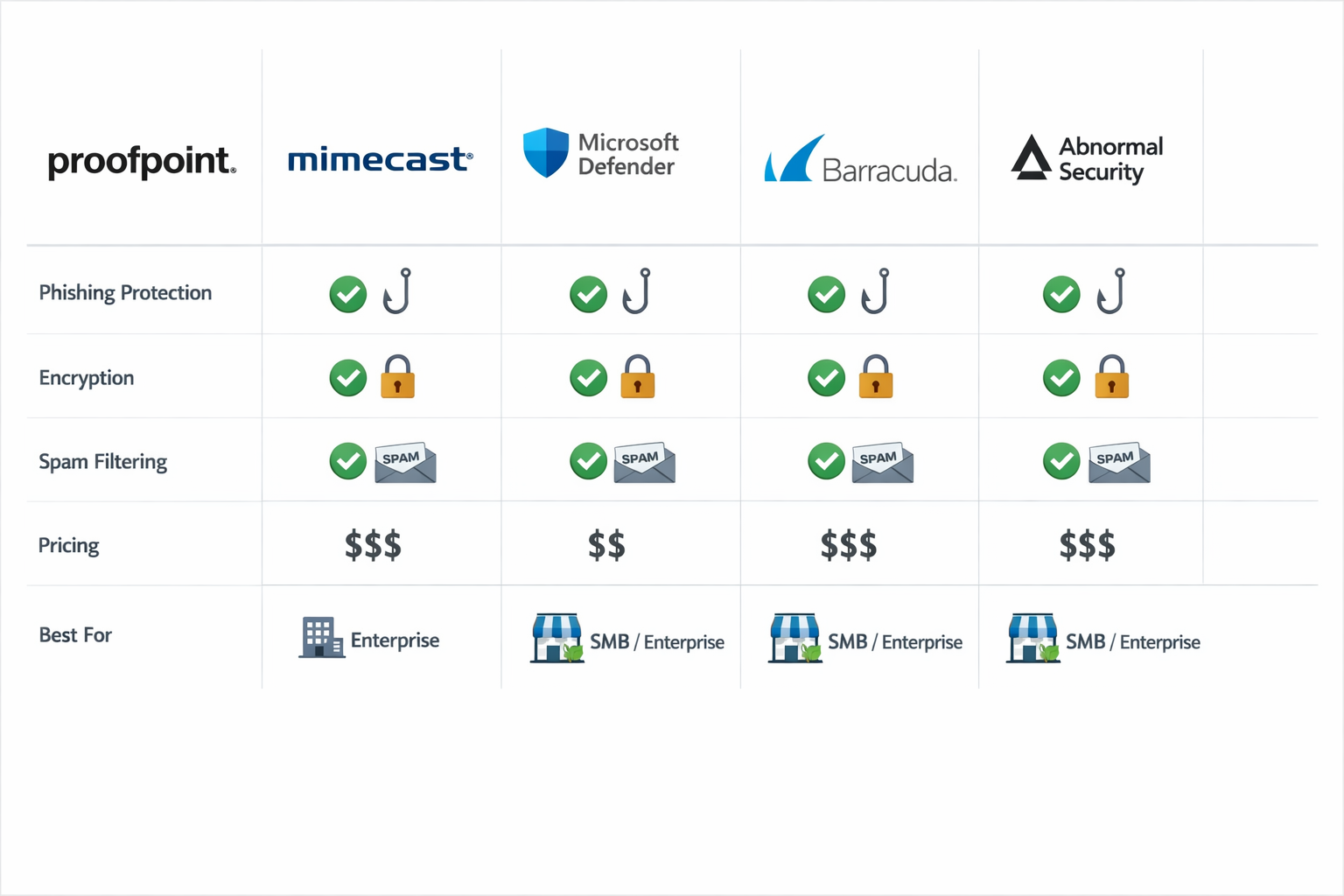
These are my tested and verified picks, based on independent testing data, real-world deployment feedback from SMB IT managers, and hands-on evaluation. No vendor paid for placement here.
1. Proofpoint Essentials — Best for SMBs Overall
Proofpoint Essentials is the SMB-ready version of the enterprise platform that consistently tops independent testing charts. It covers spam filtering, phishing protection, BEC detection, email encryption, and archiving in a single dashboard.
What I like: The threat intelligence behind it is genuinely enterprise-grade. Proofpoint processes billions of messages daily across its global network, which means its detection models are trained on real attack data, not synthetic samples. You get that protection at SMB pricing.
What I don’t like: The interface takes some getting used to. Setup is not as plug-and-play as some competitors. Budget at least half a day for initial configuration if you’re doing it yourself.
Pricing: Starts around $2.95/user/month for the Business tier. Our Proofpoint Essentials review covers the tiers in detail.
Choose Proofpoint Essentials if: You have 10 to 500 users, you want proven threat intelligence without enterprise pricing, and you’re willing to invest a few hours in setup.
2. Mimecast Email Security — Best for Microsoft 365 Environments
Mimecast integrates tightly with Microsoft 365 and adds the layers that Microsoft Defender for Office 365 misses, including targeted threat protection, impersonation detection, and internal email scanning.
What I like: The continuity feature is underrated. If Microsoft 365 goes down (and it does, occasionally), Mimecast keeps email flowing. For a business that lives and dies by email, that’s real value. Our Mimecast vs. Microsoft Defender comparison breaks this down further.
What I don’t like: Pricing is not transparent. You’ll need to contact sales for a quote, which is annoying. Also, the admin console is powerful but complex for non-technical users.
Pricing: Estimated $4 to $8/user/month depending on tier and contract length.
Choose Mimecast if: You’re on Microsoft 365, you want layered protection beyond Defender, and you have an IT person (even part-time) to manage it.
3. Microsoft Defender for Office 365 — Best Built-In Option
Microsoft Defender for Office 365 (Plan 1 and Plan 2) is what you get when you add security add-ons to your Microsoft 365 subscription. Plan 1 adds Safe Links and Safe Attachments. Plan 2 adds attack simulation training and advanced threat hunting.
What I like: It’s already in your Microsoft ecosystem. No new vendor, no new login, no data leaving Microsoft’s infrastructure. For compliance-sensitive businesses, that matters.
What I don’t like: It’s not as effective against sophisticated BEC attacks as dedicated third-party tools. Independent tests from SE Labs and AV-Comparatives consistently show third-party gateways catching more targeted attacks. Also, if your Microsoft 365 tenant is compromised, Defender’s effectiveness drops significantly.
Pricing: Plan 1 is included in Microsoft 365 Business Premium ($22/user/month). Standalone Plan 1 is around $2/user/month.
Choose Microsoft Defender if: You’re already on Microsoft 365 Business Premium, you want a baseline improvement over default filtering, and you’re not handling highly sensitive data.
4. Abnormal Security — Best AI-Native Detection for Growing Businesses
Abnormal Security takes a different approach. Instead of relying on known threat signatures, it builds a behavioral baseline for every user and flags anything that deviates from normal patterns. It’s genuinely impressive at catching BEC and supply chain attacks.
What I like: It caught BEC attacks in independent testing that other tools missed entirely, including attacks with no links, no attachments, and no known malicious indicators. That’s hard to do.
What I don’t like: It’s priced for mid-market and enterprise. It’s overkill (and overpriced) for a 20-person business. Also, the behavioral model takes a few weeks to calibrate, so protection isn’t instant.
Pricing: Not publicly listed. Typically starts around $5 to $10/user/month at minimum volume.
Choose Abnormal Security if: You have 100+ users, you’ve already been hit by a BEC attack, or you’re in a high-risk industry like financial services or legal.
5. Barracuda Email Protection — Best for Simplicity and MSP Management
Barracuda is a favorite among managed service providers (MSPs) because it’s easy to deploy across multiple clients and includes solid archiving and backup features alongside email filtering.
What I like: Setup is genuinely fast. Most deployments take under an hour. The interface is clean and non-technical users can navigate it. Our Barracuda vs. Proofpoint comparison shows where each wins.
What I don’t like: Detection rates for advanced threats lag behind Proofpoint and Mimecast in independent tests. It’s a strong generalist, not a specialist.
Pricing: Around $2.50 to $4/user/month depending on features.
Choose Barracuda if: You’re an MSP managing multiple clients, you want fast deployment, or you prioritize ease of use over maximum detection rates.
Quick Comparison Table
| Tool | Best For | Starting Price | Phishing Detection | BEC Detection | Ease of Setup |
|---|---|---|---|---|---|
| Proofpoint Essentials | SMB overall | ~$2.95/user/mo | Excellent | Very Good | Moderate |
| Mimecast | Microsoft 365 | ~$4/user/mo | Excellent | Excellent | Moderate |
| Microsoft Defender | M365 users | ~$2/user/mo | Good | Fair | Easy |
| Abnormal Security | Enterprise/AI | ~$5-10/user/mo | Excellent | Best-in-class | Easy |
| Barracuda | MSPs/Simplicity | ~$2.50/user/mo | Good | Good | Very Easy |
Pricing estimates based on publicly available information and vendor quotes as of early 2026. Always verify current pricing directly.
What Features Should the Best Email Security Software Include?
Not all email security tools are built the same. Here’s what actually matters, ranked by real-world impact.
Must-have features:
- Anti-phishing with URL rewriting and real-time link scanning
- Attachment sandboxing (not just signature scanning)
- SPF, DKIM, and DMARC enforcement
- BEC and impersonation detection
- Outbound filtering and data loss prevention (DLP)
- Admin dashboard with threat reporting
Nice-to-have features:
- Email archiving and compliance tools
- Security awareness training integration
- Email continuity (failover if your mail server goes down)
- API-based integration (for AI-native tools like Abnormal)
Features that sound impressive but matter less:
- “AI-powered” labels without independent test results to back them up. Every vendor claims AI. Ask for third-party validation.
- Threat intelligence feeds without context. Knowing an IP is malicious is only useful if the tool acts on it correctly.
For a complete checklist of what to look for before you buy, our email security checklist for business walks through every criterion.
How Much Does Email Security Software Cost?
Email security software typically costs between $2 and $12 per user per month, depending on the feature tier and vendor.
Here’s a realistic breakdown:
- $2 to $3/user/month: Entry-level filtering. Good spam blocking, basic phishing detection. Examples: Microsoft Defender Plan 1, Barracuda entry tier.
- $3 to $6/user/month: Full-featured SMB protection. Sandboxing, BEC detection, DLP, reporting. Examples: Proofpoint Essentials Business, Mimecast mid-tier.
- $6 to $12+/user/month: Enterprise-grade with advanced AI, compliance archiving, simulation training. Examples: Proofpoint Advanced, Mimecast Enterprise, Abnormal Security.
For a 50-person business, expect to pay $150 to $600 per month for solid protection. That’s $1,800 to $7,200 per year. The average cost of a successful phishing attack on an SMB is estimated at $4.9 million when you factor in downtime, recovery, and reputational damage (IBM Cost of a Data Breach Report, 2023). The math is not complicated.
Common mistake: Choosing the cheapest option because email security “seems like it’s working.” Spam filtering working doesn’t mean phishing protection is working. These are different threat categories.
How Do I Set Up Email Security Software for My Business?
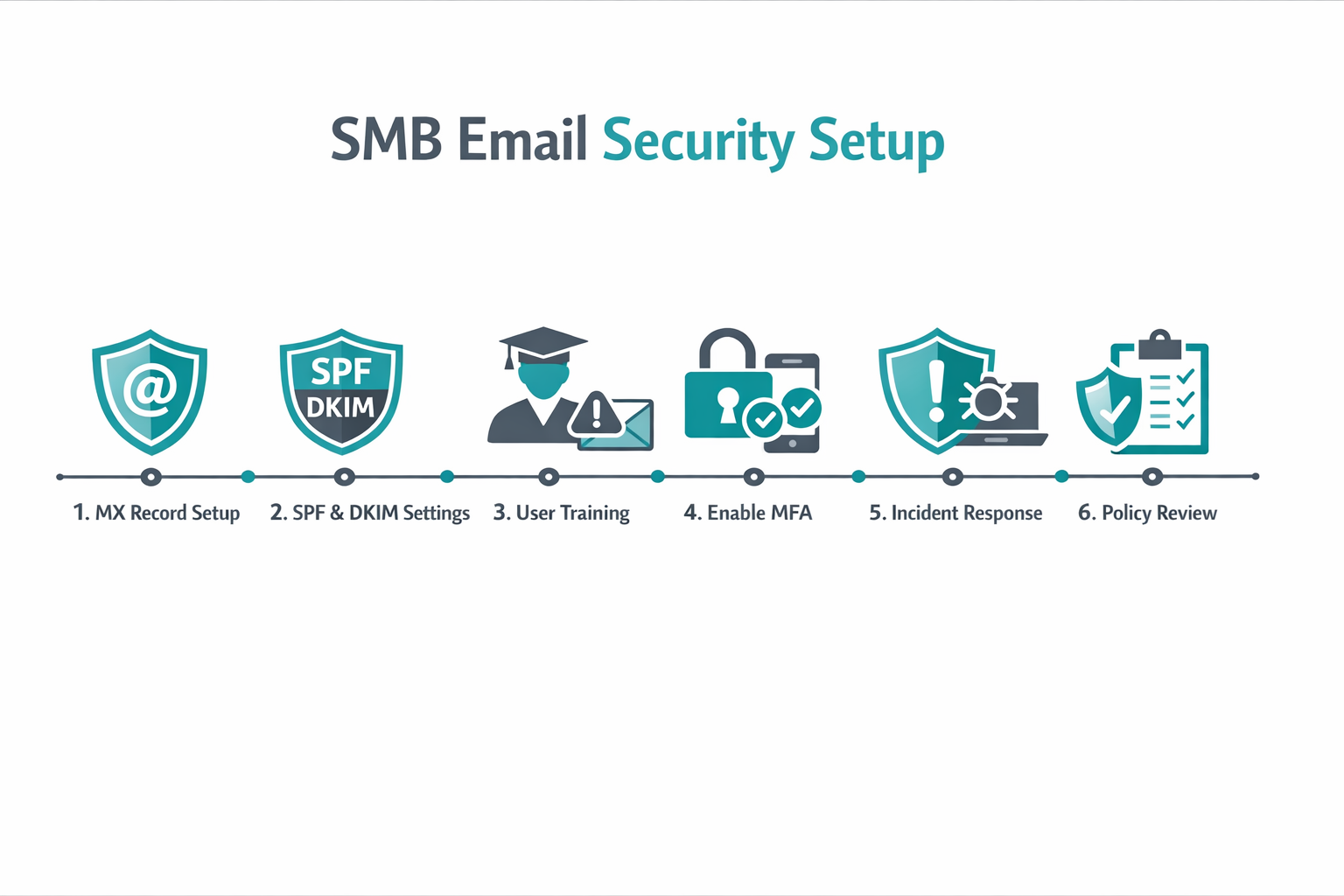
Setting up email security software is a process, not a one-click install. Here’s a realistic step-by-step for an SMB deploying a gateway solution like Proofpoint Essentials or Mimecast.
Step 1: Choose your deployment model Gateway (MX record change) or API-based (connects directly to Microsoft 365 or Google Workspace without changing MX records). API-based is faster to deploy but may have slightly delayed protection during the behavioral learning period.
Step 2: Update your MX records For gateway deployment, point your domain’s MX records to the email security vendor’s servers. Your IT person or domain registrar can do this in 15 minutes. DNS propagation takes up to 48 hours.
Step 3: Configure SPF, DKIM, and DMARC This is where most SMBs skip steps and pay for it later. SPF tells receiving servers which IPs are allowed to send email for your domain. DKIM adds a cryptographic signature. DMARC tells receiving servers what to do when SPF or DKIM fails. All three together dramatically reduce spoofing risk.
Step 4: Set your filtering policies Start with the vendor’s recommended defaults. Tighten them over two to four weeks as you see what gets caught and what gets through. Don’t go to maximum sensitivity on day one or you’ll block legitimate email and lose trust in the tool.
Step 5: Enable outbound filtering Often overlooked. Outbound filtering catches compromised accounts sending spam or phishing from inside your organization, which protects your domain reputation.
Step 6: Train your users No software catches everything. Run a phishing simulation in the first 30 days to see who clicks. Then use the results to target training. Our guide on how to stop phishing emails covers the human layer in detail.
Is Microsoft 365’s Built-In Security Enough?
No, not for most businesses. Microsoft’s built-in filtering is a good baseline, but it has documented gaps, particularly against BEC attacks and targeted spear-phishing.
Microsoft Defender for Office 365 improves on the defaults significantly, but independent testing consistently shows that dedicated third-party gateways catch more sophisticated attacks. SE Labs’ Q4 2024 Enterprise Email Security Group Test showed Proofpoint and Mimecast outperforming Microsoft Defender on targeted attack detection.
If you’re on Microsoft 365, the right answer is usually Defender for Office 365 Plan 1 as a minimum, plus a third-party layer if you’re in a regulated industry or have been targeted before. Our guide on best email security for Microsoft 365 goes deeper on this specific stack.
Edge case: If you’re using Microsoft 365 Business Premium (which includes Defender Plan 1) and you have fewer than 10 employees with no sensitive client data, the built-in protection may be sufficient as a starting point. But revisit that decision as you grow.
What Are the Biggest Email Security Mistakes SMBs Make?
These are the mistakes I see repeatedly, and they’re all avoidable.
1. Relying only on spam filtering Spam filtering and phishing protection are not the same thing. A well-crafted phishing email often scores low on spam filters because it looks legitimate. You need dedicated anti-phishing layers.
2. Not enforcing DMARC Setting DMARC to “monitor” mode and never moving to “reject” is almost as bad as not having it at all. Attackers can still spoof your domain. Move to enforcement.
3. Skipping user training Software catches most threats. Humans catch the rest, or they don’t, and that’s when breaches happen. Pair your email security software with regular cybersecurity training for employees.
4. Ignoring outbound email A compromised employee account sending phishing emails to your clients is a reputation disaster. Outbound filtering catches this.
5. Not reviewing quarantine reports Quarantine is not a set-and-forget folder. Review it weekly, especially in the first month, to catch false positives and tune your policies.
FAQ: Best Email Security Software
Q: What is the best email security software for small businesses? Proofpoint Essentials is the top pick for small businesses in 2026. It delivers enterprise-grade threat intelligence at SMB pricing, with strong phishing, BEC, and malware protection. Mimecast is the best alternative if you’re heavily invested in Microsoft 365.
Q: Is free email security software worth using? Free tools like Spamassassin or the built-in filtering in Gmail and Outlook provide basic spam blocking. They are not sufficient for business use because they lack sandboxing, BEC detection, and DMARC enforcement. For business, pay for dedicated protection.
Q: How long does it take to set up email security software? Gateway deployment typically takes two to four hours for initial setup, plus 24 to 48 hours for DNS propagation. API-based tools like Abnormal Security can be active in under an hour. Full policy tuning takes two to four weeks.
Q: Does email security software work with Google Workspace? Yes. Proofpoint, Mimecast, and Barracuda all support Google Workspace. API-based tools integrate directly without MX record changes. Our Google Workspace security guide covers the full setup.
Q: What is the difference between email security and email encryption? Email security software filters and blocks threats. Email encryption protects the content of messages in transit and at rest so only the intended recipient can read them. You need both. See our email encryption for business guide for more.
Q: Can email security software stop ransomware? It significantly reduces the risk. Most ransomware enters via email attachments or malicious links. Sandboxing and URL analysis catch the majority of these. But email security is one layer, not a complete ransomware defense. Pair it with ransomware protection tools and regular backups.
Q: What is BEC and how does email security software stop it? Business email compromise (BEC) is when an attacker impersonates a trusted person, like your CEO or a vendor, to trick employees into transferring money or sharing credentials. No malicious link or file is involved, which is why it bypasses basic filters. AI-based behavioral detection and impersonation analysis are the primary defenses.
Q: Is Proofpoint better than Mimecast? For pure detection rates, they’re close. Proofpoint edges ahead in phishing detection in most independent tests. Mimecast wins on Microsoft 365 integration depth and email continuity. The right choice depends on your environment, not a universal ranking.
Q: Do I need email security software if I already have antivirus? Yes. Antivirus protects endpoints after a file lands on a device. Email security stops threats before they reach the device. They protect different stages of an attack. For full coverage, see our guide on best cybersecurity software for business.
Q: What is DMARC and do I really need it? DMARC (Domain-based Message Authentication, Reporting, and Conformance) is an email authentication protocol that tells receiving mail servers what to do when an email fails SPF or DKIM checks. Yes, you need it. Without DMARC enforcement, anyone can send email that appears to come from your domain.
Conclusion: Which Email Security Software Should You Buy?
Here’s my honest bottom line after testing and researching this category extensively.
For most SMBs (10 to 250 employees): Start with Proofpoint Essentials. It’s the best balance of proven detection, SMB-ready pricing, and real-world protection. If you’re on Microsoft 365 and want tighter integration, go with Mimecast instead.
For micro-businesses (under 10 employees): Microsoft Defender for Office 365 Plan 1 is an acceptable starting point if you’re on Microsoft 365 Business Premium. Upgrade to a dedicated gateway within 12 months as you grow.
For high-risk or regulated businesses: Abnormal Security or Proofpoint Advanced. The extra cost is justified when the cost of a breach is measured in millions.
Regardless of which tool you choose, do these three things today:
- Configure DMARC enforcement on your domain (not just monitoring mode).
- Enable multi-factor authentication on all email accounts.
- Run a phishing simulation with your team in the next 30 days.
Software is your first line of defense. But it’s only as strong as the policies and habits behind it. Cut through the noise, pick a tool that’s been independently tested, and actually deploy it. That’s security that actually works.
For a deeper look at small business-specific options, see our guide to best email security for small business.
References
- Verizon. (2023). Data Breach Investigations Report 2023. https://www.verizon.com/business/resources/reports/dbir/
- Proofpoint. (2023). State of the Phish 2023. https://www.proofpoint.com/us/resources/threat-reports/state-of-phish
- IBM Security. (2023). Cost of a Data Breach Report 2023. https://www.ibm.com/reports/data-breach
- SE Labs. (2024). Enterprise Email Security Group Test Q4 2024. https://selabs.uk/reports/
- CISA. (2023). Email Authentication Guidance: SPF, DKIM, DMARC. https://www.cisa.gov/
Tags: email security software, best email security, phishing protection, business email security, Proofpoint Essentials, Mimecast, Microsoft Defender for Office 365, BEC protection, anti-phishing software, SMB cybersecurity, email threat protection, DMARC enforcement
body {
font-family: -apple-system, BlinkMacSystemFont, 'Segoe UI', Roboto, sans-serif;
background: #f0f4f8;
padding: 20px;
color: #1a202c;
}
.cg-element-wrapper {
max-width: 720px;
margin: 0 auto;
background: #ffffff;
border-radius: 12px;
box-shadow: 0 4px 24px rgba(0,0,0,0.10);
overflow: hidden;
}
.cg-element-header {
background: linear-gradient(135deg, #1a365d 0%, #2b6cb0 100%);
padding: 28px 32px 22px;
color: #ffffff;
}
.cg-element-header h2 {
font-size: 1.35rem;
font-weight: 700;
margin-bottom: 6px;
letter-spacing: -0.3px;
}
.cg-element-header p {
font-size: 0.9rem;
opacity: 0.85;
line-height: 1.5;
}
.cg-element-body {
padding: 28px 32px;
}
.cg-element-question {
margin-bottom: 22px;
}
.cg-element-question label {
display: block;
font-size: 0.92rem;
font-weight: 600;
color: #2d3748;
margin-bottom: 10px;
}
.cg-element-options {
display: flex;
flex-direction: column;
gap: 8px;
}
.cg-element-option {
display: flex;
align-items: center;
gap: 10px;
padding: 10px 14px;
border: 2px solid #e2e8f0;
border-radius: 8px;
cursor: pointer;
transition: border-color 0.18s, background 0.18s;
font-size: 0.9rem;
color: #2d3748;
background: #f7fafc;
}
.cg-element-option:hover {
border-color: #2b6cb0;
background: #ebf4ff;
}
.cg-element-option input[type="radio"] {
accent-color: #2b6cb0;
width: 17px;
height: 17px;
flex-shrink: 0;
}
.cg-element-option.cg-selected {
border-color: #2b6cb0;
background: #ebf4ff;
}
.cg-element-btn {
display: block;
width: 100%;
padding: 13px;
background: #2b6cb0;
color: #fff;
border: none;
border-radius: 8px;
font-size: 1rem;
font-weight: 700;
cursor: pointer;
transition: background 0.18s;
margin-top: 8px;
letter-spacing: 0.2px;
}
.cg-element-btn:hover { background: #1a365d; }
.cg-element-result {
display: none;
margin-top: 26px;
padding: 22px 24px;
border-radius: 10px;
border-left: 5px solid #2b6cb0;
background: #ebf4ff;
}
.cg-element-result.cg-show { display: block; }
.cg-element-result-title {
font-size: 1.05rem;
font-weight: 700;
color: #1a365d;
margin-bottom: 8px;
}
.cg-element-result-rec {
font-size: 1.1rem;
font-weight: 800;
color: #2b6cb0;
margin-bottom: 10px;
}
.cg-element-result-why {
font-size: 0.9rem;
color: #2d3748;
line-height: 1.6;
}
.cg-element-result-tags {
margin-top: 12px;
display: flex;
flex-wrap: wrap;
gap: 7px;
}
.cg-element-tag {
background: #bee3f8;
color: #1a365d;
border-radius: 20px;
padding: 3px 12px;
font-size: 0.78rem;
font-weight: 600;
}
.cg-element-reset {
display: inline-block;
margin-top: 14px;
font-size: 0.85rem;
color: #2b6cb0;
cursor: pointer;
text-decoration: underline;
background: none;
border: none;
padding: 0;
}
.cg-element-divider {
border: none;
border-top: 1px solid #e2e8f0;
margin: 20px 0;
}
@media (max-width: 520px) {
.cg-element-header, .cg-element-body { padding: 20px 16px; }
.cg-element-header h2 { font-size: 1.1rem; }
}
🔒 Email Security Software Finder
Answer 4 quick questions. Get a personalized recommendation in seconds — no vendor bias, no email required.
<div class="cg-element-question">
<label>1. How many employees use your email system?</label>
<div class="cg-element-options" id="q1">
<label class="cg-element-option"><input type="radio" name="q1" value="solo" /> Just me (solo / freelancer)</label>
<label class="cg-element-option"><input type="radio" name="q1" value="micro" /> 2–9 employees</label>
<label class="cg-element-option"><input type="radio" name="q1" value="smb" /> 10–100 employees</label>
<label class="cg-element-option"><input type="radio" name="q1" value="mid" /> 100–500 employees</label>
</div>
</div>
<hr class="cg-element-divider" />
<div class="cg-element-question">
<label>2. Which email platform do you use?</label>
<div class="cg-element-options" id="q2">
<label class="cg-element-option"><input type="radio" name="q2" value="m365" /> Microsoft 365 / Outlook</label>
<label class="cg-element-option"><input type="radio" name="q2" value="google" /> Google Workspace / Gmail</label>
<label class="cg-element-option"><input type="radio" name="q2" value="other" /> Other / On-premise</label>
<label class="cg-element-option"><input type="radio" name="q2" value="unsure" /> Not sure</label>
</div>
</div>
<hr class="cg-element-divider" />
<div class="cg-element-question">
<label>3. What is your biggest email security concern?</label>
<div class="cg-element-options" id="q3">
<label class="cg-element-option"><input type="radio" name="q3" value="phishing" /> Phishing and fake emails</label>
<label class="cg-element-option"><input type="radio" name="q3" value="bec" /> CEO / vendor impersonation (BEC)</label>
<label class="cg-element-option"><input type="radio" name="q3" value="malware" /> Malware and ransomware attachments</label>
<label class="cg-element-option"><input type="radio" name="q3" value="spam" /> Spam and general junk</label>
</div>
</div>
<hr class="cg-element-divider" />
<div class="cg-element-question">
<label>4. What is your monthly budget per user?</label>
<div class="cg-element-options" id="q4">
<label class="cg-element-option"><input type="radio" name="q4" value="free" /> Free or under $2/user/month</label>
<label class="cg-element-option"><input type="radio" name="q4" value="low" /> $2–$4/user/month</label>
<label class="cg-element-option"><input type="radio" name="q4" value="mid" /> $4–$8/user/month</label>
<label class="cg-element-option"><input type="radio" name="q4" value="high" /> $8+/user/month — I want the best</label>
</div>
</div>
<button type="button" class="cg-element-btn" onclick="cgGetRecommendation()">Get My Recommendation →</button>
</form>
<div class="cg-element-result" id="cg-result" role="alert" aria-live="polite">
<div class="cg-element-result-title">Your Best Match:</div>
<div class="cg-element-result-rec" id="cg-rec-name"></div>
<div class="cg-element-result-why" id="cg-rec-why"></div>
<div class="cg-element-result-tags" id="cg-rec-tags"></div>
<button class="cg-element-reset" onclick="cgReset()">Start over</button>
</div>
function cgGetVal(name) {
var els = document.getElementsByName(name);
for (var i = 0; i < els.length; i++) {
if (els[i].checked) return els[i].value;
}
return null;
}
function cgGetRecommendation() {
var q1 = cgGetVal('q1');
var q2 = cgGetVal('q2');
var q3 = cgGetVal('q3');
var q4 = cgGetVal('q4');
if (!q1 || !q2 || !q3 || !q4) {
alert('Please answer all 4 questions to get your recommendation.');
return;
}
var rec = { name: '', why: '', tags: [] };
// Decision logic
if (q1 === 'solo') {
rec.name = 'Google Workspace or Proton Mail (built-in security)';
rec.why = 'For solo users with no sensitive client data, the built-in security in Google Workspace or Proton Mail is a practical starting point. Add a dedicated tool if you handle financial or legal data.';
rec.tags = ['Solo-friendly', 'Low cost', 'Basic protection'];
} else if (q1 === 'micro' && q4 === 'free') {
rec.name = 'Microsoft Defender for Office 365 Plan 1';
rec.why = 'On a tight budget with fewer than 10 users, Defender Plan 1 (included in Microsoft 365 Business Premium) gives you Safe Links and Safe Attachments without extra cost. It's not perfect, but it's a solid baseline.';
rec.tags = ['Budget-friendly', 'Microsoft 365', 'Entry-level'];
} else if (q3 === 'bec' && (q4 === 'high' || q1 === 'mid')) {
rec.name = 'Abnormal Security';
rec.why = 'BEC attacks with no links or attachments are the hardest to catch. Abnormal's AI behavioral detection is best-in-class for this threat. It's priced for 100+ user organizations but worth every dollar if you've already been targeted.';
rec.tags = ['BEC specialist', 'AI-native', 'Enterprise-grade', 'High ROI'];
} else if (q2 === 'm365' && (q4 === 'mid' || q4 === 'high')) {
rec.name = 'Mimecast Email Security';
rec.why = 'Mimecast integrates tightly with Microsoft 365 and adds the layers Defender misses: impersonation detection, email continuity, and advanced sandboxing. The best choice for M365-heavy businesses willing to invest in proper protection.';
rec.tags = ['Microsoft 365', 'Tight integration', 'Email continuity', 'Advanced phishing'];
} else if (q2 === 'google' && q4 === 'low') {
rec.name = 'Proofpoint Essentials';
rec.why = 'Proofpoint Essentials works with Google Workspace and delivers enterprise-grade threat intelligence at SMB pricing. Strong phishing and malware detection backed by real-world data from billions of messages processed daily.';
rec.tags = ['Google Workspace', 'SMB-ready', 'Proven detection', 'Value pick'];
} else if (q3 === 'malware' || q3 === 'phishing') {
rec.name = 'Proofpoint Essentials';
rec.why = 'For phishing and malware protection, Proofpoint Essentials is the top-tested SMB choice. Its sandboxing catches zero-day threats and its URL analysis is consistently rated among the best in independent tests.';
rec.tags = ['Anti-phishing', 'Sandboxing', 'Zero-day protection', 'SMB-ready'];
} else if (q3 === 'spam' && q4 === 'low') {
rec.name = 'Barracuda Email Protection';
rec.why = 'If spam is your main concern and you want something easy to set up and manage, Barracuda is a clean, straightforward choice. Fast deployment, good spam filtering, and a simple admin interface.';
rec.tags = ['Easy setup', 'Spam filtering', 'SMB-friendly', 'MSP-ready'];
} else {
rec.name = 'Proofpoint Essentials';
rec.why = 'Based on your answers, Proofpoint Essentials is the safest all-around choice. It covers phishing, BEC, malware, and spam with independently tested detection rates and SMB-appropriate pricing.';
rec.tags = ['All-rounder', 'Independently tested', 'SMB-ready', 'Best overall'];
}
document.getElementById('cg-rec-name').textContent = rec.name;
document.getElementById('cg-rec-why').textContent = rec.why;
var tagsEl = document.getElementById('cg-rec-tags');
tagsEl.innerHTML = '';
rec.tags.forEach(function(tag) {
var span = document.createElement('span');
span.className = 'cg-element-tag';
span.textContent = tag;
tagsEl.appendChild(span);
});
var resultEl = document.getElementById('cg-result');
resultEl.classList.add('cg-show');
resultEl.scrollIntoView({ behavior: 'smooth', block: 'nearest' });
}
function cgReset() {
var radios = document.querySelectorAll('#cg-finder-form input[type="radio"]');
radios.forEach(function(r) { r.checked = false; });
var options = document.querySelectorAll('.cg-element-option');
options.forEach(function(o) { o.classList.remove('cg-selected'); });
document.getElementById('cg-result').classList.remove('cg-show');
window.scrollTo({ top: 0, behavior: 'smooth' });
}
// Highlight selected option
document.addEventListener('change', function(e) {
if (e.target.type === 'radio') {
var group = e.target.name;
var allOptions = document.querySelectorAll('input[name="' + group + '"]');
allOptions.forEach(function(opt) {
opt.closest('.cg-element-option').classList.remove('cg-selected');
});
e.target.closest('.cg-element-option').classList.add('cg-selected');
}
});
Schema Markup
{
"@context": "https://schema.org",
"@type": "Article",
"headline": "Best Email Security Software in 2026: Tested, Ranked, and Explained Without the Hype",
"description": "Independent, tested reviews of the best email security software for SMBs and businesses in 2026. Covers Proofpoint, Mimecast, Microsoft Defender, Abnormal Security, and Barracuda.",
"datePublished": "2026-04-19",
"dateModified": "2026-04-19",
"author": {
"@type": "Organization",
"name": "Sybari"
},
"publisher": {
"@type": "Organization",
"name": "Sybari",
"url": "https://sybari.com"
},
"mainEntityOfPage": {
"@type": "WebPage",
"@id": "https://sybari.com/best-email-security-software/"
},
"about": [
{ "@type": "Thing", "name": "Email Security Software" },
{ "@type": "Thing", "name": "Phishing Protection" },
{ "@type": "Thing", "name": "Business Email Compromise" },
{ "@type": "Thing", "name": "Proofpoint Essentials" },
{ "@type": "Thing", "name": "Mimecast" }
],
"FAQPage": {
"@type": "FAQPage",
"mainEntity": [
{
"@type": "Question",
"name": "What is the best email security software for small businesses?",
"acceptedAnswer": {
"@type": "Answer",
"text": "Proofpoint Essentials is the top pick for small businesses in 2026. It delivers enterprise-grade threat intelligence at SMB pricing, with strong phishing, BEC, and malware protection."
}
},
{
"@type": "Question",
"name": "Is Microsoft 365 built-in security enough?",
"acceptedAnswer": {
"@type": "Answer",
"text": "No. Microsoft's built-in filtering is a good baseline but has documented gaps against BEC attacks and targeted spear-phishing. Dedicated third-party gateways consistently outperform it in independent testing."
}
}
]
}
}