A caregiver-friendly guide to choosing identity theft protection for older adults, with emphasis on clear alerts, recovery help, credit monitoring, scam risk, and family support.
Quick Answer
Aura is the best first choice for many seniors and caregivers if you want one simpler bundle to evaluate, clear identity alerts, and recovery support to verify before buying. Choose LifeLock first if you already trust Norton and want a familiar brand with detailed tiers. Compare Experian IdentityWorks, IDShield, and Identity Guard if your main concern is credit monitoring depth and plan-by-plan bureau coverage.
Updated May 19, 2026Pricing checked May 19, 20263 featured picks, 5 providers reviewedSenior and caregiver focus
Disclosure: Some links on this page may be affiliate links. Sybari may earn a commission if you buy through those links, at no extra cost to you. Recommendations are based on editorial review criteria, product fit, pricing, security features, public documentation, and buyer use cases.
Caregiver lensWe prioritize clarity, recovery help, and practical family oversight.
Senior-safe wordingNo fear-based promises or guaranteed prevention claims.
Pricing checkedOfficial pricing pages reviewed May 19, 2026.
Recovery focusedIdentityTheft.gov and FTC guidance were included.
Senior Decision Rules
What seniors actually need from identity theft protection
Recovery help matters more than a crowded dashboard
Many seniors and caregivers need clear alerts, simple support steps, and recovery guidance more than a long list of technical features. Before buying, verify how alerts arrive, whether phone support is available, what recovery specialists can help with, and whether a trusted family member can help manage the account.
Seniors also face risks that are not solved by credit monitoring alone, including government impersonation, Medicare-related fraud, tax scams, grandparent scams, romance scams, and account takeover. Identity theft protection can help with monitoring and recovery, but it does not replace credit freezes, careful phone habits, or reporting fraud through official channels.
Top Picks
Best identity theft protection for seniors
Best overall
Aura
Check current individual, couple, and family pricing.
Best for seniors and caregivers who want identity monitoring, digital safety tools, and a simpler protection bundle.
Clearer all-in-one buying path.
Caregivers should confirm how alerts arrive, who can access them, and what support channels are available.
Two more senior identity protection options to review
Tiered option
Identity Guard
Worth comparing if you want to study tiered identity and credit protection. Verify which tier includes the monitoring, alerts, and recovery support the senior actually needs.
Worth comparing if you want to choose between one-bureau and three-bureau monitoring, but verify support channels and senior-specific recovery fit before buying.
If an adult child or caregiver will help, confirm whether the provider allows alert sharing, trusted contacts, authorized support calls, or other caregiver workflows.
Markets identity protection alongside broader digital safety tools in one buying path
Confirm alert delivery, support channels, caregiver help options, and renewal price
LifeLock
Norton users and brand-sensitive buyers
Detailed tiers and recognizable name
Read first-year pricing, renewal pricing, Norton bundle details, and support terms carefully
Identity Guard
Buyers comparing tiered identity and credit protection
Tiered plan structure for identity and credit monitoring
Verify which tier includes credit monitoring depth, recovery support, and alerts you expect
IDShield
Seniors comparing one-bureau vs three-bureau monitoring
Clearer one-bureau vs three-bureau comparison path
Confirm whether support, recovery, and monitoring match senior scam risks beyond credit reports
Experian IdentityWorks
Credit-focused seniors
Experian-centered credit and identity plan
Trial billing and credit-card requirement should be reviewed
Senior Feature Checklist
Senior-friendly features to verify before choosing
Feature to verify
Why it matters for seniors
What to ask before buying
Alert delivery
Some seniors may miss app-only notifications.
Can alerts arrive by email, text, phone, or caregiver contact?
Phone support
A phone call may be easier during a stressful fraud event.
Is phone support available, and what are the hours?
Caregiver assistance
An adult child may need to help review alerts or speak with support.
Does the provider allow trusted contacts, shared alerts, or authorized support access?
Recovery support
Clear recovery steps matter more than a long dashboard list.
What exactly will recovery specialists help with, and what documentation is required?
Senior scam relevance
Credit monitoring alone does not stop Medicare, tax, grandparent, or tech-support scams.
Does the plan monitor only credit files, or also accounts, SSN exposure, dark web exposure, and identity misuse?
Methodology
How we reviewed senior identity theft protection
Senior-specific criteria
We prioritized plain-language plan clarity, recovery support, credit monitoring, bank and account monitoring signals, family usefulness, renewal pricing clarity, and FTC recovery guidance. We did not test claim payouts, private account dashboards, call-center wait times, or recovery specialists.
We reviewed public plan pages, pricing pages, support language where available, and FTC identity theft recovery guidance as part of the May 19, 2026 update. We also looked for senior-specific buying risks: confusing renewal pricing, app-only workflows, caregiver visibility questions, credit freeze guidance, and recovery support language.
We did not test live alerts, support wait times, fraud specialist quality, claims payout speed, cancellation workflows, or whether a caregiver can manage an account for a parent. Verify those details directly before purchase if they matter to your family.
Pricing
Pricing notes for seniors and caregivers
Pricing last checked on May 19, 2026. Current prices may vary by promotion, region, taxes, billing term, and renewal date. Seniors should avoid buying based only on the lowest first-year price because renewal terms and support features may matter more.
Sybari buyer advice: avoid the autopay surprise
If you are setting up protection for an aging parent, set a calendar reminder before the renewal date. First-year promotions, trial billing, and annual renewals can be easy to miss, especially when the card belongs to a caregiver or shared household account.
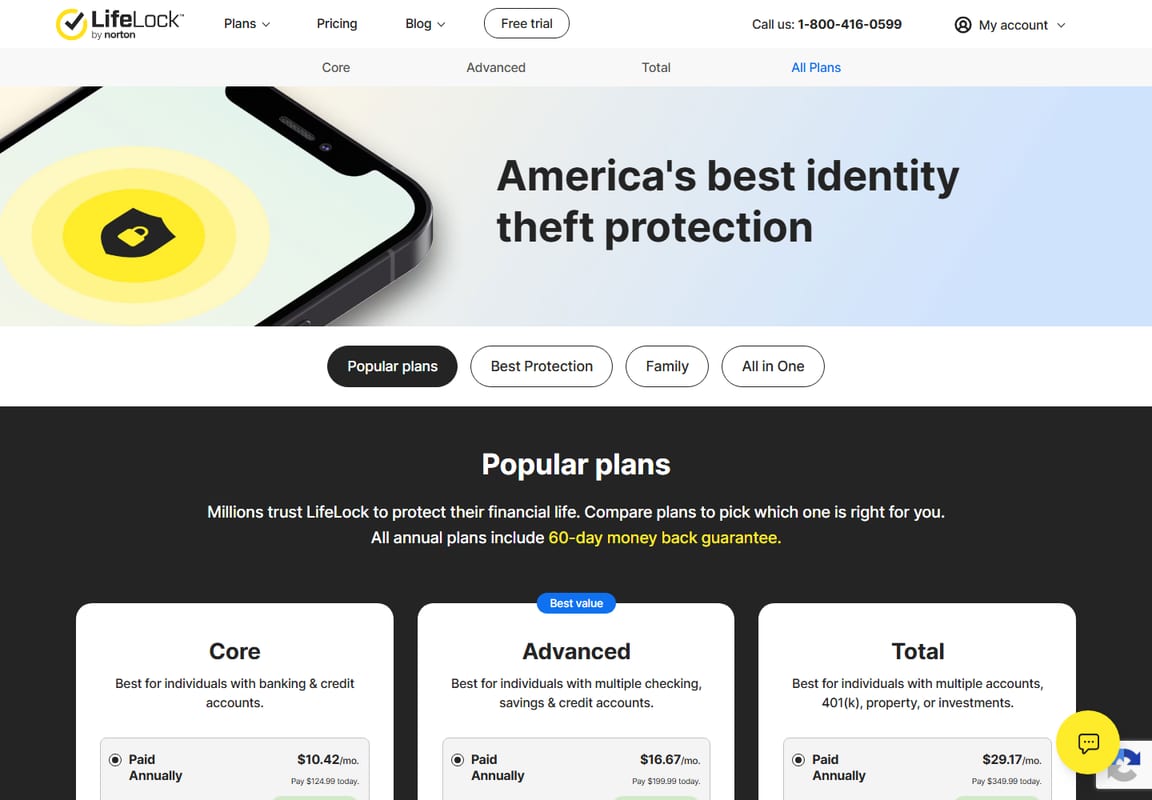
LifeLock source view
LifeLock plan tiers
This screenshot supports the LifeLock plan-tier discussion for seniors and caregivers.
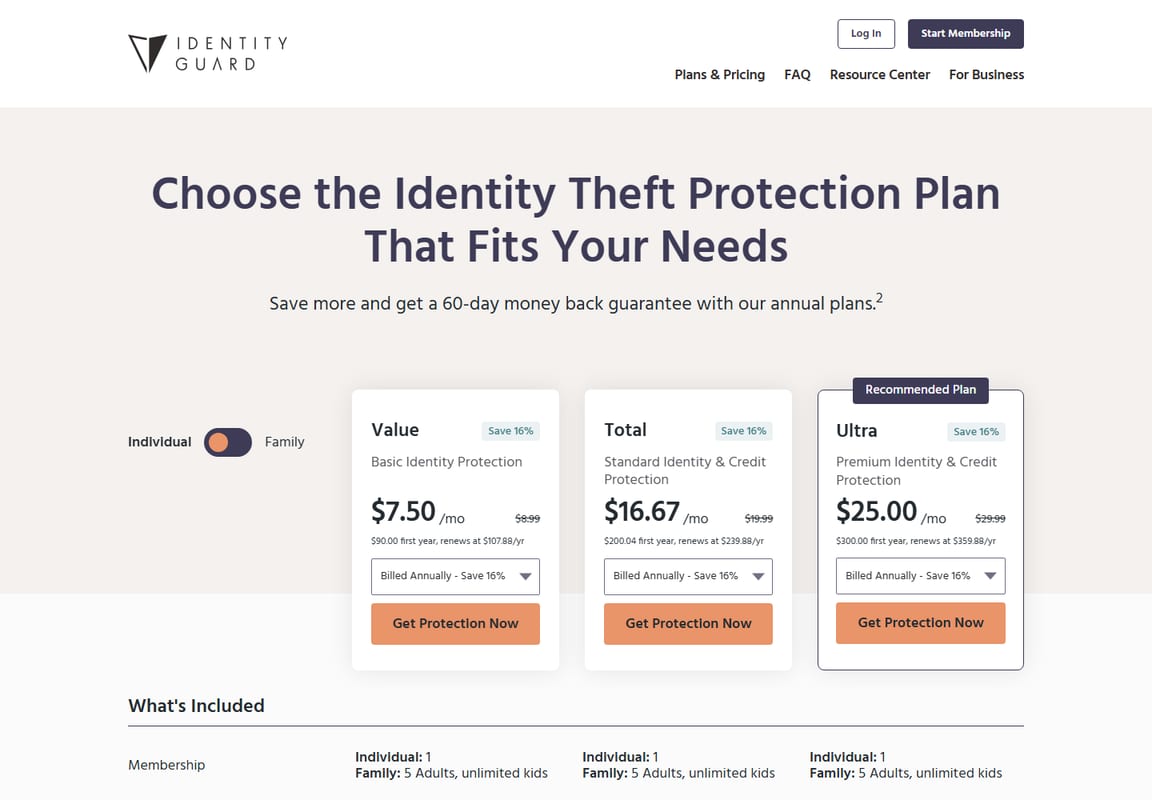
Identity Guard source view
Identity Guard plan grid
This screenshot supports the tiered identity and credit protection comparison.
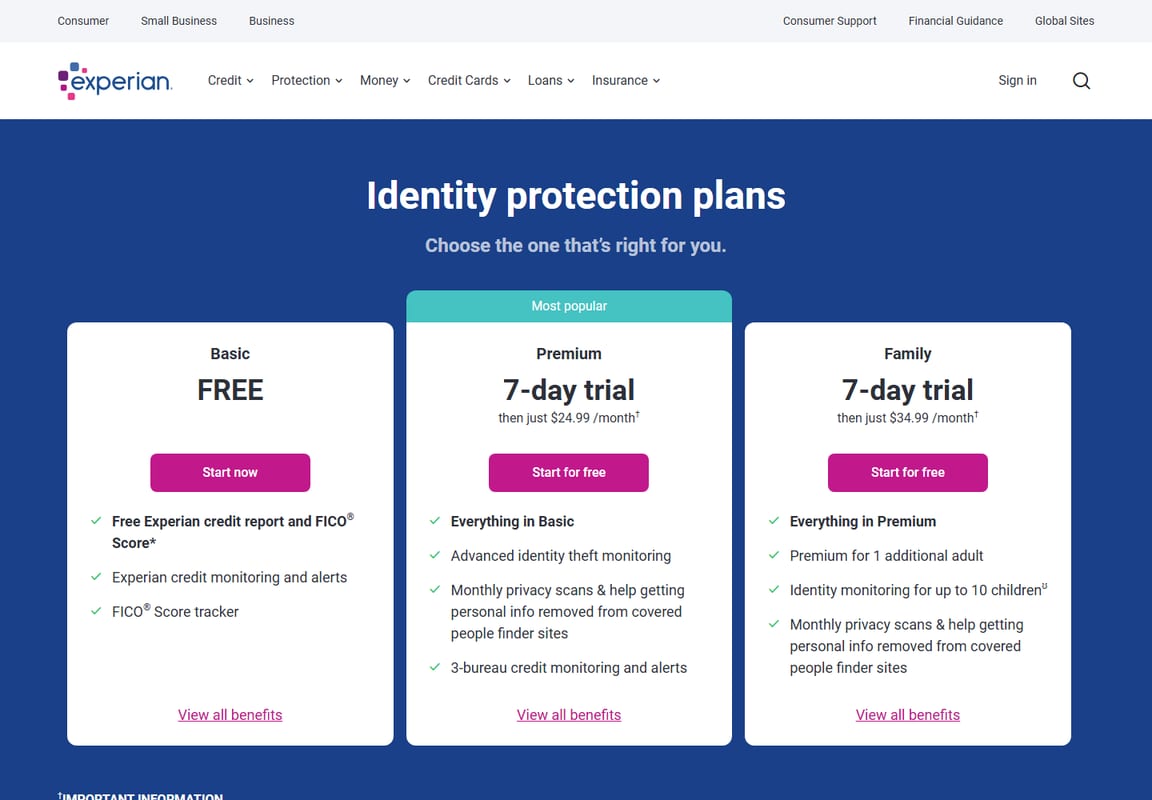
Experian source view
Experian IdentityWorks
This screenshot supports the credit-focused senior comparison.
Decision Support
Quick match guide
Buying for yourself
Choose the service with the clearest alerts, easiest login, and support you would actually use.
How to set up identity protection for an aging parent
Talk with the parent first and confirm consent before creating or managing any account.
Ask the provider whether alerts can be sent to both the senior and a trusted caregiver.
Verify what documentation is needed if a family member must speak with support during a crisis.
Choose alert methods the senior will actually see, such as email, text, phone, or caregiver notifications.
Store account access safely in a password manager or documented recovery plan.
Write down who to call if fraud is suspected: provider support, banks, credit bureaus, IdentityTheft.gov, Medicare, or Social Security when relevant.
Senior Setup
Senior identity protection checklist
Freeze credit at Equifax, Experian, and TransUnion unless new credit is needed soon.
Set up free weekly credit report checks through AnnualCreditReport.com.
Use a password manager for email, banking, Medicare, Social Security, mobile carrier, and investment accounts.
Turn on multi-factor authentication for email and financial accounts.
Choose an identity theft protection plan only after checking renewal price and support features.
Test or verify the support channel before a crisis if phone help is important.
Decide who can help with alerts, support calls, and recovery paperwork if the senior is overwhelmed.
Save IdentityTheft.gov recovery steps where the senior and caregiver can find them.
Common Mistakes
Common mistakes seniors and caregivers should avoid
Buying the Cheapest First-Year Plan Without Checking Renewal Pricing
Identity theft protection is usually a recurring subscription. The renewal price matters more than the promotional price if the service stays active for several years.
Paying for Monitoring While Skipping Credit Freezes
Monitoring can warn you after suspicious activity appears, but a credit freeze can help block certain new-account fraud before it starts.
Assuming Monitoring Prevents All Identity Theft
Monitoring can alert you to suspicious activity, but it does not stop every form of fraud. Credit freezes, strong passwords, and scam awareness still matter.
Assuming Alerts Will Always Reach the Right Person
Some seniors may miss app-only or email-only alerts. Confirm how alerts are delivered and whether a trusted caregiver can help review them.
Confusing Identity Monitoring With Scam Prevention
Identity theft protection may help with monitoring and recovery, but it will not automatically stop Medicare impersonation, fake tech support calls, romance scams, or grandparent scams.
Leaving the Caregiver Out of the Recovery Plan
If a trusted family member will help during a crisis, decide in advance who can access alerts, documents, and support contacts. Some support teams may require authorization, account-holder consent, or legal paperwork before discussing an account with a family member.
What To Skip
What should seniors and caregivers skip?
Skip buying from first-year price alone
First-year discounts can look attractive, but renewal pricing matters more for seniors on fixed incomes.
Skip app-only workflows if the senior will not use the app
If the senior prefers phone calls or email, verify support and alert channels before buying.
Skip credit-only plans if the main fear is scams
Credit monitoring can be useful, but it may not address Medicare scams, tax scams, romance scams, or fake support calls. Pair monitoring with scam-awareness habits and official reporting steps.
Skip paid monitoring until free protections are handled
Credit freezes, strong email security, multi-factor authentication, free credit reports, and IdentityTheft.gov recovery steps should come before any subscription.
Final Recommendation
Final recommendation for seniors
Start with Aura if you want the simplest all-in-one option to evaluate and you will use the broader digital safety tools. Start with LifeLock if the senior already trusts Norton or wants a familiar brand with tiered plan choices. Compare Experian IdentityWorks, IDShield, and Identity Guard if the main priority is credit monitoring depth, bureau coverage, and plan-by-plan pricing.
If cost is the biggest issue, start with free protections first: credit freezes, AnnualCreditReport.com, strong email security, multi-factor authentication, and IdentityTheft.gov. Add paid monitoring when alerts, recovery help, or caregiver peace of mind are worth the recurring cost.
Reviewed by Sybari
Sybari writes cybersecurity buying guidance for non-technical readers, including seniors, caregivers, and families. This guide is based on public documentation, official pricing pages, FTC guidance, and buyer-fit analysis.
What is the best identity theft protection for seniors?
Aura is the best starting point for many seniors because it is easier to compare and includes broader digital safety positioning. LifeLock, Identity Guard, IDShield, and Experian IdentityWorks are still worth comparing based on budget and credit monitoring needs.
Should seniors freeze their credit?
Many seniors should consider freezing their credit if they are not actively applying for new credit. A credit freeze is free and can reduce the risk of new-account credit fraud.
Can identity theft protection recover stolen money?
Some plans include insurance, reimbursement, or recovery help, but benefits are subject to policy terms and exclusions. Read the plan documents before buying.
Can a family member manage alerts for a senior?
Policies vary by provider. Before buying, ask whether alerts can be shared, whether trusted contacts are supported, and what authorization is required if a caregiver needs to speak with support.
Do seniors need a smartphone to use identity theft protection?
Not always, but some services rely heavily on app or email alerts. Seniors who do not use smartphones should verify phone, email, text, and caregiver alert options before choosing a plan.
Will identity theft protection stop Medicare scams?
No service can stop every Medicare scam or impersonation attempt. Identity theft protection may help with monitoring and recovery, but seniors should still review Medicare statements and report suspected Medicare fraud through official channels.
What is the best identity theft protection for elderly parents?
The best choice is the service the parent and caregiver can actually manage. Prioritize clear alerts, support channels, renewal pricing, recovery help, and whether a trusted family member can help during a crisis.
Should seniors pay for identity theft protection on a fixed income?
Not always. Seniors should start with free credit freezes, free credit reports, strong passwords, and multi-factor authentication. Paid monitoring makes more sense when recovery help, alerts, or caregiver visibility justify the recurring cost.
David Durden is a cybersecurity analyst and lead reviewer at Sybari.com with 12+ years of experience testing VPNs, antivirus, and SMB security tools. He focuses on real-world performance, not vendor claims, using hands-on testing across devices and networks to find what actually works.
Compare the best password managers for families, including 1Password, Bitwarden, Keeper, Apple Passwords, and Google Password Manager, with plain-English guidance on what to share, keep private, and skip.
Compare the best data removal services for seniors, including DeleteMe, Incogni, and Optery, with caregiver-aware guidance on pricing, privacy trade-offs, free steps, and what to skip.
Compare antivirus options for seniors, including Windows Security, Norton, Bitdefender, and Malwarebytes. Learn when paid protection helps and what to skip.
A practical family privacy stack that explains what to set up for free, what to buy first, what to wait on, and what to skip across identity protection, passwords, devices, VPNs, and data removal.