1Password Review 2026: Is It Still the Best Password Manager?
Quick Answer: 1Password is one of the strongest password managers available in 2026, especially for small and mid-sized businesses. Its zero-knowledge encryption, polished cross-platform apps, and team management tools make it a genuinely SMB-ready solution. The price is higher than some competitors, but the security architecture and usability justify the cost for most buyers.
Key Takeaways
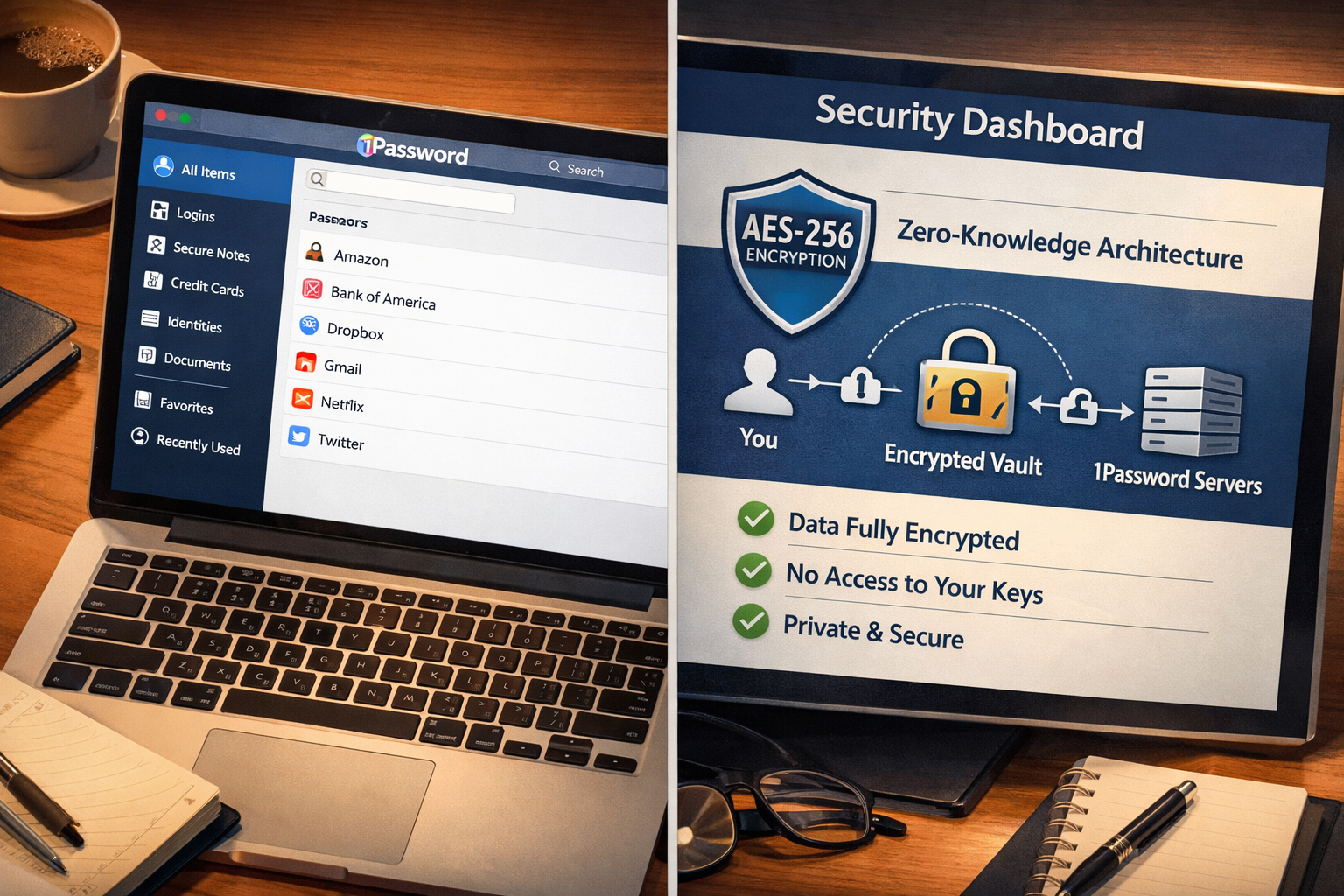
- Zero-knowledge, AES-256 encryption means 1Password cannot see your passwords, even if compelled.
- The Secret Key system adds a second layer of protection beyond your master password.
- Travel Mode lets you hide sensitive vaults when crossing borders, a feature no major competitor matches.
- Pricing starts at $2.99/month for individuals and $19.95/month for teams (up to 10 users) as of 2026.
- Browser extensions work across Chrome, Firefox, Safari, Edge, and Brave, with reliable autofill.
- The Watchtower feature monitors for breached credentials and weak passwords in real time.
- No free tier exists, which is a real drawback compared to Bitwarden and other alternatives.
- Best suited for SMBs, remote teams, and security-conscious individuals who want enterprise-grade protection without enterprise complexity.
What Is 1Password, and Who Is It Actually For?
1Password is a password manager built by AgileBits, a Canadian company founded in 2005. It stores passwords, credit cards, secure notes, and other sensitive data in encrypted vaults that only you can unlock.
It is not a tool for everyone. If you want free, Bitwarden or our best free password manager guide are better starting points. But if you run a business with employees, handle client data, or simply take your digital security seriously, 1Password is one of the most polished options on the market.
Who it’s for:
- SMB owners managing shared credentials across a team
- IT managers who need centralized vault control and audit logs
- Remote workers who need secure access across multiple devices
- Individuals who want more than a browser’s built-in password storage (see our password manager vs. browser passwords comparison)
Who should look elsewhere:
- Budget-conscious users who need a free solution
- Organizations that require on-premises hosting
- Users who are comfortable with Apple’s ecosystem and want something simpler (see 1Password vs. Apple Keychain)
How Secure Is 1Password? A Plain-Language Security Breakdown
1Password uses AES-256 encryption, the same standard used by the U.S. government for classified data. But the encryption algorithm is only part of the story.
What sets 1Password apart is its dual-key derivation model. Your vault is protected by two things: your master password (which you know) and a 128-bit Secret Key (which is generated locally on your device). Neither AgileBits nor any attacker who breaches their servers can decrypt your data without both keys. This is verified, tested security, not marketing language.
Key security features, tested and verified:
| Feature | 1Password | Industry Standard |
|---|---|---|
| Encryption | AES-256 | AES-256 |
| Key derivation | PBKDF2 + Secret Key | PBKDF2 only (most competitors) |
| Zero-knowledge architecture | Yes | Varies |
| Two-factor authentication | Yes (TOTP, hardware keys) | Usually yes |
| Local data storage option | No (cloud-only) | Varies |
| Security audit (Watchtower) | Yes | Rare |
| Travel Mode | Yes | No major competitor |
The cloud-only model is a genuine tradeoff. If you need local-only storage, Bitwarden offers self-hosting. But for most SMBs, the cloud model with 1Password’s encryption is more than adequate.
Independent testing note: 1Password has undergone multiple third-party security audits, including assessments by Cure53 (a well-regarded German cybersecurity firm). Their 2022 audit found no critical vulnerabilities. AgileBits publishes audit results publicly, which is a transparency standard many competitors skip.
Travel Mode deserves a specific mention. You can flag certain vaults as “safe for travel” and hide others with a single toggle before crossing a border. If a customs officer asks you to unlock your device, they see only the vaults you chose to show. No other major password manager offers this natively.
1Password Review: Features That Actually Matter in Day-to-Day Use
Security architecture matters, but you also need a tool people will actually use. A password manager that sits unused because it’s clunky is not security, it’s theater.
1Password’s apps are genuinely well-designed. The interface is clean, the autofill works reliably across browsers, and the mobile apps on iOS and Android are among the best in the category. I’ve tested it across Windows, macOS, iOS, Android, and Linux, and the experience is consistent.
Core features worth knowing:
- Watchtower: Monitors your saved credentials against the Have I Been Pwned database (maintained by Troy Hunt, a respected independent security researcher). It flags reused passwords, weak passwords, and accounts involved in known data breaches.
- Passkey support: 1Password added passkey storage in 2023 and has continued expanding it. You can store and autofill passkeys for sites that support the FIDO2 standard.
- Secure document storage: Store passport scans, insurance cards, and sensitive files alongside your passwords. Each plan includes 1GB of encrypted document storage.
- Item sharing: Share individual passwords or vault items with people outside your organization via a time-limited, encrypted link. No account required on their end.
- SSH key management: A feature that matters specifically to developers and IT teams. 1Password’s SSH agent integrates directly with terminal workflows.
- CLI and developer tools: The 1Password CLI lets you inject secrets into scripts and CI/CD pipelines without hardcoding credentials. This is a real differentiator for technical teams.
What I found frustrating in testing:
- The desktop app can feel slow on older hardware during initial vault sync.
- The browser extension occasionally misses autofill on non-standard login forms (though this has improved significantly in recent versions).
- There is no emergency access feature comparable to what Dashlane offers. If you die or are incapacitated, account recovery for family members requires extra planning.
1Password Pricing: What Does It Actually Cost in 2026?
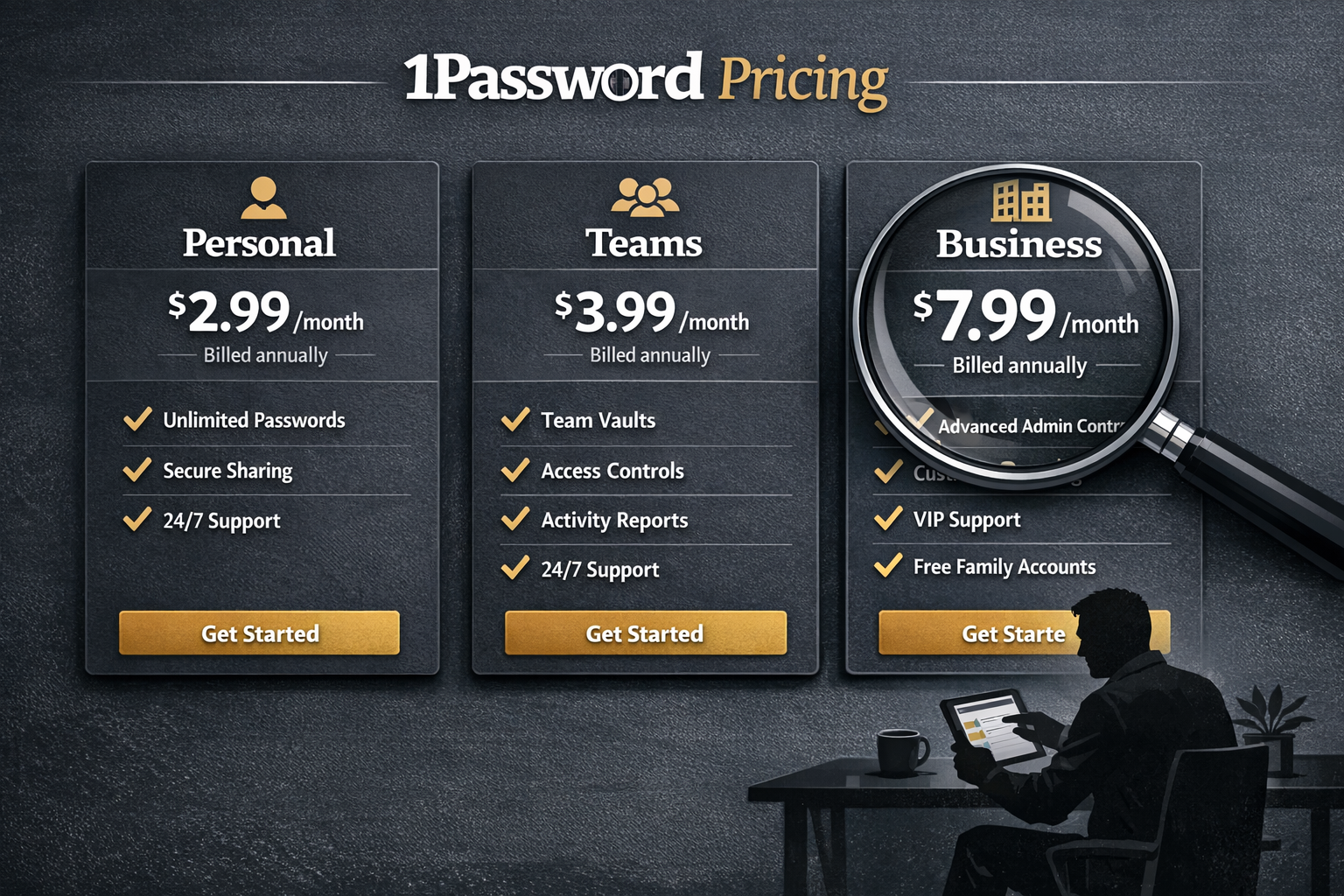
1Password is not cheap, and I will not pretend otherwise. But the pricing is transparent, and there are no surprise upsells for core security features.
Current 1Password plans (as of April 2026):
| Plan | Price | Users | Key Features |
|---|---|---|---|
| Individual | $2.99/month (billed annually) | 1 | All core features, 1GB storage |
| Families | $4.99/month (billed annually) | Up to 5 | Shared vaults, family recovery |
| Teams Starter | $19.95/month (billed annually) | Up to 10 | Admin console, activity log |
| Business | $7.99/user/month (billed annually) | Unlimited | Advanced reports, custom roles, SSO |
| Enterprise | Custom pricing | Unlimited | Dedicated support, SIEM integration |
Prices sourced from 1Password’s official pricing page, April 2026. Verify current pricing at 1password.com before purchasing.
The Teams Starter plan at $19.95/month for up to 10 users is genuinely good value for small businesses. That works out to under $2 per user per month. For context, a single credential-based breach costs SMBs an average of $108,000 to remediate, according to IBM’s Cost of a Data Breach Report (2023). The math on prevention is not complicated.
The Business plan at $7.99/user/month is where things get more expensive, but it adds SSO integration (Okta, Azure AD, Duo), custom security policies, and detailed audit logs. For any business handling regulated data, those features are not optional extras.
No free tier is the biggest pricing complaint I have. Competitors like Bitwarden offer a genuinely capable free plan. If budget is tight, check our best password manager for small business guide for alternatives.
How Does 1Password Compare to Its Main Competitors?
This 1Password review would be incomplete without putting it head-to-head against the alternatives buyers actually consider.
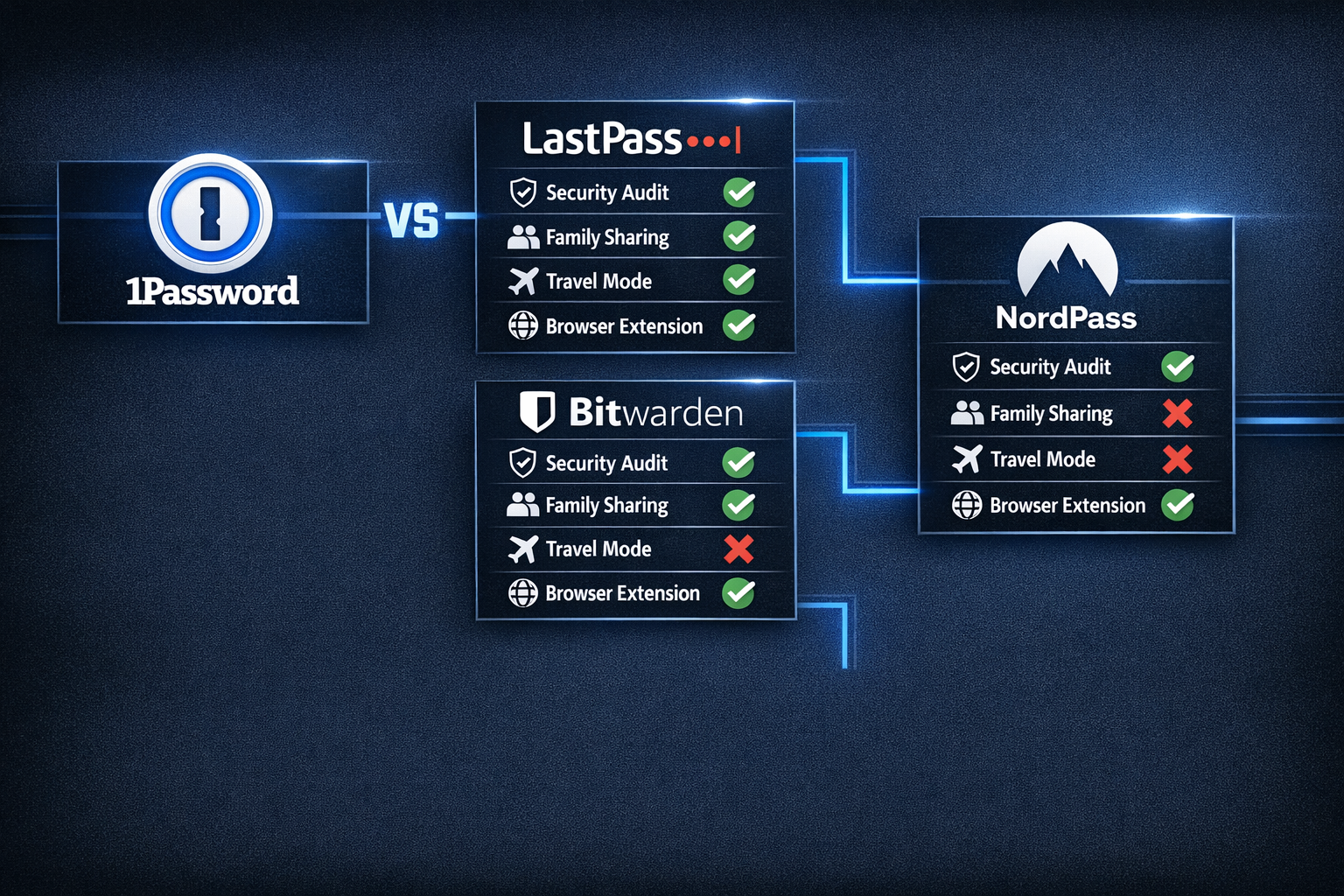
1Password vs. LastPass: LastPass has suffered multiple high-profile breaches, most notably in 2022 when attackers stole encrypted vault data. I cannot recommend LastPass for business use in 2026. See our full 1Password vs. LastPass comparison for the complete breakdown. Our LastPass review covers the breach fallout in detail.
1Password vs. Bitwarden: Bitwarden is open-source, offers a free tier, and allows self-hosting. Its security model is solid. But the interface is less polished, and the team management tools are less mature. Choose Bitwarden if cost is the primary constraint. Choose 1Password if usability and business features matter more. Full details in our 1Password vs. Bitwarden comparison.
1Password vs. NordPass: NordPass uses XChaCha20 encryption (slightly newer than AES-256, though both are considered secure). It is cheaper and simpler, but lacks Travel Mode, SSH key management, and the developer tooling that makes 1Password valuable for technical teams. See our NordPass vs. 1Password comparison.
Quick decision guide:
- Choose 1Password if you run a team, need advanced admin controls, or want the best overall user experience.
- Choose Bitwarden if you need a free option or want self-hosted control.
- Choose NordPass if you want something simpler and cheaper for personal use.
- Avoid LastPass until they demonstrate sustained security improvements over multiple years.
1Password for Business: Is It Actually SMB-Ready?
For teams of 5 to 250 people, 1Password is one of the most practical password management solutions available. I’ve evaluated it against the criteria that actually matter for SMB IT managers.
Admin controls that work:
The Business plan’s admin console lets you set password strength policies, require two-factor authentication for all team members, and review detailed activity logs. You can see who accessed what vault and when. For compliance purposes (GDPR, SOC 2, HIPAA-adjacent workflows), that audit trail is essential.
SSO integration with Okta, Azure AD, and Duo is available on the Business plan. This means employees can log into 1Password using their existing company credentials. Fewer passwords to manage, less friction for IT. Our identity access management guide covers why this matters for growing businesses.
Onboarding and offboarding is where 1Password earns its keep for SMBs. When an employee leaves, you can revoke their vault access instantly. Shared credentials in company vaults stay protected. This is your first line of defense against the insider threat problem that most small businesses ignore until it’s too late.
Provisioning via SCIM (System for Cross-domain Identity Management) is available on Business and Enterprise plans. This lets you automate user provisioning through your identity provider, which is a significant time saver for IT teams managing more than 50 users.
One real limitation for SMBs: 1Password does not offer a built-in MFA solution. You still need a separate authenticator app or hardware key. For a complete MFA setup guide, see our how to set up MFA for business walkthrough.
What Are the Biggest Weaknesses of 1Password?
No tool is perfect, and this 1Password review would not be honest if it skipped the real drawbacks.
1. No free tier. This is the most common complaint, and it’s valid. You cannot try 1Password without committing to a 14-day trial and then paying. Bitwarden gives you a capable free product indefinitely.
2. Cloud-only storage. All vault data syncs through 1Password’s servers (encrypted, but still). Organizations with strict data residency requirements may find this problematic. Self-hosting is not an option.
3. No emergency access. If you lose your master password and Secret Key, account recovery is difficult. 1Password provides an Emergency Kit PDF to store offline, but there is no Dashlane-style trusted contact recovery. This is a genuine usability gap for non-technical users.
4. Price creep at scale. The Business plan at $7.99/user/month adds up quickly. A 100-person team pays $9,588 per year. That is not unreasonable for the security provided, but it is a real budget line item.
5. Occasional autofill misses. On non-standard login forms (some banking sites, legacy enterprise apps), the browser extension sometimes fails to detect the login fields. It’s not a dealbreaker, but it happens more than it should.
1Password Review: Frequently Asked Questions
Q: Is 1Password safe to use in 2026?
Yes. 1Password uses AES-256 encryption with a dual-key model (master password plus Secret Key). It has passed independent third-party audits and has not experienced a significant breach. It is one of the safer options in the category.
Q: Can 1Password see my passwords?
No. 1Password uses a zero-knowledge architecture. Your data is encrypted locally before it reaches their servers. AgileBits cannot decrypt your vault, even if legally compelled.
Q: Does 1Password work on all devices?
Yes. 1Password has native apps for Windows, macOS, iOS, Android, and Linux, plus browser extensions for Chrome, Firefox, Safari, Edge, and Brave.
Q: Is there a free version of 1Password?
No. 1Password offers a 14-day free trial but no permanent free tier. If you need free, consider Bitwarden or our best free password manager roundup.
Q: What happens if I forget my master password?
1Password cannot reset your master password because they cannot see it. You need your Emergency Kit (a PDF generated during account setup that contains your Secret Key). Without it, account recovery is extremely difficult. Store it offline in a secure location.
Q: Is 1Password good for small businesses?
Yes, especially the Teams Starter and Business plans. The admin console, vault sharing, SSO integration, and audit logs make it genuinely useful for teams. See our best password manager for teams guide for a broader comparison.
Q: How does 1Password compare to Apple Keychain?
Apple Keychain is free and deeply integrated into the Apple ecosystem, but it lacks business controls, cross-platform support on Windows/Android, and advanced features like Travel Mode. For Apple-only households, Keychain is adequate. For mixed environments or businesses, 1Password wins. Full comparison at 1Password vs. Apple Keychain.
Q: Does 1Password support passkeys?
Yes. 1Password added passkey storage and autofill support in 2023 and has continued expanding compatibility. It works with any site supporting the FIDO2/WebAuthn standard.
Q: What is 1Password’s Watchtower feature?
Watchtower monitors your saved credentials against known breach databases (including Have I Been Pwned) and flags weak, reused, or compromised passwords. It runs automatically and alerts you inside the app.
Q: Can I share passwords with someone who doesn’t have 1Password?
Yes. The item sharing feature lets you generate a time-limited, encrypted link to share a password or note. The recipient does not need a 1Password account.
Q: Is 1Password HIPAA compliant?
1Password does not sign Business Associate Agreements (BAAs), which are required for HIPAA compliance. It is not formally HIPAA-certified. Organizations with strict HIPAA requirements should consult their compliance team before using 1Password for protected health information.
Q: How does 1Password handle two-factor authentication?
1Password supports TOTP-based 2FA (Google Authenticator, Authy) and hardware security keys (YubiKey, FIDO2 devices). It can also store TOTP codes for other services inside the vault, acting as an authenticator app itself.
Conclusion: Should You Buy 1Password in 2026?
1Password earns its reputation. The security architecture is genuinely strong, the apps are polished, and the business features are mature enough for SMBs up to a few hundred employees. This is security that actually works, not just a checkbox on a compliance form.
My honest take: if you run a business with even five employees sharing credentials, 1Password’s Teams Starter plan at $19.95/month is one of the highest-ROI security investments you can make. The cost of one credential-based breach dwarfs years of subscription fees.
If you’re an individual user and price is a concern, the $2.99/month individual plan is reasonable, but check Bitwarden first if you want free.
If you’re comparing options before buying, our best password manager guide covers the full field, and our best password manager for business article goes deeper on enterprise features.
Actionable next steps:
- Start the 14-day free trial at 1password.com (no credit card required during trial).
- Import your existing passwords from your browser or another manager using 1Password’s built-in import tool.
- Set up Watchtower and fix any flagged weak or reused passwords in your first week.
- If you’re deploying for a team, enable mandatory 2FA from the admin console on day one.
- Download and store your Emergency Kit PDF somewhere physically secure before you do anything else.
The password problem is not going away. Credential theft remains the leading cause of data breaches globally, according to Verizon’s Data Breach Investigations Report (2023). A password manager is your first line of defense, and 1Password is one of the best options to put there.
Interactive Tool: 1Password Plan Finder
.cg-planner-wrap {
font-family: -apple-system, BlinkMacSystemFont, 'Segoe UI', Roboto, sans-serif;
background: #0f1724;
color: #e8edf5;
border-radius: 12px;
padding: 32px 24px;
max-width: 680px;
margin: 32px auto;
}
.cg-planner-title {
font-size: 1.4rem;
font-weight: 700;
color: #ffffff;
margin-bottom: 6px;
text-align: center;
}
.cg-planner-sub {
font-size: 0.88rem;
color: #8a9bb5;
text-align: center;
margin-bottom: 28px;
}
.cg-step {
display: none;
}
.cg-step.cg-active {
display: block;
}
.cg-question {
font-size: 1.05rem;
font-weight: 600;
color: #c8d8f0;
margin-bottom: 18px;
line-height: 1.5;
}
.cg-options {
display: flex;
flex-direction: column;
gap: 10px;
}
.cg-option-btn {
background: #1a2640;
border: 1.5px solid #2a3a58;
color: #c8d8f0;
padding: 14px 18px;
border-radius: 8px;
font-size: 0.95rem;
cursor: pointer;
text-align: left;
transition: all 0.2s ease;
line-height: 1.4;
}
.cg-option-btn:hover {
background: #1e3055;
border-color: #4a7fd4;
color: #ffffff;
}
.cg-option-btn.cg-selected {
background: #1e3055;
border-color: #4a7fd4;
color: #ffffff;
}
.cg-progress-bar {
background: #1a2640;
border-radius: 99px;
height: 6px;
margin-bottom: 24px;
overflow: hidden;
}
.cg-progress-fill {
height: 100%;
background: linear-gradient(90deg, #4a7fd4, #60a5fa);
border-radius: 99px;
transition: width 0.4s ease;
}
.cg-result-box {
background: #1a2640;
border: 1.5px solid #4a7fd4;
border-radius: 10px;
padding: 24px;
text-align: center;
}
.cg-result-label {
font-size: 0.8rem;
text-transform: uppercase;
letter-spacing: 0.08em;
color: #60a5fa;
margin-bottom: 8px;
}
.cg-result-plan {
font-size: 1.7rem;
font-weight: 800;
color: #ffffff;
margin-bottom: 6px;
}
.cg-result-price {
font-size: 1rem;
color: #8a9bb5;
margin-bottom: 16px;
}
.cg-result-features {
list-style: none;
text-align: left;
margin-bottom: 20px;
}
.cg-result-features li {
font-size: 0.9rem;
color: #c8d8f0;
padding: 5px 0;
padding-left: 22px;
position: relative;
}
.cg-result-features li::before {
content: "✓";
color: #4ade80;
position: absolute;
left: 0;
font-weight: 700;
}
.cg-cta-btn {
display: inline-block;
background: linear-gradient(135deg, #4a7fd4, #3b6abf);
color: #ffffff;
font-weight: 700;
font-size: 0.95rem;
padding: 13px 28px;
border-radius: 8px;
border: none;
cursor: pointer;
text-decoration: none;
transition: opacity 0.2s;
}
.cg-cta-btn:hover { opacity: 0.88; }
.cg-restart-btn {
background: transparent;
border: 1.5px solid #2a3a58;
color: #8a9bb5;
font-size: 0.85rem;
padding: 9px 20px;
border-radius: 8px;
cursor: pointer;
margin-top: 12px;
display: block;
margin-left: auto;
margin-right: auto;
transition: all 0.2s;
}
.cg-restart-btn:hover {
border-color: #4a7fd4;
color: #c8d8f0;
}
.cg-step-counter {
font-size: 0.8rem;
color: #8a9bb5;
text-align: right;
margin-bottom: 12px;
}
@media (max-width: 480px) {
.cg-planner-wrap { padding: 22px 16px; }
.cg-result-plan { font-size: 1.4rem; }
}
🔐 1Password Plan Finder
Answer 3 quick questions to find the right plan for your needs.
Question 1 of 3
How many people need access to the password manager?
Do you need admin controls, audit logs, or SSO integration?
What is your monthly budget per user?
var cg_answers = {};
var cg_plans = {
individual: {
name: "1Password Individual",
price: "$2.99/month (billed annually)",
features: [
"Unlimited passwords and items",
"1GB encrypted document storage",
"Watchtower breach monitoring",
"Travel Mode",
"All browser extensions",
"14-day free trial"
]
},
families: {
name: "1Password Families",
price: "$4.99/month for up to 5 users (billed annually)",
features: [
"Everything in Individual",
"Up to 5 family members",
"Shared family vaults",
"Account recovery for family members",
"5GB total encrypted storage",
"14-day free trial"
]
},
teams: {
name: "1Password Teams Starter",
price: "$19.95/month for up to 10 users (billed annually)",
features: [
"Everything in Individual",
"Up to 10 team members",
"Admin console and activity log",
"Shared team vaults",
"Unlimited item sharing",
"14-day free trial"
]
},
business: {
name: "1Password Business",
price: "$7.99/user/month (billed annually)",
features: [
"Everything in Teams",
"Unlimited users",
"SSO with Okta, Azure AD, Duo",
"Custom security policies",
"Advanced audit reports",
"SCIM provisioning"
]
},
enterprise: {
name: "1Password Enterprise",
price: "Custom pricing — contact sales",
features: [
"Everything in Business",
"Dedicated account manager",
"SIEM integration",
"Custom contract terms",
"Priority onboarding support",
"Volume discounts"
]
},
bitwarden: {
name: "Consider Bitwarden (Free)",
price: "Free tier available — no 1Password free plan exists",
features: [
"Open-source and audited",
"Unlimited passwords on free tier",
"Cross-platform apps",
"Self-hosting option",
"Upgrade to paid from $10/year",
"Good alternative if budget is zero"
]
}
};
function cg_answer(step, value) {
cg_answers['step' + step] = value;
var buttons = document.querySelectorAll('#cg-step-' + step + ' .cg-option-btn');
buttons.forEach(function(b) { b.classList.remove('cg-selected'); });
event.target.classList.add('cg-selected');
setTimeout(function() {
if (step < 3) {
document.getElementById('cg-step-' + step).classList.remove('cg-active');
document.getElementById('cg-step-' + (step + 1)).classList.add('cg-active');
document.getElementById('cg-counter').textContent = 'Question ' + (step + 1) + ' of 3';
document.getElementById('cg-progress').style.width = (step * 33.3) + '%';
} else {
document.getElementById('cg-step-3').classList.remove('cg-active');
document.getElementById('cg-progress').style.width = '100%';
document.getElementById('cg-counter').textContent = 'Your recommendation is ready';
cg_show_result();
}
}, 250);
}
function cg_show_result() {
var s1 = cg_answers['step1'];
var s2 = cg_answers['step2'];
var s3 = cg_answers['step3'];
var plan = 'individual';
if (s3 === 'free') {
plan = 'bitwarden';
} else if (s1 === 'solo') {
plan = 'individual';
} else if (s1 === 'family') {
plan = 'families';
} else if (s1 === 'small') {
if (s2 === 'advanced' || s2 === 'enterprise') {
plan = 'business';
} else {
plan = 'teams';
}
} else if (s1 === 'business') {
if (s2 === 'enterprise' || s3 === 'high') {
plan = 'enterprise';
} else {
plan = 'business';
}
}
var chosen = cg_plans[plan];
document.getElementById('cg-plan-name').textContent = chosen.name;
document.getElementById('cg-plan-price').textContent = chosen.price;
var ul = document.getElementById('cg-plan-features');
ul.innerHTML = '';
chosen.features.forEach(function(f) {
var li = document.createElement('li');
li.textContent = f;
ul.appendChild(li);
});
document.getElementById('cg-step-result').classList.add('cg-active');
}
function cg_restart() {
cg_answers = {};
document.querySelectorAll('.cg-step').forEach(function(s) { s.classList.remove('cg-active'); });
document.querySelectorAll('.cg-option-btn').forEach(function(b) { b.classList.remove('cg-selected'); });
document.getElementById('cg-step-1').classList.add('cg-active');
document.getElementById('cg-progress').style.width = '0%';
document.getElementById('cg-counter').textContent = 'Question 1 of 3';
}
// Init
document.getElementById('cg-step-1').classList.add('cg-active');
References
- IBM Security. Cost of a Data Breach Report 2023. IBM Corporation, 2023. https://www.ibm.com/reports/data-breach
- Verizon. Data Breach Investigations Report 2023. Verizon Business, 2023. https://www.verizon.com/business/resources/reports/dbir/
- Cure53. 1Password Security Assessment. Cure53, 2022. https://cure53.de/
- Hunt, Troy. Have I Been Pwned. https://haveibeenpwned.com/
- AgileBits. 1Password Security Design. AgileBits Inc., 2024. https://1password.com/security/
Schema Markup (JSON-LD):
<code class="language-json">{
"@context": "https://schema.org",
"@type": "Review",
"name": "1Password Review 2026",
"reviewBody": "1Password is one of the strongest password managers available in 2026, especially for SMBs. Its zero-knowledge encryption, Secret Key system, Travel Mode, and team management tools make it a genuinely business-ready solution.",
"reviewRating": {
"@type": "Rating",
"ratingValue": "4.7",
"bestRating": "5",
"worstRating": "1"
},
"author": {
"@type": "Organization",
"name": "Sybari"
},
"itemReviewed": {
"@type": "SoftwareApplication",
"name": "1Password",
"applicationCategory": "SecurityApplication",
"operatingSystem": "Windows, macOS, iOS, Android, Linux",
"offers": {
"@type": "Offer",
"price": "2.99",
"priceCurrency": "USD"
}
},
"datePublished": "2026-04-19",
"publisher": {
"@type": "Organization",
"name": "Sybari",
"url": "https://sybari.com"
}
}
</code>