Should You Use a VPN at Work? Plain-English Guide
Last updated: May 12, 2026
Quick Answer: Yes — but with conditions. Whether you should use a VPN at work depends on who owns the network, what device you’re on, and what your IT policy says. Remote workers on public or home networks almost always need one. Employees on a monitored corporate network may already have equivalent protection built in. The wrong VPN choice can actually create new security gaps instead of closing them.
Key Takeaways
- Remote workers connecting from home or public Wi-Fi should use a VPN — or a modern replacement like ZTNA — every time.
- On-site employees on a corporate network are usually protected by existing firewall and monitoring tools; a personal VPN may conflict with those controls.
- IT policy comes first. Using an unauthorized VPN on a company device can violate acceptable-use policies and flag you as a security incident.
- A VPN encrypts your traffic between your device and the VPN server — it does not protect you from malware, phishing, or credential theft.
- Business-grade VPNs (like Cisco AnyConnect, Palo Alto GlobalProtect, or Perimeter 81) are built differently from consumer VPNs — don’t conflate the two.
- For SMBs without a corporate VPN, a best VPN for small business is a practical, low-cost starting point.
- VPNs are one layer of protection, not a complete security stack. Pair them with antivirus, MFA, and strong passwords.
- Larger organizations are increasingly replacing traditional VPNs with Zero Trust Network Access (ZTNA) for better control.
What Does a VPN Actually Do at Work?
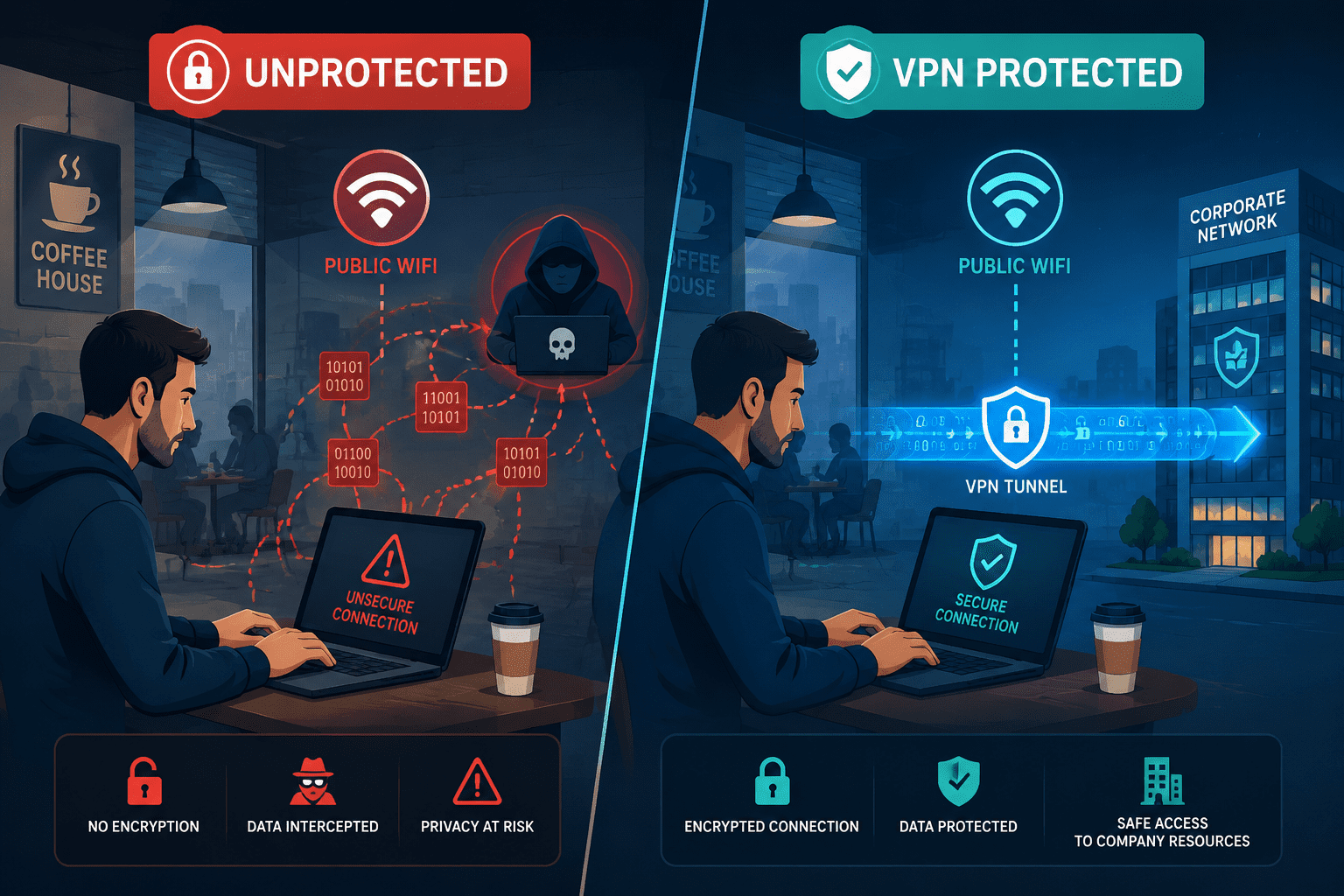
A VPN (Virtual Private Network) creates an encrypted tunnel between your device and a server — either your company’s network or a third-party VPN provider’s server. All your internet traffic passes through that tunnel, hidden from anyone on the same network.
In a work context, this matters most when you’re connecting from somewhere other than a secured office network. A coffee shop, hotel, airport, or even your home ISP can expose unencrypted traffic to interception.
What a VPN does NOT do:
- Block malware or ransomware
- Prevent phishing attacks
- Stop a hacker who already has your credentials
- Make a compromised device safe
For a fuller picture of endpoint threats, see our guide on how antivirus software works — because a VPN and an antivirus solve completely different problems.
Should You Use a VPN at Work? Get the IT Expert Answer for Remote Workers
Yes, remote workers should use a VPN — or a ZTNA solution — every time they connect to company resources. This is the clearest use case, and it’s not really debatable in 2026.
When you work from home or a public location, your traffic travels over networks you don’t control. Without encryption, your ISP, a network admin, or an attacker on the same Wi-Fi can intercept unencrypted data.
Scenarios where a VPN is non-negotiable for remote workers:
| Scenario | Risk Without VPN | VPN Helps? |
|---|---|---|
| Public Wi-Fi (café, airport) | High — man-in-the-middle attacks | ✅ Yes |
| Home broadband | Medium — ISP data logging | ✅ Yes |
| Hotel network | High — shared, often unpatched | ✅ Yes |
| Mobile hotspot (4G/5G) | Low — already encrypted | ⚠️ Optional |
| Corporate office LAN | Low — IT-managed controls | ❌ Usually not needed |
If your company hasn’t provided a corporate VPN, look at tested options in our best VPN for remote workers guide — we’ve ranked them by security, speed, and SMB-readiness.
Common mistake: Using a free consumer VPN for work. Free VPNs frequently log traffic and sell data to advertisers. That’s the opposite of what you want when handling client files or internal communications.
Should You Use a VPN at Work? Get the IT Expert Answer for Office-Based Employees
For employees physically in the office on a corporate network, a personal VPN is usually unnecessary — and sometimes counterproductive. Your company’s firewall, DNS filtering, and network monitoring tools already handle most of what a VPN would add.
More importantly, running a personal VPN on a company device can:
- Bypass your IT team’s monitoring, which may violate your acceptable-use policy
- Break internal tools that rely on local network access (printers, file servers, internal apps)
- Flag you as a security incident — IT may see encrypted tunneling as suspicious behavior
“The biggest mistake I see is employees installing consumer VPNs on work laptops without telling IT. From a security monitoring perspective, that’s a blind spot we can’t afford.” — paraphrased from common IT administrator feedback in enterprise security forums.
Bottom line for office workers: Ask IT before installing any VPN. If they’ve already deployed one, use theirs. If they haven’t, that’s a conversation worth having with your manager.
Corporate VPN vs. Personal VPN: Which One Belongs at Work?
These are two different tools solving two different problems. Mixing them up is one of the most common sources of confusion I see from SMB owners asking about VPNs.
Corporate VPN (e.g., Cisco AnyConnect, Palo Alto GlobalProtect, OpenVPN Access Server):
- Connects remote employees to the company’s internal network
- Managed and monitored by IT
- Enforces company security policies
- Required for accessing internal servers, databases, and apps
Personal/Consumer VPN (e.g., NordVPN, Surfshark, ExpressVPN):
- Hides your traffic from your ISP and local network
- Routes through a third-party server you don’t control
- No integration with company security tools
- Fine for personal browsing; risky for work use without IT approval
If you’re an SMB owner evaluating options, our best business VPN roundup covers solutions built specifically for team deployments — not consumer products repackaged with a “business” label.
What IT Experts Actually Recommend in 2026
The honest IT expert answer in 2026 is: use a VPN as a baseline, but know its limits. The security industry has largely moved toward Zero Trust models, where VPNs are just one component — not the whole solution.
Here’s what a layered security stack looks like for an SMB with remote workers:
- Corporate or business-grade VPN for encrypting remote connections
- Multi-factor authentication (MFA) on all accounts — see our MFA setup guide for business
- Endpoint protection (antivirus/EDR) on every device
- Password manager to prevent credential reuse — compare options in our Keeper vs 1Password review
- DNS filtering to block malicious domains at the network level
- Security policy that defines acceptable use — our cybersecurity policy template for small business is a free starting point
The NIST Cybersecurity Framework, which we’ve broken down in plain language at NIST Cybersecurity Framework explained, treats network access controls (including VPNs) as part of the “Protect” function — not a standalone solution.
Is a VPN Enough to Secure Remote Work?
No. A VPN is your first line of defense on the network layer, but it leaves significant gaps. This is the part most vendor marketing glosses over, so let’s be direct.
A VPN cannot stop:
- A phishing email that tricks an employee into handing over credentials
- Malware downloaded from a compromised website
- An insider threat using legitimate credentials
- A data breach on the VPN provider’s own servers
For remote workers specifically, the best antivirus for remote workers article covers what endpoint protection you need alongside a VPN. They’re complementary tools, not substitutes.
Also worth noting: if you’re running Microsoft 365 or Google Workspace, those platforms have their own security controls that operate independently of your VPN. Our Microsoft 365 vs Google Workspace security comparison covers what’s built in and what you still need to add.
When Should You NOT Use a VPN at Work?
There are real situations where using a VPN at work creates more problems than it solves. This is the part most “always use a VPN” articles skip.
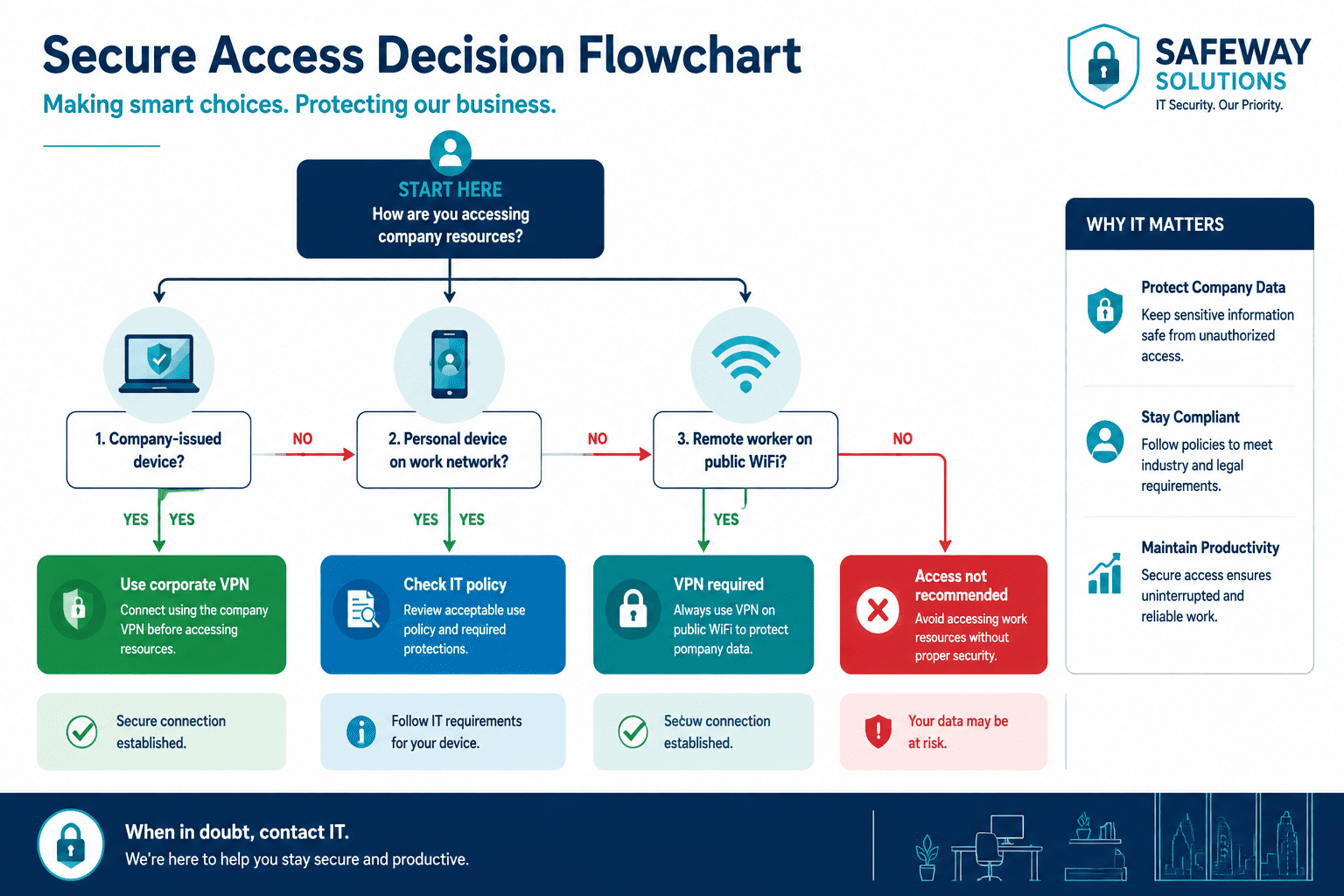
Skip the VPN (or check with IT first) when:
- You’re on a company-managed network with existing security controls
- Your company’s internal apps require direct LAN access (VPNs can break routing)
- You’re using a company-issued device with MDM (Mobile Device Management) — the IT team may already have VPN configured
- Your company uses a SASE or ZTNA architecture — a separate VPN may conflict with it (see our SASE vs VPN breakdown)
- The VPN you’re considering is a free consumer product with no audit trail or transparency report
Edge case: Some regulated industries (healthcare, finance, legal) have specific requirements about data routing. Running a personal VPN that routes traffic through overseas servers could technically violate data residency requirements under HIPAA or GDPR. If you work in a regulated sector, get legal or compliance sign-off before installing any VPN.
How to Choose the Right VPN for Work Use
Choose a business-grade VPN if you have a team; choose a reputable consumer VPN if you’re a solo operator or freelancer. The criteria differ.
For SMBs and IT managers — look for:
- Centralized admin dashboard
- Per-user or per-device licensing
- Audit logs and activity reporting
- Support for split tunneling (route only work traffic through VPN)
- No-logs policy with independent audit verification
For individual remote workers or freelancers:
- Verified no-logs policy (audited by a third party, not just claimed)
- Kill switch that cuts internet if VPN drops
- Multi-device support (laptop, phone, tablet)
- Fast enough speeds to not cripple video calls
We’ve done the independent testing work on specific products. If you’re on Windows, see best VPN for Windows. Mac users can check best VPN for Mac. For mobile, we’ve covered best VPN for iPhone and best VPN for Android separately — because mobile VPN performance varies significantly by platform.
Budget-conscious? Our best cheap VPN guide filters out the ones that cut corners on security to hit a low price point.
FAQ: Should You Use a VPN at Work?
Q: Can my employer see what I do if I use a personal VPN on their network?
Possibly. If you’re on a company-managed network, IT can see that you’re using a VPN and may be able to see the volume of traffic — even if not the content. On a company-issued device with endpoint monitoring software, they may see more regardless of VPN use.
Q: Is it against company policy to use a personal VPN at work?
Often yes. Many acceptable-use policies prohibit installing unauthorized software or bypassing network monitoring. Check your policy before installing anything. When in doubt, ask IT.
Q: Does a VPN slow down my internet at work?
Yes, slightly. Encryption adds overhead. With a quality business VPN, the speed reduction is typically 10–20% — noticeable on large file transfers but not on video calls or normal browsing.
Q: Do I need a VPN if I work from home full-time?
Yes, especially if you access company systems, client data, or internal tools. Your home network is more secure than public Wi-Fi, but it’s still not IT-managed. A VPN adds a meaningful layer of protection.
Q: What’s the difference between a VPN and Zero Trust?
A VPN grants access to a network segment. Zero Trust grants access to specific applications or resources based on identity, device health, and context — even if the user is already on the network. Zero Trust is more granular and generally more secure for modern remote work.
Q: Can I use a free VPN for work?
No. Free VPNs typically monetize through data logging and ad targeting. That’s incompatible with any serious work security posture. If cost is the issue, our best free VPN for business guide covers the rare exceptions with transparent business models.
Q: Should I use a VPN for Microsoft 365 access?
It helps, but Microsoft 365 has its own security controls. A VPN protects the connection; it doesn’t replace 365’s identity and access management. See our best VPN for Microsoft 365 guide for options that integrate cleanly.
Q: What if my company doesn’t have a VPN policy?
That’s a gap worth raising. Propose a simple policy using our cybersecurity policy template and recommend a business-grade VPN solution to IT or management.
Conclusion: The Practical Answer You Can Act on Today
Here’s the bottom line, no fluff: remote workers need a VPN; office workers on corporate networks usually don’t — and should check policy before installing one.
If you’re an SMB owner without a VPN solution in place, that’s a gap to close this week, not next quarter. Start with a business-grade option from our best VPN for small business guide, pair it with MFA and endpoint protection, and document your acceptable-use policy so employees know the rules.
If you’re an employee wondering whether to install a personal VPN on your work laptop — ask IT first. The answer might be yes, no, or “we already have one.” Any of those is better than creating a security blind spot your IT team can’t see.
A VPN is real-world protection for the network layer. It’s not a silver bullet, and no single tool is. But used correctly, as part of a layered security stack, it’s security that actually works.
References
- National Institute of Standards and Technology (NIST). NIST Special Publication 800-77 Rev. 1: Guide to IPsec VPNs. 2020. https://csrc.nist.gov/publications/detail/sp/800-77/rev-1/final
- Cybersecurity and Infrastructure Security Agency (CISA). Security Tip: Choosing and Protecting Passwords and VPNs. 2021. https://www.cisa.gov/uscert/ncas/tips/ST04-002
- Verizon. 2024 Data Breach Investigations Report. 2024. https://www.verizon.com/business/resources/reports/dbir/
- Gartner. Market Guide for Zero Trust Network Access. 2023. https://www.gartner.com/en/documents/4227991
Meta Title: Should You Use a VPN at Work? The IT Expert Answer (2026)
Meta Description: Should you use a VPN at work? Get the honest IT expert answer for remote workers, office staff, and SMBs — including when NOT to use one and what to use instead.
Tags: VPN at work, business VPN, remote work security, corporate VPN, VPN policy, zero trust network access, SMB cybersecurity, remote worker VPN, network security, VPN vs ZTNA, work from home security, IT security policy
.cg-vpn-tool {
font-family: -apple-system, BlinkMacSystemFont, 'Segoe UI', Roboto, sans-serif;
max-width: 680px;
margin: 32px auto;
background: #ffffff;
border: 1px solid #e2e8f0;
border-radius: 12px;
overflow: hidden;
box-shadow: 0 4px 24px rgba(0,0,0,0.08);
}
.cg-vpn-header {
background: linear-gradient(135deg, #0f172a 0%, #1e3a5f 100%);
color: #ffffff;
padding: 28px 32px;
text-align: center;
}
.cg-vpn-header h2 {
font-size: 1.3rem;
font-weight: 700;
margin-bottom: 6px;
line-height: 1.3;
}
.cg-vpn-header p {
font-size: 0.875rem;
color: #94a3b8;
}
.cg-vpn-body {
padding: 28px 32px;
}
.cg-vpn-question {
display: none;
}
.cg-vpn-question.cg-active {
display: block;
}
.cg-vpn-question-label {
font-size: 1rem;
font-weight: 600;
color: #0f172a;
margin-bottom: 18px;
line-height: 1.5;
}
.cg-vpn-step-indicator {
font-size: 0.75rem;
color: #64748b;
font-weight: 500;
text-transform: uppercase;
letter-spacing: 0.05em;
margin-bottom: 8px;
}
.cg-vpn-options {
display: flex;
flex-direction: column;
gap: 10px;
}
.cg-vpn-btn {
display: block;
width: 100%;
padding: 14px 18px;
background: #f8fafc;
border: 2px solid #e2e8f0;
border-radius: 8px;
font-size: 0.9rem;
font-weight: 500;
color: #1e293b;
cursor: pointer;
text-align: left;
transition: all 0.18s ease;
line-height: 1.4;
}
.cg-vpn-btn:hover {
background: #eff6ff;
border-color: #3b82f6;
color: #1d4ed8;
}
.cg-vpn-result {
display: none;
padding: 22px;
border-radius: 10px;
margin-top: 4px;
}
.cg-vpn-result.cg-show {
display: block;
}
.cg-vpn-result.cg-yes {
background: #f0fdf4;
border: 2px solid #22c55e;
}
.cg-vpn-result.cg-no {
background: #fff7ed;
border: 2px solid #f97316;
}
.cg-vpn-result.cg-caution {
background: #fefce8;
border: 2px solid #eab308;
}
.cg-vpn-result-icon {
font-size: 1.8rem;
margin-bottom: 8px;
}
.cg-vpn-result-title {
font-size: 1.05rem;
font-weight: 700;
color: #0f172a;
margin-bottom: 8px;
}
.cg-vpn-result-text {
font-size: 0.875rem;
color: #374151;
line-height: 1.6;
margin-bottom: 12px;
}
.cg-vpn-result-tips {
list-style: none;
padding: 0;
}
.cg-vpn-result-tips li {
font-size: 0.82rem;
color: #4b5563;
padding: 4px 0 4px 18px;
position: relative;
line-height: 1.5;
}
.cg-vpn-result-tips li::before {
content: "→";
position: absolute;
left: 0;
color: #6b7280;
}
.cg-vpn-restart-btn {
display: inline-block;
margin-top: 16px;
padding: 10px 20px;
background: #0f172a;
color: #ffffff;
border: none;
border-radius: 6px;
font-size: 0.85rem;
font-weight: 600;
cursor: pointer;
transition: background 0.18s ease;
}
.cg-vpn-restart-btn:hover {
background: #1e3a5f;
}
.cg-vpn-progress {
display: flex;
gap: 6px;
margin-bottom: 22px;
}
.cg-vpn-progress-dot {
height: 4px;
flex: 1;
background: #e2e8f0;
border-radius: 2px;
transition: background 0.2s;
}
.cg-vpn-progress-dot.cg-done {
background: #3b82f6;
}
.cg-vpn-footer {
padding: 14px 32px;
background: #f8fafc;
border-top: 1px solid #e2e8f0;
font-size: 0.75rem;
color: #94a3b8;
text-align: center;
}
@media (max-width: 520px) {
.cg-vpn-body { padding: 20px 18px; }
.cg-vpn-header { padding: 22px 18px; }
.cg-vpn-header h2 { font-size: 1.1rem; }
.cg-vpn-footer { padding: 12px 18px; }
}
🔒 Should You Use a VPN at Work?
Answer 3 quick questions — get a plain-language IT recommendation
<div class="cg-vpn-progress" id="cg-progress">
<div class="cg-vpn-progress-dot" id="cg-dot-0"></div>
<div class="cg-vpn-progress-dot" id="cg-dot-1"></div>
<div class="cg-vpn-progress-dot" id="cg-dot-2"></div>
</div>
<!-- Q1 -->
<div class="cg-vpn-question cg-active" id="cg-q1">
<div class="cg-vpn-step-indicator">Question 1 of 3</div>
<div class="cg-vpn-question-label">Where are you working from right now?</div>
<div class="cg-vpn-options">
<button class="cg-vpn-btn" onclick="cg_next('q2_remote')">🏠 Home or remote location</button>
<button class="cg-vpn-btn" onclick="cg_next('q2_office')">🏢 Company office on the corporate network</button>
<button class="cg-vpn-btn" onclick="cg_next('q2_public')">☕ Public place (café, airport, hotel)</button>
</div>
</div>
<!-- Q2: Remote path -->
<div class="cg-vpn-question" id="cg-q2_remote">
<div class="cg-vpn-step-indicator">Question 2 of 3</div>
<div class="cg-vpn-question-label">Has your company provided a corporate VPN for remote access?</div>
<div class="cg-vpn-options">
<button class="cg-vpn-btn" onclick="cg_next('q3_remote_yes')">✅ Yes, IT set one up for me</button>
<button class="cg-vpn-btn" onclick="cg_next('q3_remote_no')">❌ No — I'm on my own</button>
<button class="cg-vpn-btn" onclick="cg_next('q3_remote_unsure')">🤷 I'm not sure</button>
</div>
</div>
<!-- Q2: Office path -->
<div class="cg-vpn-question" id="cg-q2_office">
<div class="cg-vpn-step-indicator">Question 2 of 3</div>
<div class="cg-vpn-question-label">Are you thinking of installing a personal VPN on your work device?</div>
<div class="cg-vpn-options">
<button class="cg-vpn-btn" onclick="cg_next('q3_office_personal')">Yes, a personal VPN like NordVPN or Surfshark</button>
<button class="cg-vpn-btn" onclick="cg_next('q3_office_corp')">No, I want to know if IT should deploy one for us</button>
</div>
</div>
<!-- Q2: Public path -->
<div class="cg-vpn-question" id="cg-q2_public">
<div class="cg-vpn-step-indicator">Question 2 of 3</div>
<div class="cg-vpn-question-label">Are you accessing company data or just personal browsing?</div>
<div class="cg-vpn-options">
<button class="cg-vpn-btn" onclick="cg_result('public_work')">Accessing company files, email, or apps</button>
<button class="cg-vpn-btn" onclick="cg_result('public_personal')">Just personal browsing on a work device</button>
</div>
</div>
<!-- Q3: Remote + Corp VPN -->
<div class="cg-vpn-question" id="cg-q3_remote_yes">
<div class="cg-vpn-step-indicator">Question 3 of 3</div>
<div class="cg-vpn-question-label">Do you connect to the corporate VPN every time you access work systems?</div>
<div class="cg-vpn-options">
<button class="cg-vpn-btn" onclick="cg_result('remote_corp_yes')">Yes, always</button>
<button class="cg-vpn-btn" onclick="cg_result('remote_corp_sometimes')">Sometimes — I skip it occasionally</button>
</div>
</div>
<!-- Q3: Remote + No Corp VPN -->
<div class="cg-vpn-question" id="cg-q3_remote_no">
<div class="cg-vpn-step-indicator">Question 3 of 3</div>
<div class="cg-vpn-question-label">What type of work data do you handle remotely?</div>
<div class="cg-vpn-options">
<button class="cg-vpn-btn" onclick="cg_result('remote_no_sensitive')">Client data, financial info, or internal systems</button>
<button class="cg-vpn-btn" onclick="cg_result('remote_no_light')">Mostly email and cloud apps (Google Workspace, M365)</button>
</div>
</div>
<!-- Q3: Unsure -->
<div class="cg-vpn-question" id="cg-q3_remote_unsure">
<div class="cg-vpn-step-indicator">Question 3 of 3</div>
<div class="cg-vpn-question-label">Is there an IT department or IT contact you can ask?</div>
<div class="cg-vpn-options">
<button class="cg-vpn-btn" onclick="cg_result('unsure_has_it')">Yes, we have IT support</button>
<button class="cg-vpn-btn" onclick="cg_result('unsure_no_it')">No — I'm the IT person (or there isn't one)</button>
</div>
</div>
<!-- Q3: Office personal -->
<div class="cg-vpn-question" id="cg-q3_office_personal">
<div class="cg-vpn-step-indicator">Question 3 of 3</div>
<div class="cg-vpn-question-label">Have you checked your company's acceptable-use policy?</div>
<div class="cg-vpn-options">
<button class="cg-vpn-btn" onclick="cg_result('office_personal_checked')">Yes — it doesn't prohibit it</button>
<button class="cg-vpn-btn" onclick="cg_result('office_personal_no')">No, or I'm not sure what it says</button>
</div>
</div>
<!-- Q3: Office corp -->
<div class="cg-vpn-question" id="cg-q3_office_corp">
<div class="cg-vpn-step-indicator">Question 3 of 3</div>
<div class="cg-vpn-question-label">How many employees need remote access?</div>
<div class="cg-vpn-options">
<button class="cg-vpn-btn" onclick="cg_result('office_corp_small')">Fewer than 25 people</button>
<button class="cg-vpn-btn" onclick="cg_result('office_corp_medium')">25–250 people</button>
</div>
</div>
<!-- RESULTS -->
<div class="cg-vpn-result cg-yes" id="cg-r-remote_corp_yes">
<div class="cg-vpn-result-icon">✅</div>
<div class="cg-vpn-result-title">You're doing it right — keep it up</div>
<div class="cg-vpn-result-text">You have a corporate VPN and you use it consistently. That's the correct setup for remote work. Your traffic to company systems is encrypted.</div>
<ul class="cg-vpn-result-tips">
<li>Make sure your VPN client is kept up to date</li>
<li>Enable the kill switch if your VPN supports it</li>
<li>Pair with MFA on all accounts for full protection</li>
</ul>
<button class="cg-vpn-restart-btn" onclick="cg_restart()">Start Over</button>
</div>
<div class="cg-vpn-result cg-caution" id="cg-r-remote_corp_sometimes">
<div class="cg-vpn-result-icon">⚠️</div>
<div class="cg-vpn-result-title">Use the corporate VPN every time — no exceptions</div>
<div class="cg-vpn-result-text">Skipping the VPN occasionally creates gaps. Any session without it exposes your traffic to interception, especially on home or shared networks.</div>
<ul class="cg-vpn-result-tips">
<li>Set the VPN to auto-connect on startup</li>
<li>Ask IT if split tunneling is available for speed</li>
<li>Report connection issues to IT — don't work around them</li>
</ul>
<button class="cg-vpn-restart-btn" onclick="cg_restart()">Start Over</button>
</div>
<div class="cg-vpn-result cg-yes" id="cg-r-remote_no_sensitive">
<div class="cg-vpn-result-icon">🔴</div>
<div class="cg-vpn-result-title">You need a VPN — this is urgent</div>
<div class="cg-vpn-result-text">Handling sensitive data remotely without a VPN is a real risk. You need either a business VPN deployed by IT, or a reputable third-party business VPN immediately.</div>
<ul class="cg-vpn-result-tips">
<li>Look at business-grade options: Perimeter 81, NordLayer, or Cisco AnyConnect</li>
<li>Avoid free VPNs — they log and sell your traffic data</li>
<li>Raise this with management as a security gap</li>
<li>Add MFA to all accounts as a parallel step</li>
</ul>
<button class="cg-vpn-restart-btn" onclick="cg_restart()">Start Over</button>
</div>
<div class="cg-vpn-result cg-caution" id="cg-r-remote_no_light">
<div class="cg-vpn-result-icon">⚠️</div>
<div class="cg-vpn-result-title">A VPN helps — but cloud app security matters more here</div>
<div class="cg-vpn-result-text">Google Workspace and Microsoft 365 have strong built-in security, but your connection to them is still exposed without a VPN. A reputable consumer VPN adds a useful layer.</div>
<ul class="cg-vpn-result-tips">
<li>Enable MFA on all cloud accounts first — that's higher priority</li>
<li>A consumer VPN like NordVPN or Mullvad works fine for this use case</li>
<li>Check your cloud platform's security settings are fully configured</li>
</ul>
<button class="cg-vpn-restart-btn" onclick="cg_restart()">Start Over</button>
</div>
<div class="cg-vpn-result cg-caution" id="cg-r-unsure_has_it">
<div class="cg-vpn-result-icon">💬</div>
<div class="cg-vpn-result-title">Ask IT before installing anything</div>
<div class="cg-vpn-result-text">Your company may already have a VPN solution — or a policy against personal VPNs. A quick message to IT is the right first step.</div>
<ul class="cg-vpn-result-tips">
<li>Ask: "Do we have a corporate VPN for remote access?"</li>
<li>Ask: "Is it okay to use a personal VPN on my work device?"</li>
<li>Don't install anything until you have a clear answer</li>
</ul>
<button class="cg-vpn-restart-btn" onclick="cg_restart()">Start Over</button>
</div>
<div class="cg-vpn-result cg-yes" id="cg-r-unsure_no_it">
<div class="cg-vpn-result-icon">🛠️</div>
<div class="cg-vpn-result-title">You're the decision-maker — here's what to do</div>
<div class="cg-vpn-result-text">As an SMB owner or solo operator without IT support, you need a business-grade VPN and a basic security policy. This is a gap you can close quickly.</div>
<ul class="cg-vpn-result-tips">
<li>Choose a business VPN with a central admin dashboard</li>
<li>Document a simple acceptable-use policy for your team</li>
<li>Add MFA and endpoint protection alongside the VPN</li>
<li>Consider a managed security provider if your team is growing</li>
</ul>
<button class="cg-vpn-restart-btn" onclick="cg_restart()">Start Over</button>
</div>
<div class="cg-vpn-result cg-no" id="cg-r-office_personal_checked">
<div class="cg-vpn-result-icon">🟡</div>
<div class="cg-vpn-result-title">Proceed with caution — and tell IT</div>
<div class="cg-vpn-result-text">If policy allows it, a personal VPN on a corporate network is technically possible — but it creates monitoring blind spots for your IT team. Let them know.</div>
<ul class="cg-vpn-result-tips">
<li>Inform IT you're using a personal VPN and why</li>
<li>Be aware it may break access to internal tools</li>
<li>Use split tunneling to route only personal traffic through it</li>
</ul>
<button class="cg-vpn-restart-btn" onclick="cg_restart()">Start Over</button>
</div>
<div class="cg-vpn-result cg-no" id="cg-r-office_personal_no">
<div class="cg-vpn-result-icon">🚫</div>
<div class="cg-vpn-result-title">Don't install it yet — check the policy first</div>
<div class="cg-vpn-result-text">Installing a personal VPN without checking your acceptable-use policy could violate company rules and flag you as a security incident. Check first.</div>
<ul class="cg-vpn-result-tips">
<li>Read your employee handbook or AUP for software installation rules</li>
<li>Ask IT directly — they may already have a VPN solution</li>
<li>If you have a privacy concern, raise it through proper channels</li>
</ul>
<button class="cg-vpn-restart-btn" onclick="cg_restart()">Start Over</button>
</div>
<div class="cg-vpn-result cg-yes" id="cg-r-office_corp_small">
<div class="cg-vpn-result-icon">✅</div>
<div class="cg-vpn-result-title">A business VPN is the right fit for your team size</div>
<div class="cg-vpn-result-text">For teams under 25, a cloud-managed business VPN like NordLayer, Perimeter 81, or Twingate is cost-effective and easy to deploy without dedicated IT staff.</div>
<ul class="cg-vpn-result-tips">
<li>Look for per-user pricing under $10/user/month</li>
<li>Prioritize ease of setup and a web-based admin panel</li>
<li>Ensure it supports your team's devices (Windows, Mac, mobile)</li>
</ul>
<button class="cg-vpn-restart-btn" onclick="cg_restart()">Start Over</button>
</div>
<div class="cg-vpn-result cg-yes" id="cg-r-office_corp_medium">
<div class="cg-vpn-result-icon">🏢</div>
<div class="cg-vpn-result-title">Consider ZTNA alongside or instead of a traditional VPN</div>
<div class="cg-vpn-result-text">At 25–250 employees, a traditional VPN can become a management burden. Zero Trust Network Access (ZTNA) gives you more granular control and scales better.</div>
<ul class="cg-vpn-result-tips">
<li>Evaluate Zscaler Private Access, Cloudflare Access, or Palo Alto Prisma</li>
<li>ZTNA limits access per app — not the whole network — reducing breach impact</li>
<li>Consult a managed security provider for deployment at this scale</li>
</ul>
<button class="cg-vpn-restart-btn" onclick="cg_restart()">Start Over</button>
</div>
<div class="cg-vpn-result cg-yes" id="cg-r-public_work">
<div class="cg-vpn-result-icon">🔴</div>
<div class="cg-vpn-result-title">Use a VPN right now — public Wi-Fi is high risk</div>
<div class="cg-vpn-result-text">Accessing company data on public Wi-Fi without a VPN is one of the highest-risk things you can do. Public networks are frequently monitored or compromised.</div>
<ul class="cg-vpn-result-tips">
<li>Connect to your corporate VPN before opening any work apps</li>
<li>If you don't have one, use a reputable paid VPN immediately</li>
<li>Avoid accessing sensitive systems until you're protected</li>
<li>Use your phone's mobile hotspot as a safer alternative to public Wi-Fi</li>
</ul>
<button class="cg-vpn-restart-btn" onclick="cg_restart()">Start Over</button>
</div>
<div class="cg-vpn-result cg-caution" id="cg-r-public_personal">
<div class="cg-vpn-result-icon">⚠️</div>
<div class="cg-vpn-result-title">A VPN is still a good idea on public Wi-Fi</div>
<div class="cg-vpn-result-text">Even for personal browsing on a work device, public Wi-Fi exposes your traffic. A VPN is worth using — just make sure it doesn't violate company policy.</div>
<ul class="cg-vpn-result-tips">
<li>Check company policy on personal VPN use on work devices</li>
<li>A mobile hotspot from your phone is often the safest alternative</li>
<li>Avoid logging into any sensitive accounts without VPN protection</li>
</ul>
<button class="cg-vpn-restart-btn" onclick="cg_restart()">Start Over</button>
</div>
var cg_path = [];
function cg_next(questionId) {
var current = document.querySelector('.cg-vpn-question.cg-active');
if (current) {
current.classList.remove('cg-active');
cg_path.push(current.id);
}
var next = document.getElementById('cg-' + questionId);
if (next) {
next.classList.add('cg-active');
}
cg_updateProgress();
}
function cg_result(resultId) {
var current = document.querySelector('.cg-vpn-question.cg-active');
if (current) {
current.classList.remove('cg-active');
}
var result = document.getElementById('cg-r-' + resultId);
if (result) {
result.classList.add('cg-show');
}
cg_fillProgress();
}
function cg_restart() {
var results = document.querySelectorAll('.cg-vpn-result');
results.forEach(function(r) { r.classList.remove('cg-show'); });
var questions = document.querySelectorAll('.cg-vpn-question');
questions.forEach(function(q) { q.classList.remove('cg-active'); });
document.getElementById('cg-q1').classList.add('cg-active');
cg_path = [];
cg_updateProgress();
}
function cg_updateProgress() {
var dots = document.querySelectorAll('.cg-vpn-progress-dot');
dots.forEach(function(d, i) {
d.classList.toggle('cg-done', i < cg_path.length);
});
}
function cg_fillProgress() {
var dots = document.querySelectorAll('.cg-vpn-progress-dot');
dots.forEach(function(d) { d.classList.add('cg-done'); });
}